Home / Insights / Shopify email marketing: Shopify Email or Klaviyo?
Email · 13 min read
Shopify email marketing: Shopify Email or Klaviyo?
Wondering why not just use Shopify Email, or tired of a Klaviyo bill that keeps climbing? Here is what Shopify's own email tool does, what it costs as of September 2026, and when a store outgrows it.
The short answer
Shopify email marketing now runs through Shopify Messaging, formerly Shopify Email. As of September 2026, it includes 10,000 free emails a month on any paid plan, then $1 per 1,000. It suits stores that mainly send campaigns. Klaviyo fits when your flows depend on detailed store behavior. Judge either one by orders in your store's own reports.
Shopify email marketing means sending campaigns and automatic emails to your customers from your store's admin, with Shopify Messaging, or through a connected app such as Klaviyo. Messaging is the tool the company introduced as Shopify Email on November 5, 2019.
Today it sends email, SMS and WhatsApp marketing from your admin. The company says it can help you grow your business, drive sales and stay connected with customers. Stores on the Basic, Grow, Advanced and Plus plans can use it, and its product page says more than 500k entrepreneurs trust it.
New to email, or watching your Klaviyo cost rise while your list barely changes? The native tool is the obvious first look.
If your email is set up but not selling, the tool is rarely the whole story. Start by knowing exactly what the native option does and costs.
How much does Shopify Email cost?
As of September 2026, the pricing rules give every store on those plans 10,000 free emails a month. After that you pay per email sent:
Emails sent in a calendar month
Price
First 10,000
Free
Up to 300,000
$1 per 1,000 additional emails
After 300,000
$0.65 per 1,000
After 750,000
$0.55 per 1,000
Every address counts: one promotional email to 800 subscribers is 800 emails. Automated emails count toward the free 10,000, except abandoned checkout emails, which are always free.
Unused emails do not carry over, and any extra cost appears on your Shopify bill as Marketing emails. SMS messages are charged separately, per message sent.
What can Shopify Messaging do?
It covers the two jobs most stores need: campaigns you send by hand, and automations that send when a customer does something. Shopify says you send and track emails from the same place you manage products and customers.
Email campaigns
Templates pull your logo, store colors, products and prices in automatically, and a drag-and-drop editor handles the layout. You choose customer segments as recipients, preview the email, and can add express checkout buttons so customers buy your products straight from the email.
Sidekick, Shopify's AI assistant, can generate on-brand copy. Sidekick can also recommend a send time. The Shopify Messaging page promises insights all in one place and tells merchants to own their own data.
Automations
The automation guide lists ready-made templates, each with its trigger already set:
Automation
Sends when
Channels
Convert abandoned product browse
A customer views a product and leaves without adding it to the cart
Email, SMS
Recover abandoned cart
A customer adds products but does not start checkout
Email, SMS
Recover abandoned checkout
A customer starts checkout but does not complete the order
Email, SMS
New subscriber discount email or series
Someone subscribes through a form on your online store
Email
Thank customers after they purchase
A first or second purchase
Email
Upsell after first purchase
A first purchase
Email
Win back customers
A set time passes after the last order
Email
Birthday and VIP messages
A birthday, or joining a VIP segment
Email
Reports
For each automation, the app shows reach, sessions, orders, conversion rate and sales attributed to it, per its reporting guide. Campaign reports show open rates, sales and more.
What are the disadvantages of using Shopify Email?
The limits show up when your email needs custom logic. None of them matter for a store that sends a weekly campaign and a few standard automations.
Custom logic needs another app. Anything beyond the templates, or involving a third-party app, is built as a workflow in the Flow app.
SMS automation is limited. It covers abandoned product browse, cart and checkout only.
Automated emails reach subscribers only. By default they send only to customers subscribed to marketing; abandoned checkout is the exception.
Editing needs a desktop. On a phone you can create only the three abandonment types.
Overlaps double up. Activate two new-subscriber automations and customers receive twice as many emails, per the automation considerations page.
Setup conditions. Your store needs an active paid plan, and Shopify Network Intelligence turned on in your privacy settings.
Shopify Email vs Klaviyo: which should you use?
Use Shopify Messaging when most of your email is campaigns plus standard automations. Use Klaviyo when your best emails react to detailed behavior, such as a price drop on a product someone viewed, or need many branching paths.
Shopify Messaging
Klaviyo
Priced on
Emails sent
Active profiles, anyone it can email
Free allowance, as of September 2026
10,000 emails a month on a paid plan
250 active profiles and 500 email sends
Automations
Ready-made templates; custom logic through Shopify Flow
Flows triggered by lists, segments, actions, dates or price drops
SMS
Campaigns, plus abandonment messages for browse, cart and checkout
Campaigns and flows, billed per message
How it counts sales
Sales attributed to each marketing activity
Orders after an open or click inside its attribution window
Finkelstein said that in 2022, when his company made a strategic investment in Klaviyo, which became the recommended email solution partner for Shopify Plus. Shopify backs both paths, so the choice is about what your business needs, not loyalty to either brand.
What does each one cost for your list?
At each of the three list sizes below, Shopify Messaging costs less. The table assumes one campaign a week to everyone, about four sends a month, at September 2026 prices:
Subscribers
Campaign emails a month
Shopify Messaging
Klaviyo Email plan
2,500
10,000
$0
$60
5,000
20,000
$10
$100
10,000
40,000
$30
$150
Two things move these numbers. Flow emails also count toward the free 10,000, except abandoned checkout. And Klaviyo bills on active profiles, which per its billing guide include people who can be emailed regardless of consent, so your Klaviyo count can be higher than your subscriber count.
Price rarely decides it on its own. A plan that costs more but recovers orders you can see in Shopify can be the cheaper choice; a free plan whose automations never send costs you sales. More options are in Klaviyo alternatives, priced.
Which is better for email marketing, Shopify Email or Mailchimp?
For a Shopify store, Shopify Messaging is the cheaper start: its free allowance is 10,000 emails a month against Mailchimp's 500 free sends, and its automations come included. As of September 2026, Mailchimp's pricing page shows a free plan for 250 contacts with no automation flows, Essentials from $13 with flows of up to four steps, and Standard from $20 with up to 200 flows.
Mailchimp does connect to Shopify, sold separately, and it suits a business that already uses it for newsletters or other shops. The fuller comparison is in Klaviyo vs Mailchimp.
When checked on September 18, 2026, Mailchimp’s pricing page was also showing a first-year offer: 15 percent off these monthly prices for 12 months.
How do you set up Shopify email marketing that sells?
Set up the emails that reach buyers at the right moments first, then add one regular campaign, then measure in Shopify. Six steps:
Collect names. Add a sign-up form with the Shopify Forms app, which the new subscriber emails rely on.
Turn on the abandoned checkout automation. It reaches shoppers who start checkout but do not place the order, and its emails never count against your free allowance.
Add a welcome discount email for new subscribers, and keep only one active.
Add post-purchase and win-back automations to bring buyers back.
Send one campaign a week to the whole list, on a schedule.
Track orders in Shopify's reports every month, not open rates.
Step five matters more than it looks. On one direct to consumer store on Shopify, a weekly Klaviyo sequence built for 488 people showed as live for six weeks and reached 13 of them, because its trigger only caught people added after launch. A scheduled weekly email replaced it on September 4, 2026 and reached 484 people on its first send.
It is a rule of thumb, not a standard. One common version, from a Constant Contact community post, says about 80% of emails should inform or entertain and 20% should promote. Shopify's blog on the Pareto principle gives the store version: a business might find 80% of its sales come from 20% of its customers.
Test either version against your own customer reports before you plan around it.
How do you know if your Shopify emails are working?
Compare what the email tool credits with what Shopify's Total sales by referrer report shows for the same dates. The sales reports guide says that report shows the last interaction referrer, the site each buyer came from. You can also ask Sidekick to investigate changes in your sales in plain language.
The two counts differ. On the store in the case study, for August 17 to September 15, 2026, Klaviyo credited email with 23 orders, while Shopify's report traced 10 to an email click. Both are defensible; they count differently.
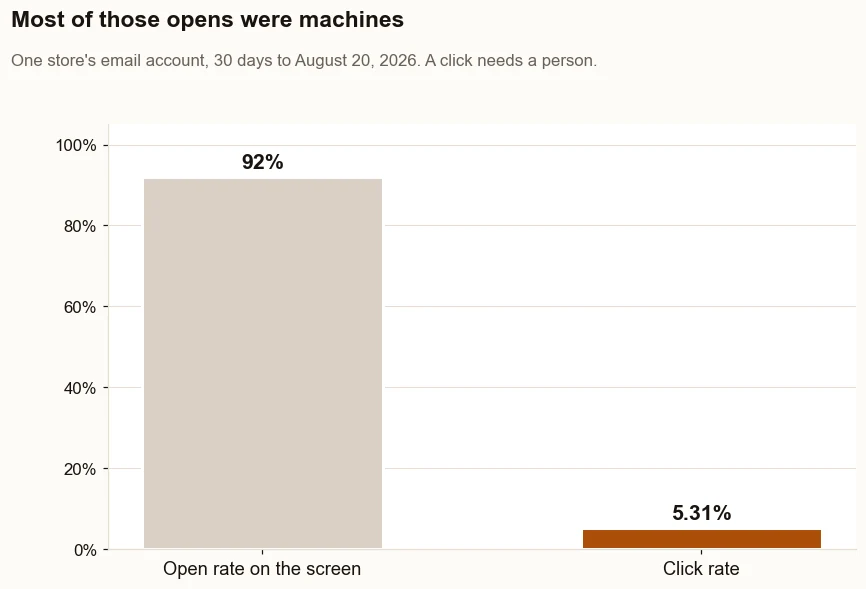
Leave open rates out of the verdict. The same account's screen showed a 92 percent open rate over the 30 days to August 20, 2026; counted by sends it was 238 opens on 263, about 90 percent, while the click rate was 5.31 percent. Apple Mail Privacy Protection records opens that no person made.
The screen showed a 92 percent open rate. The click rate on the same account was 5.31 percent. Opens can be machines. Clicks need a person.
“iOS 15 has significantly impacted email marketing open rates for ecommerce brands”
What do real sends show about campaigns and automations?
They show that a small automation can out-earn the newsletter. On a second store, on Shopify with Klaviyo, the September 2026 audit put the two side by side.
The newsletter list held 817 people. Three September sends to it opened at about 20 percent and clicked at about 1 percent, and together they produced 1 order.
The series that greets new subscribers reached 3 people over the 30 days before the audit. Two of them bought, $445 in all, by Klaviyo’s own count.
Read both with care. Opens include Apple Mail’s automatic opens, the series had three recipients, and $445 is Klaviyo’s attribution rather than a Shopify report. Two orders from three people is a pattern worth feeding, not a rate to plan on.
What it does show is where the leak is. Three recipients over 30 days means almost nobody new was entering the series, so the email that converts best had almost no one to reach. Names come first, then the campaign.
The store in the case study showed the same priorities from the other side. Its weekly email reached 13 people in six weeks as a flow, then 484 the first time it went out as a scheduled campaign. Same list, same platform: the difference was whether the email went out.
Do Shopify emails need domain authentication?
Yes, if you send from your own domain. The sending volume and warm-up guide says to authenticate your sending domain before you start, because Gmail and Yahoo require authentication.
It also says a sender reputation, the track record inbox providers build for your store, does not transfer when you switch to Shopify Messaging from another platform. The move starts small with your most engaged subscribers and grows volume by 20 to 30 percent a week.
“all users deserve the safest, most secure experience possible”
Gmail and Yahoo pushed these rules together, and the basic ones apply to every sender, however small. Gmail's sender guidelines require SPF or DKIM from everyone sending to Gmail accounts.
Should you switch from Klaviyo to Shopify Email to save money?
Only after you know which Klaviyo flows earn. Shopify’s tool costs less at every list size in the cost table above, but a selling flow that stops sending costs orders.
If the monthly cost keeps rising while your emails stay the same, wanting out makes sense. Move in this order:
List what earns: 30 days of email orders in Shopify’s Total sales by referrer report, and the flows Klaviyo credits for those dates.
Match each flow. Shopify’s templates cover browse, cart and checkout recovery, welcome, thank-you, upsell, win-back, birthday and VIP emails. Anything else becomes a Flow app workflow.
Bring consent and engagement. Export when and how each person opted in, plus opens, clicks and purchases to sort who gets the first sends. Import the list into Shopify as a CSV file, minus bounces, complaints and unsubscribes.
Warm up. Shopify’s warm-up guide says your sender reputation does not transfer, so begin with recent openers and clickers, add 20 to 30 percent a week, and hold back anyone whose opt-in you cannot confirm.
Switch off each Klaviyo flow as its replacement goes live, so nobody gets both.
Compare the same report for the next 30 days before you close Klaviyo.
When should a store move from Shopify Messaging to Klaviyo?
Move when your email needs outgrow the templates: flows that branch on what a customer bought, triggers such as a price drop on a viewed item, or SMS beyond the three abandonment moments. Do not move just to fix a flow that is not sending; that problem travels with you.
When Shopify email marketing works, it is plain to see. Every automation sends to close to the number of people it should, a campaign reaches the whole list on schedule, and Shopify's own report shows the orders email brought in.
If yours does not look like that yet, the free Traffic to Sales Check reads Shopify, Google and email side by side to find the gap. Setting up and fixing Klaviyo for a store is the work behind Klaviyo email, done for you.
The proof, from one store
Straight from the case study, with the source and what it does not prove. See all five results.
Result 2 · Email
Sales from email: $987 to $4,308 in about 90 days
Before the work$987
→
About 90 days in$4,308
4.4x
Baseline: the 30 days before the work began
$987 from 7 orders that came in through an email, 11% of sales, May 5 to June 3, 2026.
The work: what changed
Built welcome, abandoned cart, browse abandonment, win-back and high-ticket follow-up emails in Klaviyo (live July 28). Found that the weekly email only went to people who joined the list after it was switched on, so it reached 13 people in six weeks. Replaced it with a scheduled weekly email (September 4) that reached 484 people on its first send (September 8).
Result: about three months in
$4,308 from 10 orders that came in through an email, 18% of sales, August 17 to September 15, 2026, 4.4 times the baseline.
Evidence source
Shopify Analytics, Total sales by referrer, Klaviyo row, pulled September 18, 2026.
What this does not prove
One deposit order, worth $2,080, was placed 17 minutes after the buyer clicked a welcome email. Without it, email brought in $2,228, still 2 times the baseline. Klaviyo credits email with more, 23 orders for the same dates, because it counts any order placed within days of someone opening or clicking an email.
Test it on your store
In Klaviyo, open each flow and compare recipients over the last 30 days with the size of the list it should reach. Then open Total sales by referrer in Shopify for the same 30 days and find the Klaviyo row. A flow reaching a fraction of its list, or a Klaviyo row near zero, is the place to start.
Want a Klaviyo expert to run it?Klaviyo, done for you. On one store, a month of sales from email went from $987 to $4,308 in about 90 days. I work remotely with Shopify stores across the US.
Straight answers
Questions about this.
How much is Shopify email marketing?
As of September 2026, Shopify Messaging includes 10,000 free emails every calendar month, then costs $1 per 1,000 up to 300,000 emails, $0.65 per 1,000 after that, and $0.55 per 1,000 after 750,000. Abandoned checkout emails are always free, and SMS is billed separately.
What is the 80/20 rule for email marketing?
It is a rule of thumb, not a standard. One common version says about 80% of your emails should inform or entertain and 20% should promote. Shopify's own guide to the Pareto principle gives a sales version: a business might find 80% of its sales come from 20% of its customers.
Is Shopify Email free?
Partly. As of September 2026, Shopify Messaging includes 10,000 free emails monthly for stores on the Basic, Grow, Advanced and Plus plans. After that, emails cost $1 per 1,000 up to 300,000. Abandoned checkout automation emails are always free, and SMS is charged separately.
Is Shopify Email the same as Shopify Messaging?
Yes. The help center describes Shopify Messaging as formerly known as Shopify Email. The renamed app sends email, SMS and WhatsApp marketing campaigns from your store's admin, and it also runs email and SMS marketing automations such as abandoned checkout and win-back messages.
Do I need a separate email app for my Shopify store?
Not to start. Shopify's own email tool sends campaigns and ready-made automatic emails from your admin, with 10,000 free emails monthly on the Basic plan and up. Add an app when your emails must branch on what someone viewed or bought, beyond what the templates can do.
Can Shopify Email send abandoned cart emails?
Yes. The app has automations for abandoned product browse, abandoned cart and abandoned checkout, by email or SMS. Abandoned checkout emails do not count toward the free monthly allowance. Count how many shoppers qualify first: on one store it was 8 people over 30 days.
Can you use Shopify Email and Klaviyo together?
You can, but give each job to one tool. Klaviyo warns that an old email platform left connected can send double opt-in emails, and the Messaging help center notes that two similar automations send customers twice as many emails. If you run both, send campaigns from one and flows from the other.
Does Shopify Email work with Shopify Flow?
Yes. The help center says that for a custom marketing automation, or one that includes a third-party app, you create a workflow in the Flow app. Full automation features also need Flow installed and a staff member with both Marketing and Flow app permissions.
How do I send a newsletter with Shopify Email?
In your Shopify admin, go to Apps, then Messaging, and click Create campaign. Pick a template, choose All email subscribers or a segment, and add a subject line. Send yourself a test, then review and schedule it. Shopify suggests a send time but does not check spelling.
What is the best email marketing app for Shopify?
The one whose automations actually send and whose orders show up in the Total sales by referrer report. Shopify Messaging is the cheapest start for campaigns and standard automated emails. Klaviyo suits stores whose best emails react to detailed shopper behavior. Test either with the same 30-day report.