The Traffic to Sales Method
The Traffic to Sales Method finds the gaps where your Shopify store is losing sales, then closes them in order. A gap is a sale you should be getting and are not: your best products barely showing on Google, an automatic email that is switched on but reaches almost nobody, visitors you have no way to follow up with.
Herbert does the work himself, inside your store's own accounts, in five stages:
- Traffic to Sales Check: reads the tools your store runs on (Shopify, Google and your email) side by side to find the gaps.
- Get Found: gets your products and pages showing on Google without paying for ads.
- Get Names: collects the email addresses of the people who visit.
- Get Orders: sets up the emails that turn those visitors into orders.
- Show Proof: shows you what changed, before and after, from Shopify's own reports.
The goal is more of your sales coming from Google and email, and fewer that depend on paid ads.
Why does it start with the whole store?
Most stores that sell well are paying for a lot of those sales. The store in the case study was paying $1,700 a month for Facebook ads and an ad vendor, and in the 30 days before the work began (May 5 to June 3, 2026) the whole store sold $9,110. Google and email brought in 15% of that.
The reason nobody noticed is that every tool grades its own homework. Klaviyo showed the weekly email as live while it reached 13 people in six weeks. Google showed only thin versions of the store's highest-value products, because they had never been published through the store's Google channel. Reading the tools together is what finds the money.
Traffic to Sales Check, Get Found, Get Names, Get Orders, Show Proof.
Traffic to Sales Check
Read Shopify, Klaviyo, Google Search Console, GA4 and Google Merchant Center together and find where they disagree. Every tool grades its own homework, so the sales go missing in the gaps between them.
On a live store: Shopify, Klaviyo, Google Search Console, GA4 and Google Merchant Center were read side by side. That is how three problems surfaced: top products that had never been published to Google, a weekly email that reached 13 people in six weeks, and Facebook visits that almost never bought.
Get Found
Put the store in front of buyers on Google, in free product listings and in AI answers, starting with the products and pages that already exist.
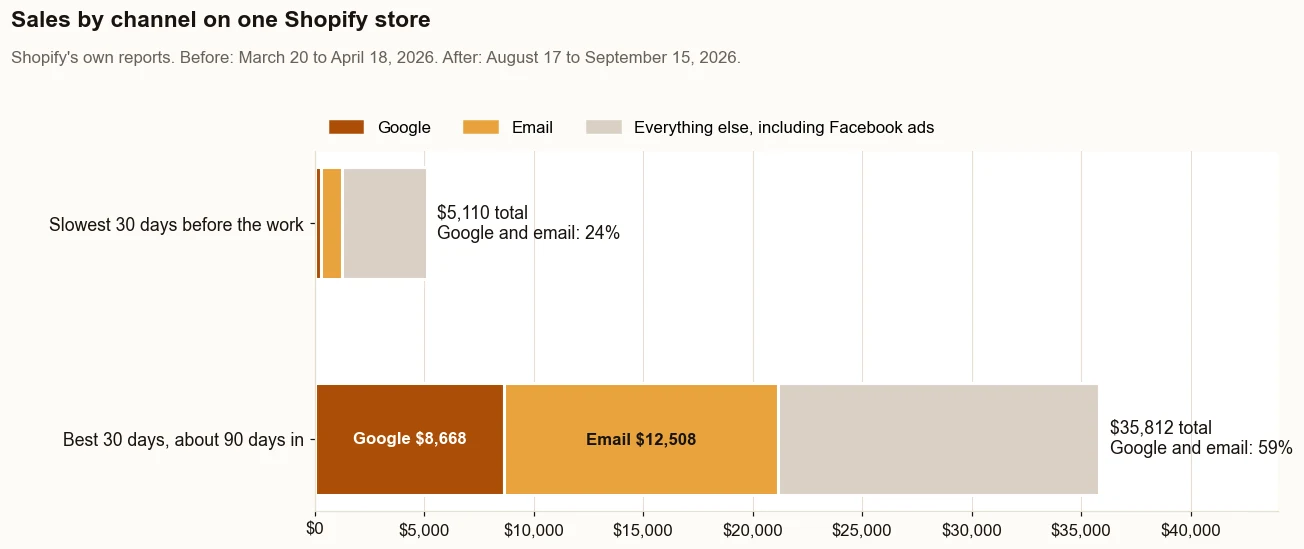
On a live store: Product names, page titles, descriptions and the text Google shows in search results were rewritten around real searches (August 7 to 30). Six city landing pages went live (August 1 and 2). The highest-value products were published to Google (August 24). Sales from Google went from $354 in the 30 days before the work began to $5,418 in the 30 days about three months in. See the receipt.
Get Names
Turn more visitors into people the store can reach. Every email flow downstream is capped by how many visitors the store can identify.
On a live store: The store can only email visitors it can identify, and it could identify about 0.8 percent of them. Sign-up forms went onto the city pages and the highest-value product pages on August 8.
Get Orders
Email flows that send and sell, checked against list size and never against the word live on a dashboard.
On a live store: Welcome, abandoned cart, browse abandonment, win-back and high-ticket follow-up emails went live July 28. On September 4, a scheduled weekly email replaced a sequence that was not sending. Sales from email went from $987 to $4,308. See the receipt.
Show Proof
Count every change from the store's own Shopify reports: the stretch before the work, the best stretch after, the source, and what the numbers do not prove.
On a live store: Every figure comes from Shopify's own reports. See the receipt.
Which tools and services does each stage use?
| Stage | Question it answers | What gets read | Service |
|---|---|---|---|
| Traffic to Sales Check | Where are sales going missing? | Shopify, Klaviyo, Search Console, GA4, Merchant Center | Shopify store audit |
| Get Found | Can buyers find the store? | Search Console, Merchant Center, AI answers | Shopify SEO, Merchant Center, AI search |
| Get Names | Can the store reach the people who visit? | Klaviyo onsite tracking, sign-up forms | Klaviyo email |
| Get Orders | Does email turn visitors into orders? | Klaviyo flows, Shopify sales by referrer | Klaviyo email |
| Show Proof | What actually changed? | Shopify sales and sessions reports | The case study |
Is it a traffic problem or a sales problem?
Divide a month’s sales by its sessions in Shopify to get sales per visit, and look at how many visits complete checkout. If visits rise while sales per visit falls, the new traffic is the wrong traffic. If visits hold and orders do not come, the store is losing buyers after they arrive.
| On the store in the case study | Before the work | About 90 days in |
|---|---|---|
| Visits (Shopify sessions) | 4,276 | 7,970 |
| Visits that completed checkout | 40 (0.9%) | 74 (0.9%) |
| Sales | $9,110 | $23,532 |
| Sales per visit | $2.13 | $2.95 |
Visits nearly doubled (4,276 to 7,970), about 1 in 100 visits completed checkout in both windows, and sales per visit rose 39% ($2.13 to $2.95). Source: Shopify’s sales and sessions reports, the 30 days before the work began (May 5 to June 3, 2026) and the 30 days about three months in (August 17 to September 15, 2026).
How do you work out sales per visit for your own store?
It takes two reports and a calculator, and it tells you whether to look for more traffic or for the sales you are already losing.
- In Shopify, open Analytics, then Reports, then Total sales over time. Note the sales for the 30 days before your last big change, and for your most recent 30 days.
- Open Sessions over time for the same two stretches and note the visits.
- Divide sales by visits for each stretch. That is your sales per visit.
- Compare the two. If visits went up and sales per visit went down, the new visitors are the wrong ones. If visits held and sales per visit fell, the store is losing buyers after they arrive.
On the store in the case study, checkout completion held at about 1 in 100 visits in both stretches while sales per visit went from $2.13 to $2.95. The same share of visitors bought, and the orders they placed were larger.
What stops traffic from turning into sales?
On a store that already gets visitors, the sales usually go missing in a handful of places. Each one below was found on a live store, and each one belongs to a stage of the method.
- The traffic is the wrong people. On cold Facebook audiences, 1 in 1,793 visits completed checkout. The fix is not more of those visits. Are Facebook ads worth it?
- The best products barely show on Google. The highest-value products had never been sent to Google from Shopify. Google free listings
- The store cannot follow up. It could identify about 0.8 percent of its visitors, so almost nobody could get a reminder. Visitor identification
- The follow-up is not sending. A weekly email was switched on and reached 13 people in six weeks. Is your email really working?
- Every tool takes credit. The email platform counted 23 orders where Shopify traced 10 to an email click, so the numbers used to make decisions were wrong. Your open rate is not real
- The store turns buyers away. Price, shipping cost and trust problems stop people at the cart. Why a Shopify store gets traffic but no sales
What does the Traffic to Sales Check look at?
Stage one is ten questions, run across the accounts the store already has. You can run the free version yourself on the Traffic to Sales Check page.
- Can Google and the AI engines reach your store?
- Are your best products listed on Google?
- Which of your pages has Google actually indexed?
- Where are you almost ranking?
- Do the AI engines name your store?
- How many of your visitors can you identify?
- Are your email flows really sending?
- Is your open rate real?
- Which channel really pays?
- How much are the ads carrying?
Who is the method for?
- Stores that already get visitors and make sales, where paid ads carry more of the month than they should.
- Stores whose tools disagree about what sold, so nobody is sure which channel really pays.
- Owners who want the work done for them, inside their own accounts. It is not a course.
- Not for anyone who needs a guaranteed ranking or sales number. Nobody can honestly promise one.
How is this different from conversion rate optimization?
Conversion rate optimization usually works on the page itself: the layout, the buttons, the checkout. That work has its place. This method starts earlier, with whether the right buyers can find the store, whether the store can reach them again, and whether the follow-up actually sends. It counts the result in sales from Shopify's own reports, not in clicks or button tests.
The case study shows why that order matters. Checkout completion barely moved, from 0.9% to 0.9%, yet sales went from $9,110 to $23,532 in about 90 days. Most of the gain came through Google and email, which went from 15% of sales to 41%: more of the right visitors, and follow-up that finally reached people.
Why are the stages in this order?
Each stage limits the one after it. If buyers cannot find a store, it has no visitors to identify. If the store cannot identify a visitor, that visitor never gets its automatic emails. And emails nobody gets cannot produce an order. Fixing a later stage first improves a number that an earlier stage is still holding down.
On the store in the case study, Klaviyo could identify about 0.8 percent of visitors, so rewriting the browse abandonment emails would have changed almost nothing. Show Proof comes last because every change has to be counted the same way, from the store's own reports.
How is each stage measured?
| Stage | What gets counted | Where it comes from |
|---|---|---|
| Traffic to Sales Check | Where the tools disagree about what sold | Shopify, Klaviyo, Search Console, GA4 and Merchant Center, side by side |
| Get Found | Indexed pages, impressions and clicks; products approved in free listings; mentions in AI answers | Search Console, Merchant Center and a fixed list of buyer questions |
| Get Names | Identified visitors as a share of sessions | Klaviyo's Active on Site metric against Shopify sessions |
| Get Orders | Sends against list size, clicks, and sales from email | Klaviyo flow reports and Shopify's Total sales by referrer |
| Show Proof | The 30 days before the work began against the 30 days about three months in | Shopify's sales reports, with the source and the dates |
Where does a store start?
Wherever its gap is. A store with little traffic starts at Get Found. A store with traffic and few sales starts at the Traffic to Sales Check, which shows which later stage is holding it back. Either way, the work happens inside the store's own accounts, and the owner keeps every login.
Where did the method come from?
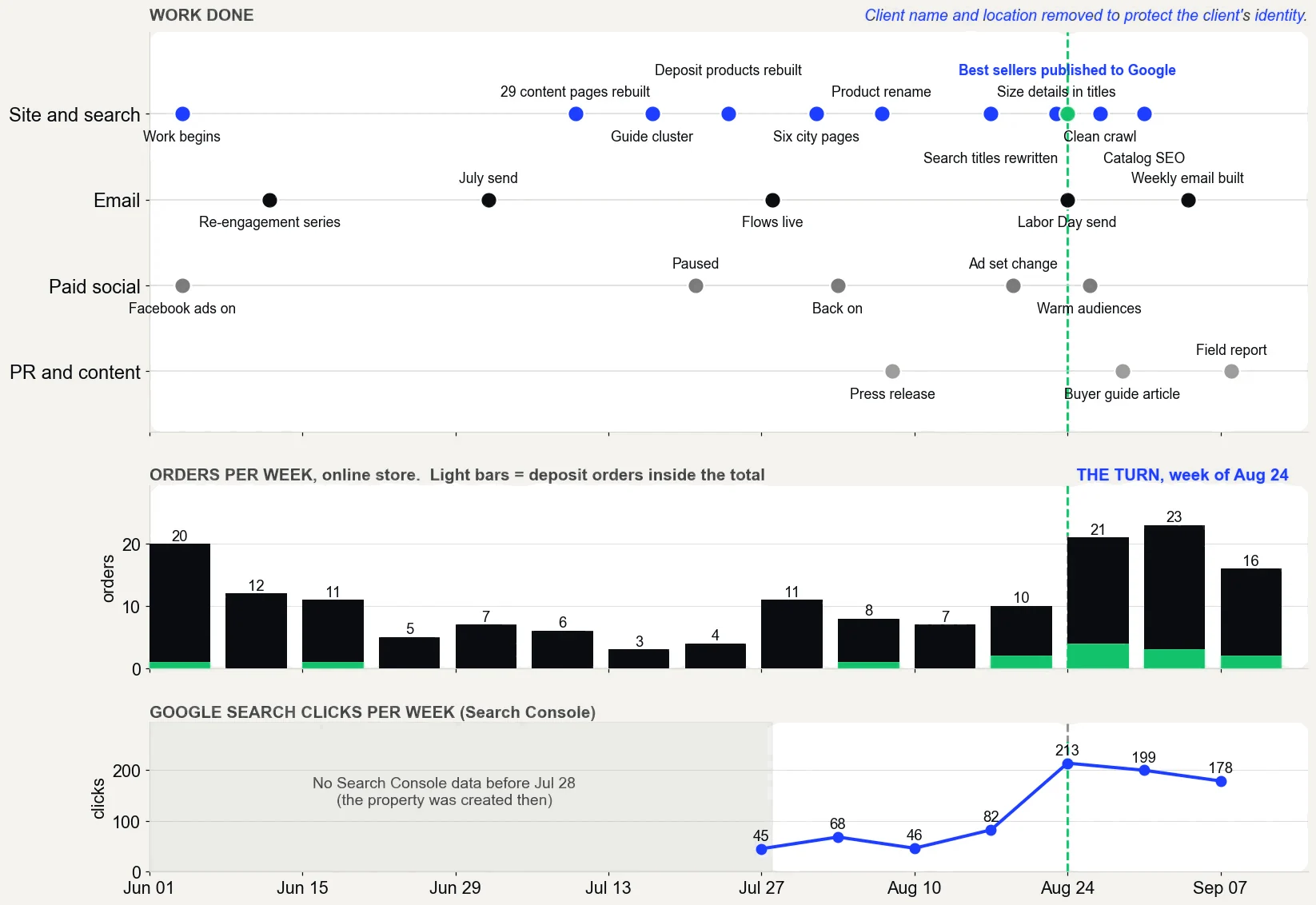
From the work on one direct to consumer Shopify store, starting June 4, 2026. The case study is laid out in the same five stages. The work did not happen in this order: the email flows went live on July 28, before the sign-up forms that feed them went up on August 8. A browse abandonment flow with almost nobody to send to is the reason Get Names now comes before Get Orders.
What did each stage look like on one store, date by date?
These are the dates the work shipped on the store in the case study. The work began on June 4, 2026.
| Date, 2026 | What shipped | Stage |
|---|---|---|
| July 28 | Welcome, abandoned cart, browse abandonment, win-back and high-ticket follow-up emails went live | Get Orders |
| August 1 and 2 | Six city landing pages went live | Get Found |
| August 7 to 30 | Product names, page titles, descriptions and the text Google shows in results were rewritten around real searches | Get Found |
| August 8 | Sign-up forms went onto the city pages and the highest-value product pages | Get Names |
| August 24 | The highest-value products were published to Google | Get Found |
| August 26 | The Facebook ads moved to warm audiences, people who already knew the store | Outside the five stages |
| September 4 | A scheduled weekly email replaced a sequence that was not sending. Its first send, on September 8, reached 484 people | Get Orders |
| September 11 | Live rank checks: four “near me” buyer searches at #1 and #2 in the target metro | Show Proof |
| September 16 | Sales pulled from Shopify for the before and after | Show Proof |
What does each stage hand you?
| Stage | What you have at the end of it |
|---|---|
| Traffic to Sales Check | A ranked list of where the store is losing sales, biggest dollars first, or a plain answer that the store is not the bottleneck |
| Get Found | Pages rewritten around the words buyers search, the best products live in Google's free listings, and a list of buyer questions checked in AI answers |
| Get Names | Sign-up forms on the pages that get traffic, and the share of visitors the store can identify, measured each month |
| Get Orders | Automatic emails that send to the people they were built for, checked against list size, with the sales counted in Shopify |
| Show Proof | A before and after from Shopify's own reports, with the dates, the source and what the numbers do not prove |
What do the tools cost?
The method starts with tools a Shopify store already has or can use for free. The cost is the work, not the software.
- Shopify's reports come with the store.
- Google Search Console is a free service from Google.
- Google Merchant Center is free, and so are the free product listings it powers.
- Google Analytics is free.
- Klaviyo has a free plan for up to 250 active profiles and 500 email sends a month. Bigger lists pay by list size.
- Shopify Messaging, Shopify's own email tool, includes up to 10,000 emails a month, then $1 for every 1,000 more.
What will this method not promise?
- A guaranteed ranking, citation or sales number. Nobody controls how Google ranks or how an AI engine answers.
- A text file or a schema block sold as a strategy. Good markup helps machines read a site. There is no secret version that buys a citation.
- More traffic before the gaps are closed. Pouring paid traffic into a store that loses it between the tools only makes the leak more expensive.
- Switching off ads that work. The goal is for the free channels to carry more of the month, not to pretend paid should disappear.
See every stage applied to one store, with the numbers, in the case study.
- Shopify Help Center: Sales reports, including Total sales by referrer
- Search Console Help: Page indexing report
- Google Merchant Center Help: Free listings for products
- Klaviyo Help Center: Getting started with flows
- Klaviyo: Pricing
- Shopify: Shopify Messaging pricing
- Search Console Help: About Search Console
- Google Merchant Center Help: About Merchant Center
Questions about the method.
What is The Traffic to Sales Method?
The Traffic to Sales Method finds the gaps where your Shopify store is losing sales, then closes them in order. It is a five stage method by Herbert Timpson for turning the traffic a Shopify store already gets into sales: Traffic to Sales Check, Get Found, Get Names, Get Orders and Show Proof. It starts with tools the store already has, like Shopify SEO, Google Merchant Center and Klaviyo email.
How long does it take to see results?
On the store in the case study, the turn came about 90 days in: sales went from $9,110 before the work to $23,532. One store is not a promise, which is why the method starts with a Traffic to Sales Check of your own numbers.
Does every store need all five stages?
No. The Traffic to Sales Check shows where the gap is, and the work goes there first. If the store is not the bottleneck, you will hear that instead of a plan.
Why does Get Names come before Get Orders?
Because every email flow can only reach people the store can identify. On one store, Klaviyo could identify about 0.8 percent of visitors, so improving the emails first would have changed almost nothing.
Which reports does the method use?
Shopify's Total sales by referrer and sessions reports, Google Search Console, Google Merchant Center, Klaviyo's flow reports and GA4. Every result is counted from Shopify's own reports, with the source and the dates.
Want to know which stage your store is stuck on?
Book thirty minutes, or run the free Traffic to Sales Check yourself first.
Prefer email? herbert@herberttimpson.com