Home / Insights / Shopify store getting traffic but no sales? Start with these checks
Sales · 8 min read
Shopify store getting traffic but no sales? Start with these checks
You have traffic but no sales, or sales that suddenly stopped, and every tool says it is working. Here is where the sales usually go, and how to tell which one is yours.
The short answer
When a Shopify store gets traffic but no sales, it is usually one of three things, in this order. First, the traffic is the wrong people, often paid clicks that were never going to buy. Second, the store turns buyers away with price, shipping or trust problems. Third, the free sales tools, like Google listings and email flows, are switched off. Check Shopify's own reports before you change anything.
Most stores with traffic and no sales are paying for that traffic. Look at the orders you do get and where each one came from, using Shopify's Total sales by referrer report, not the ad platform's report.
If most of your sessions come from paid social and almost none of your orders do, the ads are sending people who click and do not buy. That is a traffic problem, and no amount of work on the product page fixes it.
Which report tells you what is really selling?
Every platform reports on itself, and every one of them reports a win. Shopify's own reports are the referee.
One store was paying $1,700 a month for Facebook ads and an ad vendor, and in the 30 days before the work began the whole store sold $9,110. For August 17 to September 15, 2026, the same store's email platform credited itself with 23 orders, while Shopify traced 10 orders to an email click. Until you read the orders yourself, you do not know what is selling.
Shopify Analytics, Reports, Total sales by referrer
Which channels actually produce orders
Reached checkout and completed checkout
Shopify Analytics, conversion rate breakdown
Whether buyers are lost before or at checkout
Products published to Google
Shopify, Sales channels, Google & YouTube
Whether your best sellers can show in free listings
Flow sends against list size
Klaviyo flow analytics
Whether your email is actually sending
Is something wrong with Shopify itself?
Rarely, but it takes a minute to rule out. Shopify's status page, shopifystatus.com, shows whether checkout, the storefront, the admin or reports have a problem. Then place a test order. Shopify's help center explains how to use its Test payment gateway or Shopify Payments' test mode, and you are not charged. Switch test mode off afterwards, because customers cannot place live orders while it is on.
Is the store turning buyers away?
If the right people are arriving and still not buying, the store is stopping them: price, shipping cost, shipping time, missing trust signals or a broken page. Compare checkout starts with completed orders.
On one store, 33 of the 41 people who started checkout finished in the 30 days to August 20, 2026, about 80 percent. Checkout was not the problem, so the effort belonged somewhere else.
Most established stores already have tools that bring in orders without an ad bill, and some are switched off without anyone knowing. Check three:
Google free listings. Confirm your best products are published to the Google & YouTube channel. On one store the highest-value products never had been.
Email flows. Confirm they actually send. One store's weekly email sequence showed as live for six weeks and reached 13 people. The flows worth having are in the Klaviyo flows every Shopify store needs.
Visitor identification. Check how many visitors your email platform can identify. On that store it was about 0.8 percent, which capped every flow.
How do you diagnose it, step by step?
What you see
Likely cause
Report that shows it
First fix
Lots of sessions, almost no orders, mostly from one ad channel
Wrong traffic
Sessions by referrer against Total sales by referrer
Move ad spend to warm audiences, or pause it
Visitors add to cart but few reach checkout
Price, shipping cost or trust
Conversion rate breakdown
Show shipping costs and delivery dates earlier; strengthen product pages
Many reach checkout, few finish
Checkout friction
Conversion rate breakdown
Payment options and surprise fees
Few orders from Google
Products not listed or pages not indexed
Google & YouTube channel, and the Page indexing report in Search Console
Publish best sellers and fix indexing
Few orders from email
Flows not sending, or starved
Klaviyo flow sends and Active on Site
Fix triggers; add sign-up forms
Why did sales suddenly stop when they used to come in?
Because something changed, so find the change before you change anything yourself. If orders used to arrive every week and the store has gone quiet, the silence is unnerving. It is also something you can trace, one check at a time:
Can people still buy? Check shopifystatus.com and place a test order, as above.
Which channel fell? Compare the quiet weeks with the weeks before in Total sales by referrer and Sessions by referrer. Shopify's acquisition reports let you compare data from different date ranges.
If Google fell, compare the drop in Search Console's Performance report with the previous period and with the same months a year earlier, as Google's guide to debugging traffic drops suggests. Then open the Needs attention tab in Merchant Center, because its help page on product issues says disapproved products stop showing across Google. The usual fixes are in how to fix a Shopify product feed.
If the ads fell, look at what changed in the ad account that week: a new campaign, a new audience, a smaller budget or a rejected ad.
If email fell, check that each flow is still live and still sending, against the size of the list it was built for.
If everything fell at once, check the calendar, then the store. Google's guide notes that demand for some searches rises and falls with new trends and with the seasons, so compare with the same weeks last year. Then list anything that changed in the store that week: the theme, an app, prices or shipping rates.
Work down the list in that order. A broken checkout costs every sale, so it comes first. A seasonal dip needs patience, not a redesign.
What if the store is brand new?
A new store with almost no traffic has a different problem. Before it can turn visitors into buyers, it needs to be found: products listed on Google, pages that can rank, and a reason for someone to come back. The checks above still apply. They just come after getting found.
How many visits does it take before no sales means anything?
More than a few days’ worth. On the store in the case study, about 1 in 100 visits completed checkout in both the 30 days before the work began and the 30 days about three months in, so a store converting at a similar rate would expect roughly one order per 100 visits. Judge a full month, not an afternoon, and compare it with your own past months rather than another store’s.
Could the product or the offer be the problem?
Sometimes. If the right visitors arrive, read the product page and still do not add to cart, look at the price, the proof and what makes the product different before touching the tools. The checks on this page find the leaks around a good offer; they cannot fix an offer nobody wants.
Does the math work before the ads even start?
Some stores have a problem no report will show: the numbers on each order. Add up what one order costs you, then compare the total with the price:
The product itself.
Packing and shipping.
Payment fees. On Shopify's Basic plan with Shopify Payments, a $100 online order pays 2.9 percent plus 30 cents, which is $3.20.
What you pay in ads for each order.
If that total is close to the price, more traffic will not fix it. The price, the shipping or the ads have to change first. The ROAS formula turns the same sum into the return your ads need just to break even.
What did fixing it look like on one store?
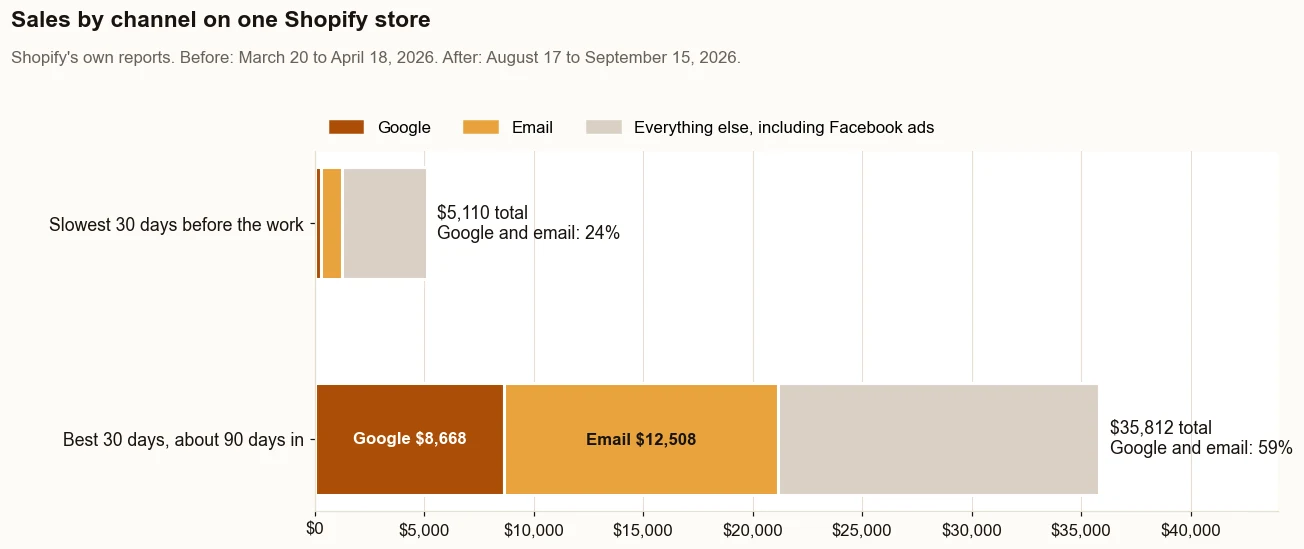
On one direct to consumer store, turning on and checking those tools took sales from $9,110 in the 30 days before the work began to $23,532 in the 30 days about three months in. Google and email went from 15% of sales to 41%. The ads kept running. They just stopped carrying everything. The whole plan is in how to increase sales on Shopify without more ad spend.Google and email went from 15% of sales to 41%. Source: Shopify’s own reports. What it does not prove: this is one store, and the Facebook ads ran in both periods.The same report for the 30 days about three months in (August 17 to September 15, 2026). Store name redacted.
The proof, from one store
Straight from the case study, with the source and what it does not prove. See all five results.
Result 1 · Sales
Total sales: $9,110 to $23,532 in about 90 days
Before the work$9,110
→
About 90 days in$23,532
2.6x
Baseline: the 30 days before the work began
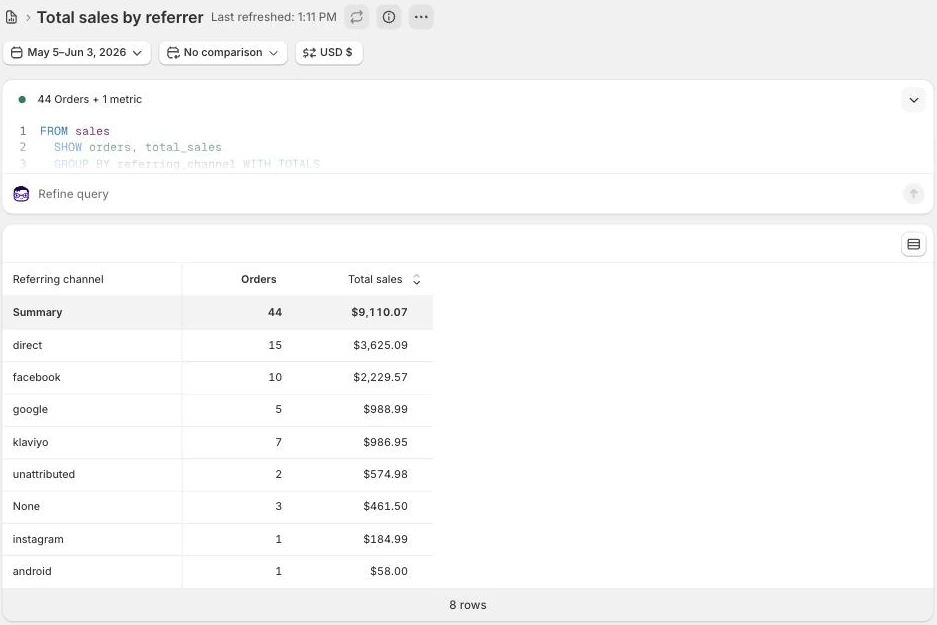
$9,110 in sales from 44 orders, May 5 to June 3, 2026: the 30 days before the work began on June 4, 2026. Google and email brought in 15% of it.
The work: what changed
Rewrote product names, page titles, descriptions and the text Google shows in search results around what buyers search for, with real weights (August 7 to 30). Built six city landing pages (August 1 and 2). Published the highest-value products to Google (August 24). Put welcome, abandoned cart and browse abandonment emails live (July 28) and replaced a weekly email that was not sending (September 4). Moved the Facebook budget to warm audiences (August 26).
Result: about three months in
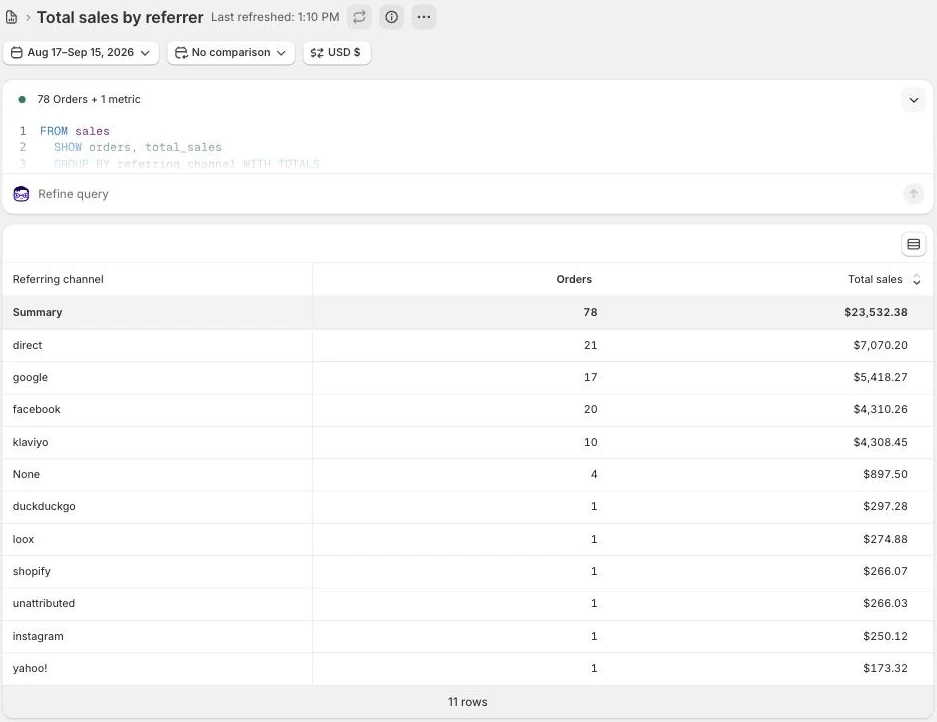
$23,532 in sales from 78 orders, August 17 to September 15, 2026, 2.6 times the baseline. Google and email brought in 41% of it.
Evidence source
Shopify Analytics, Total sales over time and Total sales by referrer, pulled September 18, 2026.Shopify’s Total sales by referrer report, grouped by referring channel, for the 30 days before the work began (May 5 to June 3, 2026). Store name redacted.The same report for the 30 days about three months in (August 17 to September 15, 2026). Store name redacted.
What this does not prove
This compares the 30 days before the work began with the 30 days about three months in, not an average. That is why every month is in the table below. The store's largest orders are seasonal deposit orders, and one September order made up $2,080 of the result. The Facebook ads ran in both periods.
Test it on your store
In Shopify, go to Analytics, then Reports, and open Total sales over time. Take the 30 days before your last big change and compare them with your most recent 30 days.
Want a Shopify expert to find the gap?Ecommerce marketing for Shopify. On one store, a month of sales went from $9,110 to $23,532 in about 90 days. I work remotely with Shopify stores across the US.
Straight answers
Questions about this.
Why is no one buying from my Shopify store?
Usually one of three things. First, the traffic is the wrong people, often paid clicks that were never going to buy. Second, the store turns buyers away with price, shipping or trust problems. Third, the tools that should sell for free, like Google listings and email flows, are quietly switched off. Check them in that order.
How do I see where my Shopify sales actually come from?
In Shopify, open Analytics, then Reports, then Total sales by referrer. It shows sales by the channel each order came from, which is a better referee than any ad platform's report on itself.
Is checkout the problem when a Shopify store has no sales?
Check before you assume. Compare checkout starts with completed orders. On one store, 33 of the 41 people who started checkout finished, about 80 percent, so the sales were being lost before checkout, not at it.
Is Shopify still worth it in 2026?
For a store that already sells, the platform is rarely the reason sales are low. On the store in the case study, sales went from $9,110 in the 30 days before the work began to $23,532 in the 30 days about three months in without changing platforms, by turning on tools Shopify already connects to: Google listings, search and email.
Why is no one even adding to cart on my Shopify store?
Usually the visitors are the wrong fit, or the product page leaves them unsure. Check where those sessions come from first, and filter out bot traffic. If they are the right people, look at what the page shows near the button: the full price with shipping, a delivery date, clear photos and real reviews.
Why did my Shopify sales suddenly stop?
Something changed, so find it before changing anything. Check shopifystatus.com and place a test order, then compare the quiet weeks with the weeks before in Total sales by referrer to see which channel fell. Then check that channel: Search Console and Merchant Center for Google, the ad account for ads, and flow sends for email.
How long should I wait before worrying about no sales?
Judge a full month, not a few days. On one store, about 1 in 100 visits completed checkout in both the 30 days before the work began and the 30 days about three months in, so a store converting at a similar rate would expect roughly one order per 100 visits. Compare the month with your own past months, not another store's.
What should I fix first if my Shopify store has no sales?
Work in order: traffic quality first, then what the store does to buyers who arrive, then the free tools. Fixing a product page will not help if the ads are sending people who never meant to buy.