Home / Insights / Google Shopping feed: how to fix a Shopify product feed
Get Found · 14 min read
Google Shopping feed: how to fix a Shopify product feed
If products are active in Shopify but missing from Google Shopping, disapproved with no clear reason, or showing the wrong price, the feed is usually why. Here is how a Shopify feed gets built, and the order to fix it in.
The short answer
A Google Shopping feed is the list of product details, such as titles, prices, images, stock and identifiers, that Google Merchant Center reads to show your products in free listings and Shopping ads. On Shopify, the Google & YouTube channel builds the feed from your product records, so most fixes belong in Shopify, not in the feed itself.
A Google Shopping feed is a structured list of your products, one row per item, with fields such as ID, title, description, link, image, price, availability, brand and identifiers. Its official name is now a data source, previously known as a feed: how you add product information to Merchant Center.
There are several ways of creating one: a .txt, .xml or .tsv file of up to 4 GB, following Google’s instructions for product files, a Sheets template, an automatic import from your site, or a platform connection. On Shopify, that connection is the Google & YouTube channel, so you rarely touch a file at all.
“Listings show products and their sellers, and they’re updated constantly”
They come from what you share in Merchant Center or from what Google reads across the web. The feed is the part you control, and Google’s Search Central documentation gives two reasons it matters: crawling is not guaranteed to find all your products, and a feed lets you control the timing of updates.
How does a Shopify product feed get to Google?
The sales channel called Google & YouTube builds and sends it. As of September 2026, Shopify’s help center notes the channel is managed by Google. Here is how the Shopify product feed behaves once it is connected:
Everything visible syncs first. On first setup, every product available to your online store syncs to Merchant Center. You can then change which products are available to the channel, one at a time or in bulk.
Nothing is permanent. Google expires synced products after 30 days, so the channel refreshes them automatically.
An old feed gets replaced. Connecting an existing account overwrites any product feed already set up there.
New products wait for review. They are reviewed within 3 to 5 business days after the first sync.
Each product then gets one of four statuses in the channel: Not approved, Limited, Under review or Approved, according to Google’s article on the app. It also warns that Google’s errors differ from Shopify’s, so an edit that looks fine in your admin can still cause a disapproval.
Which attributes does a Google Shopping feed require?
Google’s product data specification lists the required attributes, and a product missing one cannot serve in ads or unpaid results. Here is where each comes from on a Shopify catalog:
Attribute
What Google requires
Where it comes from in Shopify
title
Up to 150 characters, describing the product on the landing page
Product title, or your SEO title tag if you choose that option
description
Up to 5,000 characters, about the product only
Product description, or your meta description
link
The product’s landing page on your verified domain
The product URL
image_link
The main image, with no promotional text, watermarks or borders
Your product media
price
Matching the landing page, structured data and checkout
The variant price
availability
in_stock, out_of_stock, preorder or backorder
Your inventory
gtin
For products with a manufacturer-assigned GTIN
The barcode field on the product
brand, mpn
Brand for any product with a clear brand; MPN when there is no GTIN
Fields in the channel
condition
For used or refurbished items
A channel field
shipping
Shipping settings or costs, required in the United States
Imported from your General shipping profile, or entered by hand
age group, gender, color, size
For Apparel & Accessories
Channel fields once you pick that category
An ID is required too, and the channel creates it for you. What the channel cannot create is accuracy: every value above is only as good as the product record it came from.
Why is a product missing or not approved?
Often one of six common errors, all fixable in your admin. If a product is active in Shopify but you cannot find it on Google, first sort it into one of three buckets, because each needs a different fix:
Missing from Merchant Center. A sync problem. The product must be available to both the Online Store and the Google & YouTube channel.
In Merchant Center, not approved. A data or policy problem. Open the issue in the Needs attention tab, where Google lets you download every affected product for that issue, warnings included.
Approved, still not on Google. A timing or account problem. Shopify’s checklist: review time, policy compliance, account warnings or suspensions, and extra rules for some product categories.
Shopify’s troubleshooting guide names the six errors, and you can see each product’s errors under Sales channels when you open it.
Error
What it means
The fix
Missing description
The product has no description
Write one in the Description field
Missing image
There is no product image
Add at least one image in Media
Unavailable landing page
The product is not available to both the Online Store and Google & YouTube
Tick both sales channels and save
Missing GTIN or MPN
Google cannot match the product to its catalog
Add the barcode, or the brand and MPN in the channel
Promotional overlay on image
Text, logos, watermarks or badges on the image
Replace it with a clean product image
Excessive capitalization
An all-caps title
Sentence or title case
The seventh cause is quieter. If your feed price or stock doesn’t match your product page, Google’s help on issues says it can apply a preemptive item disapproval, erring on the side of caution until a review clears it.
How do you write feed titles Google can match?
Put the words a buyer searches first, then the details that separate one variant from another. Google’s title guidelines allow 150 characters but note that users usually notice only the first 70 or fewer.
Lead with what it is. Product type and brand before anything clever.
Add the specifics. Material, size, color or fit: the specific details people type.
Name the variant. Include color or size in the title, and submit them as attributes too.
Skip the hype. No “free shipping”, no all capitals, no gimmicky characters.
Weak title
Title Google can match
The Everyday Hoodie
Brand Organic Cotton Hoodie, Men’s, Navy, Size M
BEST SELLER Travel Mug!!
Brand Insulated Travel Mug, 16 oz, Stainless Steel, Black
Shopify gives you a useful shortcut here. In the channel settings, you can send Google your search engine title tag and meta description instead of the product title and description, so feed titles can carry more search terms without changing your storefront.
The same work helps your Shopify meta description and title tags in regular search. One newer rule: Google asks for titles written by generative AI to use a separate structured title attribute.
What do descriptions, images and identifiers need?
Accurate text, clean images and real identifiers. Each has a rule that trips up a lot of catalogs.
Descriptions
Up to 5,000 characters about the product only. Google’s specification says not to include links to your store, sales information, competitors or other products. Product description examples that sell on the page also tend to work in the feed.
Images
No promotional text, watermarks or borders, no placeholders, and no scaled-up thumbnails. As of September 2026, Google has announced a new minimum of 500 by 500 pixels for all product images, with enforcement beginning January 31, 2027. The Shopify product image size guide covers what to upload.
Identifiers
Google’s rules on product identifiers are blunt: don’t make up, guess or borrow values from similar products. If you make the product yourself and have no official brand, use your shop name as the brand with an MPN of your choice, or tick the channel’s custom product option. Shopify warns that incorrect identifiers can stop products publishing and even put the account at risk.
A Google product category is optional in Google’s own article on product categories, because Google assigns one automatically. Shopify still recommends adding one, since an automatic category can cause errors. Start with the products where Google guessed wrong.
Do feed prices and availability have to match your website?
Yes, exactly. Google’s specification says the feed price must match your landing page, your structured data and your checkout, and availability must match what the page and checkout say.
Google also has a safety net. Its automations read the structured data on your product pages and correct price, sale price, availability and condition in your ads and unpaid results. They are on by default, but Google says they are not a replacement for regular updates to your product data.
He was describing the Shopping Graph, which refreshes more than 2 billion of its product entries every hour. A feed that lags your storefront by days is the one that gets flagged. Mismatches are also on Google’s audit list for Merchant Center misrepresentation.
What stops a Shopify product feed from reaching Google in practice?
Two things, seen on two stores in September 2026: a shipping setting and a price field.
The shipping setting: one account held no products until a shipping setting was fixed on September 15, 2026. The first products were accepted that day, and 91 had been sent by September 17, none approved yet because approval is a separate step. Source: its Merchant Center account, September 17, 2026.
The price field: a second store lists its main product at the deposit. The feed repeats that field, so Google’s structured data, listing and snippet show the deposit as the price, while the full price, over $2,000, sits in paragraph four. Source: a read-only audit, September 19, 2026.
Check shipping settings before you touch a title, and make the price attribute what a buyer pays.
Should you fix the feed in Shopify, the channel or with rules?
In Shopify first, in the channel for Google-only fields, and in Merchant Center only when you must. Changes on the product page sync to Google, so a fix there survives the next refresh.
Where to fix
Good for
Watch out for
Shopify product records
Titles, descriptions, images, prices, barcodes
Google’s errors differ from Shopify’s, so recheck the channel after edits
Google & YouTube channel
Product category, brand and MPN, age, gender, condition, the SEO title option
The bulk editor changes many products at once, so check a sample first
Merchant Center attribute rules
Transforming values you cannot change at the source
Needs the Advanced data source management add-on, and rules can need rebuilding
Attribute rules are what Google used to call feed rules. Its article on attribute rules explains the add-on, and Google’s app article gives an example of rules going stale: when products in overlapping markets moved to new country data sources, existing rules did not transfer. If a feed app already manages your catalog, decide which source owns each product before connecting, because the channel overwrites an existing feed.
What is product feed optimization, and what should you fix first?
Product feed optimization means improving the data Google reads so more of your products are approved and matched to more searches. Fix it in order of money, not in order of the error list:
Coverage. Your best sellers are available to the channel and Approved.
Disapprovals. Clear the Needs attention tab in Merchant Center, starting with products that sell. Google lets you download the affected items as a CSV.
Identifiers and category. Barcodes, or brand and MPN, and a category wherever Google guessed wrong.
Titles and descriptions. The searched words first, variant details after.
Images. Clean, large product shots, ready for the 500 by 500 minimum.
Shipping and returns. Rates and return details in place, since shoppers see both beside your products.
The 2026 extras. Google’s September advice adds video links and conversational attributes, which add richer context to your products, including in AI Mode.
“Holiday success ultimately relies on an accurate product feed.”
In the same post, Google says merchants adopting its core feed best practices see, on average, a 5% increase in conversions the following month. That is Google’s figure across merchants, not a promise for your shop.
How do you know the feed fixes worked?
Watch Merchant Center’s performance report, filtered to free listings, and count sales in Shopify’s own reports. The first shows whether Google shows your products more; the second shows whether it made money.
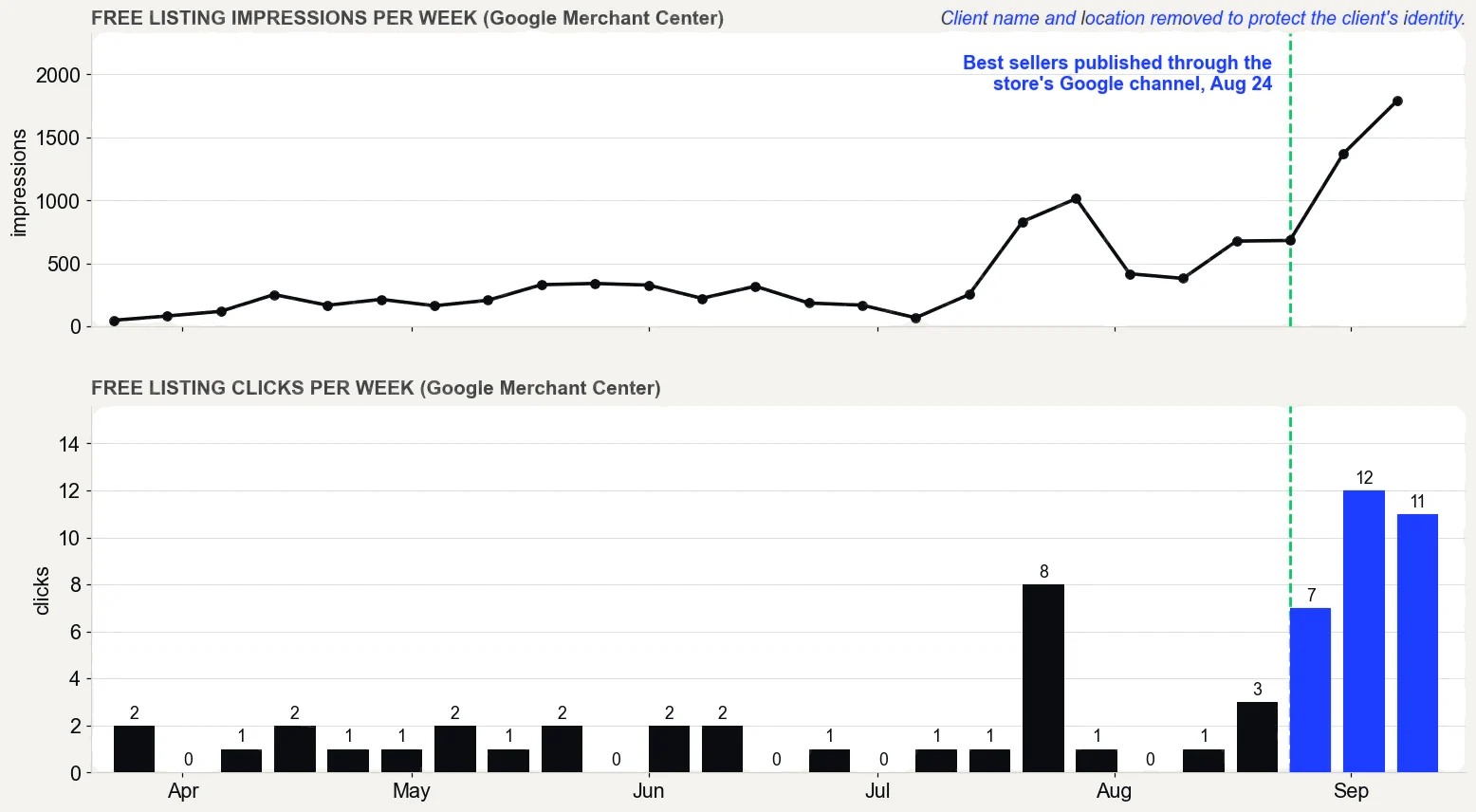
On one store, the best sellers were published through the Google & YouTube channel on August 24, 2026. Free listing clicks went from 5 in the 30 days before the work began (May 5 to June 3, 2026) to 34 in the 30 days about three months in (August 17 to September 15, 2026). Impressions went from 562 to 5,026.
Google Merchant Center performance report, free listings only, pulled September 16, 2026. What it does not prove: the product pages were rewritten in the same weeks, so not all of the change comes from publishing, and free listing clicks are still small numbers.
What it does not prove: the product pages were rewritten in the same weeks, and the click counts are still small. Also note that Google changed its performance reporting on August 24, 2026, so compare periods carefully. The whole case is on the results page.
Is Google Shopping free?
The unpaid results are; the ads are not. There is no cost per click for free listings, and new Merchant Center accounts are opted in by default, according to Google’s help article on unpaid product results. Shopping ads use the same feed but charge per click through Google Ads.
That shared feed is the point: every error you fix for the unpaid side also fixes the product data your Shopping campaigns would pay to show. Before paying, read whether Google Shopping ads are worth it.
What does a healthy Google Shopping feed look like?
Your best sellers are approved, titles lead with the words people search, prices and stock match the page, and every product carries a real identifier. The Needs attention tab is short and boring. And when you change something in Shopify, it syncs within hours, not weeks.
A feed rarely breaks loudly. It drifts, one missing barcode or stale price at a time, until your best products quietly stop showing.
The proof, from one store
Straight from the case study, with the source and what it does not prove. See all five results.
Result 3 · Google
Sales from Google: $354 to $5,418 in about 90 days
Before the work$354
→
About 90 days in$5,418
15x
Baseline: the 30 days before the work began
$354 from 2 orders that came in from Google, May 5 to June 3, 2026. The highest-value products in the catalog had never been published through the store's Google channel.
The work: what changed
Rewrote product names, titles, descriptions and search snippets around the terms buyers search, with real weights (August 7 to 30). Built six city landing pages (August 1 and 2). Published the store's highest-value products to the Google channel so they could show in free Shopping listings (August 24). Cleaned up crawl errors and expanded thin product pages to more than 400 words (August 27 to 30).
Result: about three months in
$5,418 from 17 orders that came in from Google, August 17 to September 15, 2026, 15 times the baseline.
Evidence source
Shopify Analytics, Total sales by referrer, Google row, pulled September 18, 2026.
What this does not prove
Shopify does not split Google search from free Shopping listings, so this cannot say which sold more. Four of the 17 orders were deposit orders, worth $2,070. Google Search Console only started collecting data on July 28, 2026, so there are no clicks from before the work to compare.
Test it on your store
In Shopify, open the Google and YouTube channel and check that your best sellers are published to it. In Search Console, open Performance, sort queries by impressions, and note the ones in positions 5 to 15. Then compare the Google row in Total sales by referrer for your most recent 30 days with the 30 days before your last change.
It is a structured list of your products with attributes Google can read, such as ID, title, description, link, image, price, availability and identifiers. Google Merchant Center uses it to show your products in free listings and Shopping ads. Google now calls a feed a data source.
How do I get my Google Shopping feed from Shopify?
Install the Google and YouTube channel and connect a Merchant Center account. The channel builds the feed from products available to your online store and keeps it synced, so you do not need to build a file. Fix product details in Shopify and they flow through to Google.
How do I activate Google Shopping?
Create or connect a Google Merchant Center account and add your products. Google says new accounts are opted in by default, which you can confirm on the Free listings card under Marketing methods. Shopping ads need a linked Google Ads account.
How do I access Google Shopping?
Shoppers reach it through the Shopping tab in search results or at google.com/shopping. To manage your own products there, sign in to Merchant Center at merchants.google.com with the account that owns it, or open the Google and YouTube channel in your Shopify admin.
How often does the Shopify feed update?
After the first sync, which can take up to 24 hours, Shopify says product changes typically sync to Google within a few hours. Google expires synced product data after 30 days, so the Google and YouTube channel refreshes your products automatically within that period.
Can I edit my feed in Merchant Center instead of Shopify?
You can transform values with attribute rules, which need Google's Advanced data source management add-on. But the channel keeps syncing from your Shopify product records, so fix titles, prices, images and barcodes there first. Rules can also need rebuilding when Google moves products to new data sources.
What is product feed optimization?
It is improving the product data Google reads so more products are approved and matched to more searches. Work in order of revenue: coverage of best sellers, disapprovals, identifiers, titles and descriptions, images, then shipping and returns. Google says core feed best practices lift conversions about 5% on average.
Why are my products active in Shopify but not in Merchant Center?
Because they have not synced yet, and Shopify shows the reason. A product must be available to both the Online Store and the Google and YouTube channel, and it needs a description and at least one image before it can sync. Open the product and click Google under Sales channels to see its errors.
Do I need a paid feed app, or is the Google and YouTube channel enough?
Start with the channel. It is free to install, built by Google, and typically syncs product changes within a few hours. Pay for an app only when you can name a job the channel and Merchant Center cannot do for your catalog, and let one source own each product, because connecting the channel overwrites an existing feed.
Are GTINs and a product category worth the work?
Yes for GTINs whenever the manufacturer assigned one: Google requires them for those products, and Shopify warns wrong identifiers can stop products publishing. A category is optional, since Google assigns one automatically, but Shopify notes an automatic category can cause errors, so add one where Google guessed wrong.