Home / Insights / How to write a Shopify meta description that gets clicks
Get Found · 18 min read
How to write a Shopify meta description that gets clicks
Google often rewrites meta descriptions, Shopify fills blank ones for you, and Google can keep showing the wrong one for weeks after you change it. Here is where the field lives, what to write in it, and how to tell in Search Console whether it worked.
The short answer
A Shopify meta description is the one or two sentence summary you write in the Search engine listing section of a product, collection, page or blog post. Google may show it under your title in search results. Keep it near 160 characters, unique to the page, and specific enough to earn the click.
A Shopify meta description is the short summary of a page that you write for search engines. Shopify’s keyword guide defines a meta description as the brief text displayed in search engine results after the title tag, and lets you set one for every product, collection, page and blog post. It lives in the Search engine listing section at the bottom of each one.
Google calls the text under a result the snippet. Its snippet guidelines say snippets are built mainly from the page content, and your meta description may be used when it describes the page better than other parts of the content. So the description is a pitch you offer, not a line anyone must print.
The same field can travel further than your website. Shopify’s theme documentation describes the page_description object as a brief description of a page for search engine listings and social media previews.
Do meta descriptions still matter for SEO?
They matter for clicks, not for rankings. Google said so directly in 2009:
“we still don't use the description meta tag in our ranking”
What a good description can do is win the visit once you already rank. In June 2026, John Mueller of Google answered a Reddit thread calling meta descriptions pointless. He agreed they are not a requirement, but wrote that there is no penalty for writing your own, and that doing it still has a use:
“sometimes it helps you to figure out a clear focus for a page”
He added that it is still worthwhile for the individual pages you care about. For a Shopify store, those are your best sellers, your main collections and your homepage. On those pages, a few more clicks from the same organic search results are real money for the business.
How do you add a meta description in Shopify?
Open the item, find the Search engine listing section, and type it in. Here are the steps for a product, as Shopify’s help center on adding and updating products sets them out:
From your Shopify admin, go to Products.
Open the product you want to edit.
In the Search engine listing section, click the pencil icon.
In the Page title field, enter a descriptive title. It displays as the link in search results.
In the Meta description field, write your description.
Leave the URL handle alone unless you have a reason to change it, then save.
Shopify warns that editing a handle too often can keep a product from showing in search engine results. If you do change one, set up a redirect from the old address; the guide to Shopify redirects covers when that matters.
How do you edit the meta description for a Shopify page?
The same way, from a different menu. Go to Online Store, then Pages, open the page, and edit the Search engine listing preview section with the pencil icon. Shopify’s guide to editing a page adds that if you change the web address, a Create a URL redirect option is already selected for you.
Where are the fields for collections and blog posts?
Collections sit under Products, then Collections, with the same section, according to the collection settings guide. Posts sit under Content, then Blog posts, with a matching preview section, according to the guide to working with blog posts.
How do you add a meta title and description to the homepage?
The homepage is set in a different place. Go to Online Store, then Preferences, and fill in the title and meta description in the Social sharing image and SEO section, as Shopify’s guide to adding keywords explains. It is easy to miss, because it is not where every other page keeps its fields.
Here is where each field lives, with the limits Shopify’s help center gives for each:
Page type
Where the field is
Limit in Shopify’s help center
Product
Products, then open the item
70-character title, 320-character description.
Collection
Products, then Collections
70-character title, 320-character description.
Page
Online Store, then Pages
Text past 70 (title) or 160 (description) may be cut off.
Post
Content, then Blog posts
70-character title, 320-character description.
Homepage
Online Store, then Preferences
160-character description recommended.
What happens if you leave the meta description blank?
Shopify fills the gap with your own page copy. For products, its product CSV guide says a blank SEO description means the product Description is used, and a blank SEO title means the product Title is used. Its sitemap guide says the description in a search result is usually taken from the page’s content, such as product descriptions or blog text.
That sounds convenient, and sometimes it is. The risk is what sits at the top of your copy. If a product description opens with a care warning, a size chart or a sentence copied from the maker, that is what Shopify offers as your pitch.
Google adds its own layer on top. Its snippet guidelines say snippets are designed to preview the content that best relates to a particular search, so different searches can show different snippets for the same page.
To find the gaps quickly, export your products to CSV and sort by the SEO description column. Blank cells and repeated sentences stand out in seconds, and you can fill them in the same file.
How long should a Shopify meta description be?
Aim for about 140 to 160 characters, and put the point in the first half. As of September 2026, Shopify’s help center recommends 160 characters for a description and says longer text is shortened in search engine results. Its product, collection and article fields accept up to 320.
Google sets no fixed number. Its snippet guidelines say there is no limit on how long a meta description can be, but the snippet is truncated as needed, typically to fit the device width. A phone shows less than a laptop, which is why the opening words matter most.
Length alone will not keep your text in the result. An Ahrefs study updated in October 2020 compared descriptions with the desktop snippets shown for 20,000 keywords. Rewrites hit 61.46% of the descriptions that were too long and 63.69% of the rest, nearly the same rate.
That is Ahrefs’ sample, not your store, but the lesson holds: relevance decides more than length.
What should you put in a meta description?
Put in what the page is, who it is for and one specific reason to click. Google’s SEO Starter Guide says a good meta description is short, unique to one particular page, and includes the most relevant points of the page. The snippet guidelines add that on product pages, key facts such as price or maker are often scattered across the page, and a good description can bring them together.
For a product or collection, that means:
The thing itself, named the way buyers search for it, not by an internal code.
Who or what it is for: the use, the size, the fit or the occasion.
One concrete detail the title had no room for, such as material, weight, capacity or how many styles are in stock.
One true reason to click now, such as delivery time, the return window or a guarantee, if the store actually offers it.
Should you include keywords and your store name?
Include the words a buyer would search, once, in a natural sentence. Shopify’s product listing steps suggest considering relevant keywords and your store’s name in the Meta description field. Those same snippet guidelines say descriptions made of long strings of keywords are less likely to be shown as a snippet.
So write a sentence, not a list. The research behind the words belongs in what you call the product in the first place; the ecommerce keyword research guide covers that part.
What does a good Shopify meta description look like?
A good one reads like the best sentence a salesperson would say about the page. These examples use made-up items so the pattern is easy to copy:
Page
Weak
Stronger
Product
Waxed canvas tote bag.
A waxed canvas tote that fits a 15-inch laptop and shrugs off rain. Leather handles, brass rivets, ships in two days, and returns accepted for 30 days.
Collection
Shop our collection of rain jackets.
Men’s rain jackets that pack into their own pocket and seal at the seams. Compare all 14 styles by weight, length and hood, in sizes XS to 3XL.
Homepage
Welcome to our store!
Hand-glazed ceramic mugs, bowls and plates made in small batches. Dishwasher safe, packed to arrive intact, and shipped to any address in the US.
Article
Read our latest post.
How to season a cast iron skillet in five steps, how often to repeat it, and which cooking oils hold up best. About an hour, mostly oven time.
About page
Learn more about us.
Two potters, one kiln and every order packed by hand. Why the mugs are thick-walled, how long a batch takes, and what happens if one arrives chipped.
Each stronger version names the item, gives a detail you cannot see in the title, and ends on a reason to act. Each runs 142 to 151 characters, and none of them repeats the page title word for word.
Is there a Shopify meta description template that works?
A template works as a skeleton, not as copy. For products, try: what it is, plus who it is for; one detail buyers compare; one true reason to buy from you. For collections: what the range covers, plus how to choose within it; one fact about sizes, styles or stock.
Filled in by hand, that pattern gives each page its own sentence. Filled in by a formula across 300 listings, it gives 300 pages the same sentence with one word swapped, which is exactly what the snippet guidelines warn against.
Should you use a meta description generator?
Use one for a first draft, then edit every line. The snippet guidelines say that for large database-driven sites, generating descriptions programmatically can be appropriate and is encouraged, as long as the results are human-readable and diverse. The Search team said the same in a 2022 office hours session:
“The descriptions should still be unique, specific, and relevant to each page.”
That rules out one sentence stamped across a whole catalog. It does not rule out tools. Shopify Magic, free on every plan according to the Shopify Magic help page, drafts product descriptions, pages and blog posts.
Several SEO apps offer to write titles and descriptions. Yoast SEO for Shopify, for example, lists AI suggestions for meta descriptions and titles on its App Store page. The guide to Shopify SEO tools compares what those apps cost.
For bulk edits without an app, the product CSV has SEO title and SEO description columns, so a spreadsheet can update hundreds of items at once. Whatever writes the draft, a person should check each one for the two things a generator cannot know: whether the claim is true, and whether it matches the search the page is meant to win.
What is the difference between a Shopify meta title and meta description?
The meta title is the clickable headline of the result; the meta description is the summary under it. In Shopify, the meta title is the Page title field in the same Search engine listing section. Shopify’s help center says to keep it to 60 characters or fewer, since most search engines shorten longer titles, and the field accepts up to 70.
If you leave the page title blank, Shopify says the theme uses your shop name with the title of the content. The Title field at the top of the product or collection is a separate thing: Shopify uses it to generate the page’s main H1 heading.
Google’s title link guidelines ask for descriptive, concise titles and warn against boilerplate. Their example of what not to do is a commerce site that titles every page “Cheap products for sale”, which makes it impossible for users to tell two pages apart.
What should a Shopify meta title say?
Lead with the words buyers search, then the detail that separates this page from its neighbors. For a product, that is the item name plus one attribute, such as size, material or count.
For a collection, it is the category plus who it is for. The shop name can go at the end if there is room.
Then let the description do the rest. The title earns attention in a list of results, and the description answers the next question a buyer has. The same rule applies to title tags and descriptions alike: one page, one message.
Why does Google show a different description than the one you wrote?
Because the snippet is picked for each search, and your description is only one candidate. Google’s list of supported meta tags says the description is used in the snippet in some situations. Shopify’s troubleshooting notes say search engines can choose to rewrite page titles and meta descriptions based on the page content and other signals.
First, check that the tag is live. Shopify’s troubleshooting steps:
Open the page in your browser, right-click and choose View Page Source.
Find the meta name=“description” tag near the top.
If it matches what you entered in the admin, your website is set up correctly and the difference is Google’s choice.
If it does not match, the theme or an app is changing what gets output.
After a real change, use the URL Inspection tool in Search Console to request indexing. Shopify says it can take several days to a few weeks to recrawl and update the result. The Shopify sitemap guide covers the Search Console setup if you have not done it yet.
What if an app is overriding your description?
Then the source shows a tag you did not write, or two description tags instead of one. If you changed the description weeks ago and Google still shows odd text, it is easy to think Shopify is broken. One cause is easy to miss: an app writing its own tag, or code left behind by an app you removed.
Shopify’s guide to uninstalling apps warns that uninstalling an app does not always remove the code it added to your theme. Here is how to find it:
In the same source view, search for name=“description” and count the matches. You want one, with your text.
From your Shopify admin, go to Online Store, click Edit theme on your current theme, and open the App embeds icon on the sidebar. App embeds can add code to your store that customers never see, so switch off any that belong to an SEO app you no longer use.
If an extra tag remains, contact the app’s developer. Shopify’s uninstall guide points to the developer for any extra removal steps.
Once the source shows one tag with your text, request indexing again with URL Inspection.
What mistakes make Google ignore a meta description?
The usual ones are duplicates, keyword lists and text that does not describe the page. Google named them in a 2017 post: descriptions left empty, the same description used across many pages, and descriptions that are off-topic, low quality or spammy.
“These issues tarnish our users' search experience, so we prefer to ignore such meta descriptions.”
On a Shopify store, those mistakes tend to look like this:
The same description on every collection, copied from the first one you wrote.
A stale promise: a sale that ended, a shipping cutoff that changed, a price that moved.
A keyword list in place of a sentence.
The theme default on the homepage because nobody opened Preferences.
A claim the page cannot back up. If the description promises free returns, the policy page has to say so.
The snippet guidelines put the fix plainly: identical or similar descriptions on every page are not helpful, so write descriptions that describe the specific page.
How do you know if a new meta description is working?
Check clicks against impressions in Google Search Console, not rankings. The Performance report shows which pages have the highest and lowest click-through rate, or CTR: clicks divided by impressions. A description can only move the clicks; it cannot move the impressions much, because those depend on ranking.
Pick the pages. Filter the report by page and note clicks, impressions, CTR and average position for the 28 days before your change.
Change one thing. Rewrite the description and leave the title, content and price alone for now.
Wait. The SEO Starter Guide suggests waiting a few weeks before judging whether a change helped.
Compare equal periods. Look at the same number of days after the change. If average position moved too, the CTR change is not the description’s doing alone.
The report defines average position as the average position of the topmost result from your site, so a page that climbed can earn more organic clicks with no change to its snippet. That is why the comparison has to hold position steady.
Look at the queries for each page as well. Search Console shows which searches bring people to your site, and if a page mostly shows for searches its description does not answer, rewrite the description for the words people actually type.
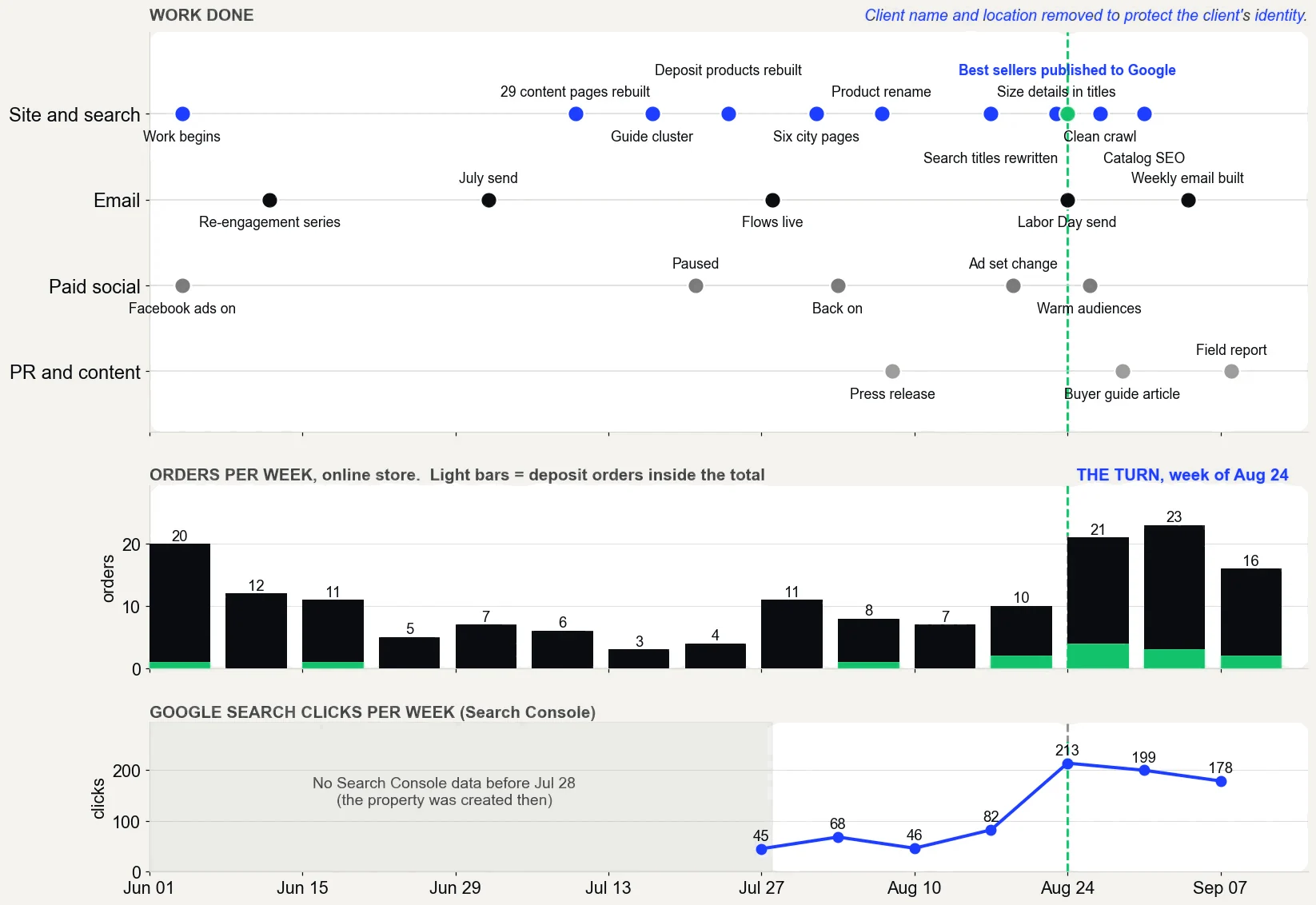
On the store in the case study, Search Console showed 45 clicks in the week of July 27, 2026 and 213 in the week of August 24, with 178 in the latest week. Its product pages were rewritten and its best sellers were published to free listings in the same weeks, so the gain cannot be credited to meta descriptions alone. It is one store, and the weekly record is what shows it.
The work, week by week from June to September 2026, with orders per week and Google search clicks per week. Source: Shopify and Google Search Console.
What did rewriting titles and descriptions do on real stores?
Three things worth knowing before you start your own pass. On one store with 124 products, every product was given a search title and a meta description in one catalog pass, and six wrong product titles were fixed along the way. Source: the store’s work record of September 17, 2026.
That store’s Search Console history only begins on August 30, so there is no before window to measure the pass against yet.
On a second store, one search buyers use to ask about price moved from an average position of 9 to 4 in Search Console after the page’s title and description were rewritten on August 17, 2026, as recorded in its September 12 progress report. Read that carefully.
Google does not rank on the description, so the title and the page get the credit. It is one search on one store, other work landed in the same weeks, and a position is an average that moves by day and by place.
The third lesson is a regression. On September 17, the same store’s developer switched themes, and the new theme added a suffix to the page title of every page. Nobody typed it; the theme did.
It was caught by crawling all 45 sitemap URLs before the switch and again after, and comparing the titles. Run that check after any theme change, because the title you wrote is only what the theme outputs.
Which pages should get a meta description first?
Start with the pages on your website that already earn impressions and money. Google’s snippet guidelines say that if you do not have time for every page, you should at least write descriptions for critical URLs like your home page and popular pages. In practice, for a Shopify store:
The collections that match real searches, the ones buyers land on from search.
Pages with many impressions and a low CTR in Search Console. These pages already show in results; the snippet is losing the click.
That order follows the Get Found stage of The Traffic to Sales Method: fix what already shows before writing anything new. The free Traffic to Sales Check reads Shopify, Google and email side by side to find which of those pages are leaking sales.
What does a store look like when its meta descriptions earn the click?
Every page you care about has its own sentence, written by a person who knows what the page sells. Search Console shows a steady or rising CTR on your best sellers and main collections, and the clicks that come in land on the right pages. When a snippet gets rewritten, you have already checked the tag, so you know it is not a broken setting.
A good Shopify meta description will not rank a page by itself. It makes sure that when the page does show up, the click goes to you.
The fuller picture of how a catalog gets found is in ecommerce SEO, and the work of getting it done for you is Shopify SEO, done for you. Leaving the fields to theme defaults costs little each day and adds up across every search.
The proof, from one store
Straight from the case study, with the source and what it does not prove. See all five results.
Result 3 · Google
Sales from Google: $354 to $5,418 in about 90 days
Before the work$354
→
About 90 days in$5,418
15x
Baseline: the 30 days before the work began
$354 from 2 orders that came in from Google, May 5 to June 3, 2026. The highest-value products in the catalog had never been published through the store's Google channel.
The work: what changed
Rewrote product names, titles, descriptions and search snippets around the terms buyers search, with real weights (August 7 to 30). Built six city landing pages (August 1 and 2). Published the store's highest-value products to the Google channel so they could show in free Shopping listings (August 24). Cleaned up crawl errors and expanded thin product pages to more than 400 words (August 27 to 30).
Result: about three months in
$5,418 from 17 orders that came in from Google, August 17 to September 15, 2026, 15 times the baseline.
Evidence source
Shopify Analytics, Total sales by referrer, Google row, pulled September 18, 2026.
What this does not prove
Shopify does not split Google search from free Shopping listings, so this cannot say which sold more. Four of the 17 orders were deposit orders, worth $2,070. Google Search Console only started collecting data on July 28, 2026, so there are no clicks from before the work to compare.
Test it on your store
In Shopify, open the Google and YouTube channel and check that your best sellers are published to it. In Search Console, open Performance, sort queries by impressions, and note the ones in positions 5 to 15. Then compare the Google row in Total sales by referrer for your most recent 30 days with the 30 days before your last change.
Rather hand it to a Shopify SEO expert?Shopify SEO services. On one store, a month of sales from Google went from $354 to $5,418 in about 90 days. I work remotely with Shopify stores across the US.
Straight answers
Questions about this.
What should I put in a meta description?
Say what the page is, who it is for and one true reason to click, in one or two plain sentences. Google's SEO Starter Guide says a good meta description is short, unique to one page and includes its most relevant points. Leave out keyword lists, which are less likely to be shown as snippets.
How do I edit the meta description for a Shopify page?
Go to Online Store, then Pages, and open the page. In the Search engine listing preview section, use the pencil icon, write your text in the Meta description field and save. Every product, collection and blog post has the same kind of section, and the homepage uses Online Store, then Preferences.
How do I create a meta description?
Write one or two plain sentences that summarize the page for someone deciding whether to click. Call the item what buyers search for, add a detail they compare, and give one honest reason to visit. In Shopify, paste it into the Meta description field for that page in your admin.
Do meta descriptions still matter?
Yes, for clicks rather than rankings. Google said in 2009 that it does not use the description meta tag in ranking, and the snippet may be rewritten anyway. In June 2026, John Mueller of Google called writing them worthwhile for the pages you care about, though not a requirement.
What is the best free meta description generator?
Any free tool can draft one, including Shopify Magic, which is free on every plan and writes product descriptions. The draft still needs a person to check it. Google says generated descriptions are fine if they are human-readable and diverse, and each one should be unique and specific to its page.
How long should a Shopify meta description be?
About 140 to 160 characters. Shopify's help center recommends 160 characters, and its product, collection and article fields accept up to 320. Google sets no fixed limit but truncates the snippet to fit the device width, so put the most important words at the start.
Why is Google not showing my meta description?
Google chooses the snippet for each search and uses your description only when it fits the search better than the page text. First check View Page Source to confirm the tag matches what you entered in Shopify. If it does, the rewrite is a choice, not a broken setting.
What is a Shopify meta title?
It is the Page title field that sits above the meta description in your admin, shown as the clickable headline in search results. Shopify recommends 60 characters or fewer and accepts up to 70. If it is left blank, the theme combines your shop name with the page's own title.
Should my meta description be the same as my product description?
It can be, and if you leave the field blank, Shopify uses the product description anyway. The two do different jobs: the product description sells on the page, while the meta description is a short pitch in search results. Google's SEO Starter Guide asks for one unique to each page, so do not share one across products.
Should the product title and the SEO title be different?
They can be. The product title becomes the page's main heading, so keep it clear for shoppers. The page title is the link in search results, so it can lead with the words buyers search and add one detail. Google can draw its title link from either, so make sure the two agree.