Home / Insights / Shopify SEO tools: which ones are worth paying for?
Get Found · 18 min read
Shopify SEO tools: which ones are worth paying for?
Before you throw money at another SEO tool, know this: most of the SEO work a shop needs runs on tools you already have for free. Here is what a paid app adds, what it repeats, and how to tell whether one is earning its fee.
The short answer
The Shopify SEO tools most stores need are already free: the built-in fields for titles, meta descriptions, alt text and redirects, the automatic sitemap, plus Google Search Console and Merchant Center. The App Store lists 1,126 SEO apps. Pay for one only when it saves hours on a job you can name, and judge it by clicks and sales.
What are Shopify SEO tools, and which ones do you need?
Shopify SEO tools are anything that helps your pages show up on Google without paying for ads. They come in three layers: the settings built into your admin, free tools from Google, and paid tools from the App Store. Most stores need the first two in full, and a paid app for one or two specific jobs.
The trouble is the third layer. As of September 18, 2026, the SEO category of the Shopify App Store lists 1,126 of them, and many of the popular ones show you an SEO score they calculate themselves. That score is the tool grading its own homework, not a sale.
If your app says 90 out of 100 and your Google sales have not moved, you are not imagining the gap. On the store in the case study, sales from Google (organic search and free listings, not ads) were $354 in the 30 days before the work began (May 5 to June 3, 2026). In the 30 days about three months in (August 17 to September 15, 2026), they were $5,418, by Shopify’s own reports.
It is one store, its Facebook ads ran in both periods, and its product pages and free listings changed in the same weeks, so no single tool gets the credit. The numbers that showed the change came from reports it already had: its sales reports and Google Search Console.
Can you do SEO on Shopify without an app?
Yes. It can feel as if everything runs on apps, but the SEO basics are built in.
Shopify’s SEO overview lists what every shop gets automatically: canonical tags to prevent duplicate content, a sitemap.xml and robots.txt file, title tags from the theme, and SSL. You can edit the page title, meta description and URL of every product, collection, page and blog post, plus the alt text on images.
The help center goes further. Every current theme from the Theme Store includes structured data for products by default, according to its article on finding and submitting your sitemap. Its guide to improving performance says the platform already compresses JPG images, often serves them as WebP, and minifies CSS and JavaScript.
Here is what is covered before you install anything:
SEO job
Built in?
Where to find it
Sitemap
Yes, automatic
At /sitemap.xml on your domain.
Canonical tags and robots.txt
Yes, automatic
Generated for you.
Page titles and meta descriptions
Yes
The Search engine listing section of each item, collection, page and blog post.
Homepage title and description
Yes
Online Store, then Preferences.
Image alt text
Yes
Click the image on the item, then the edit option.
URL redirects
Yes, up to 100,000 (20 million on Plus)
Content, then Menus, then View URL Redirects.
Structured data
Yes, in current themes
Theme code.
Image compression and minified code
Yes, automatic
Handled by the platform.
Speed from real visitors
Yes
Analytics, then Reports.
Bulk title and description edits
By spreadsheet
SEO title and SEO description columns in a CSV import.
Finding broken links
No
Google Search Console, or an app.
Keyword research
No
Keyword Planner and Search Console.
The last three rows are where an app can earn a fee, and even bulk edits have a free route. The CSV import has SEO title and SEO description columns, so one spreadsheet can rewrite hundreds of listings. The rest of the table is already paid for in your subscription.
Which Google tools should every store use?
Google’s own tools do most of the measuring and some of the fixing, and the three that matter most cost nothing. Google recommends the first one itself. Its guidance on third-party SEO tools, last updated in June 2026, says those tools have no access to Google’s internal ranking data, and strongly encourages using Search Console.
Google Search Console
Search Console is a free Google service that shows how often your site appears on Google, which searches show it and how often people click. Its Page indexing report lists pages Google has not indexed and why, including Not found (404) errors, which makes it a free broken link report. Submit your sitemap there too; the sitemap guide walks through it.
Google Merchant Center
Free listings put your catalog in Google Search, Shopping and Maps without ad spend, according to Merchant Center Help. You connect it through the Google & YouTube channel, which lets products from eligible stores display across Google for free. It is the one free Google tool built for items rather than pages; Google free listings covers the setup.
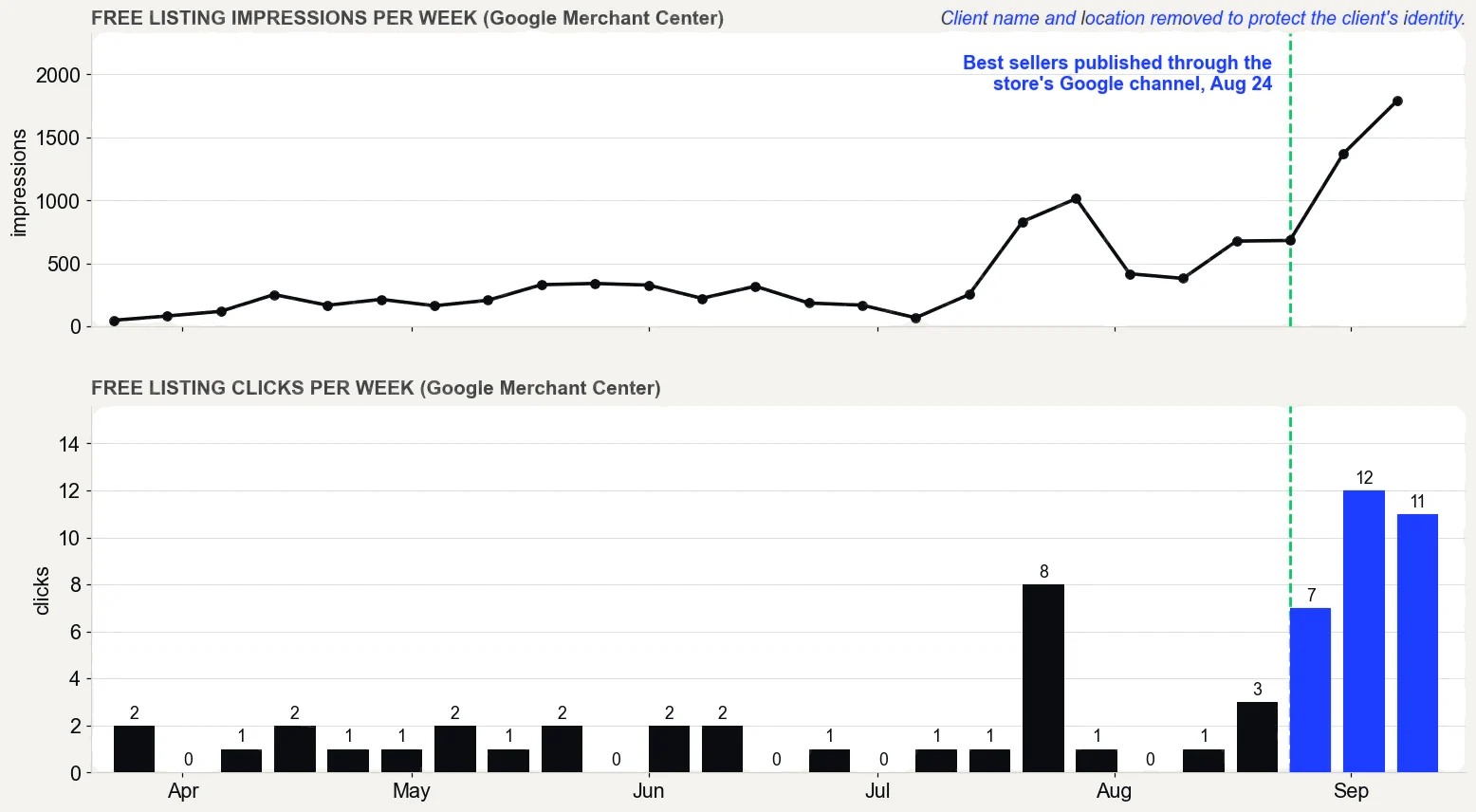
On the store in the case study, free listing clicks went from 5 on 562 impressions (May 5 to June 3, 2026) to 34 on 5,026 (August 17 to September 15, 2026). Its best sellers were published through that channel on August 24, 2026.
Google Merchant Center performance report, free listings only, pulled September 16, 2026. What it does not prove: the product pages were rewritten in the same weeks, so not all of the change comes from publishing, and free listing clicks are still small numbers.
PageSpeed Insights
PageSpeed Insights reports two kinds of data: lab data from a simulated load, and field data from real Chrome users over the previous 28 days. On the lab score, 90 or above counts as good. The field data is the part that reflects your shoppers.
Keyword Planner and the Rich Results Test
Google calls Keyword Planner a free resource, available inside Google Ads, that estimates how many searches a keyword gets each month. The guide to ecommerce keyword research shows how to use it for a catalog. The Rich Results Test shows which rich results a live page’s structured data can generate, so you can see what your theme already outputs before paying for a schema app.
Which SEO tool is best for Shopify?
Google Search Console, because its data comes, in Google’s words, directly from Google Search itself. Every third-party score is an estimate. John Mueller of Google put it plainly when asked about a third-party spam score:
“Google does not use third party SEO tools to determine scores for individual pages.”
He added that this does not make a tool useless, only that Google does not use its score. So treat an app’s SEO score as a to-do list, never as a result. The result is clicks in Search Console and orders in your sales reports.
After that, the best tool is whichever one does a job you can name. “Improve my SEO” is not a job. “Write alt text for 400 images” is, and so is “give every deleted item a redirect to the closest live one.”
No app can make a page rank. It can only do the job you give it, faster than you could by hand.
Which tools did the work on real stores?
Search Console, Shopify’s own reports and live ranking checks, in that order. No paid SEO app produced any of the results on this page.
Search Console found the biggest problem on one store. Its URL Inspection tool showed 14 new pages, published September 4 to 6, 2026, as uncrawled, and the sitemap had never been submitted until September 6. After the September 9 fixes, with the pages added to the main menu, linked from product pages and the sitemaps submitted, Google crawled and indexed all 14 by September 11.
Source: the store’s search progress report of September 12. It is one store, and the links landed in the same fix as the submission.
A second store shows the limit of every tool. Its Search Console property was verified on September 8, 2026, and Google backfilled the data to August 30. The first 18 days, August 30 to September 16, showed 263 clicks and 4,679 impressions across 588 queries with impressions.
Its GA4 tag went in on September 5, with no data before it. Source: the store’s data report of September 18. Any tool that claims to show that store’s history before August 30 is estimating, because Google itself has nothing earlier.
Ranking checks fill one gap: Search Console’s position is an average, so a live check from a chosen city shows what one buyer there sees. Treat both as readings, not results. The results are the orders in Shopify’s reports.
What do Shopify SEO apps actually do?
Nearly every SEO app bundles the same handful of jobs. The App Store’s own category page sums them up as adding alt text to images, fixing broken links and creating meta tags. Here is how each common feature compares with what you already have:
App feature
Already built in?
Worth paying for when
Bulk edits to titles and descriptions
Partly: one at a time in the admin, or by CSV
You have hundreds of listings and no time for a spreadsheet.
Broken link checks and 404 redirects
Partly: Google lists 404s for you; redirects go in one at a time or by CSV
You delete or rename items often.
Image optimization and lazy loading
Compression, yes: JPGs are compressed and often served as WebP
Rarely; check your real-visitor speed report first.
Sitemap
Yes, generated automatically
Almost never.
Structured data (JSON-LD)
Yes, in current themes
You need more, such as shipping or return details, and the Rich Results Test shows it missing.
Minifying code
Yes, CSS and JavaScript are minified automatically
Almost never.
AI-written copy
Shopify Magic drafts product descriptions free
Someone checks every line before it goes live.
SEO score and audits
Google’s own reports are free
The audit finds real issues you then act on.
Keyword research
Keyword Planner is free
You need competitor data Google does not give.
Those AI features are free on every plan, according to the help center’s guide to Magic. They draft; they do not check whether the draft is true.
What is the best SEO app for Shopify in 2026?
There is no single best SEO app for Shopify, only the best fit for the job you need done. Star ratings will not settle it: on the first page of the SEO category, every app is rated 4.7 or higher.
Plans and prices below are as of September 18, 2026, from each app’s own App Store listing. Most paid plans come with a free trial of 7 or 14 days.
Expanded structured data, Merchant Center compatible.
Two things stand out. Seven of the ten have a free or pay-as-you-go option available, so you can test the job before paying. And several higher tiers bundle speed features, AI credits and priority support you may never use, so buy the cheapest tier that does your one job.
Are free SEO apps good enough?
For a small catalog, often yes. Free plans mostly cap volume: pages checked, images compressed or AI credits. Smart SEO’s free plan checks 100 pages for broken links and optimizes 50 images, and Booster’s includes an SEO score and broken link reports.
StoreSEO’s free plan covers 25 items, and its 100-item plan is $14.99 a month, so the price will increase as the catalog grows. Every free tool still needs someone to act on what it finds.
Try a free plan on one job, check the result in Search Console, and only then decide whether a paid plan is worth it.
How much does Shopify SEO cost?
The core tools cost nothing. The built-in SEO settings come with every plan, and Google’s Search Console and Keyword Planner are free. The apps in the table above run from free plans to $99 a month, and StoreSEO’s top plan is $249.99 a month for up to 10,000 items.
A single-job app costs less. Redirect Hero starts at $2.90 a month for 404 tracking and manual redirects.
The bigger cost is time. Every tool produces a list, and somebody has to act on each item, check it again a few weeks later and undo what did not help. That work is what a done-for-you Shopify SEO service replaces: someone logs into your own Shopify and Google accounts and does it.
Will a paid SEO tool fix traffic that will not grow?
Not by itself. A paid SEO suite adds estimates: keyword volumes, difficulty scores, competitor rankings and backlink counts. It does not change anything in your store.
When traffic is flat after the basics, the cause is usually in Google’s index or in the pages themselves, and free reports show both.
If you have done the basics, waited months and the numbers have not moved, it is tempting to buy the biggest tool on the market and hope. Before you pay, run three checks in Search Console:
Are the pages that sell indexed? The Page indexing report lists the reasons URLs could not be indexed. A URL left out of the index cannot show up, whatever a tool says about its keywords.
Which searches show you just below the top ten? In the Performance report, select Average position and open the Queries tab. Queries with an average position between 11 and 20 are the nearest wins.
Which pages show up but rarely get the click? Sort the Pages tab by click-through rate. Google’s guide to common tasks in that report suggests rewriting the title and description where CTR is low, or aligning the content with the queries that show it.
A suite earns its fee when you will use it every week for work Google’s own tools do not do, such as tracking competitors across hundreds of queries. Treat its numbers as estimates: Google’s guidance on third-party tools warns that some users misread their data as coming from Google.
Can an SEO app slow down your site?
Yes. Shopify names the apps you have installed as one of the three biggest factors in web performance, alongside your theme and extra third-party code. Its performance guide advises checking that each app creates enough value to offset any speed loss.
It also warns that many third-party scanner suggestions are already handled by the platform or do not apply.
Speed matters for Google, not only for shoppers. Google’s guide to Core Web Vitals says good real-world loading, interactivity and visual stability align with what its core ranking systems seek to reward.
How do you check an app’s effect on speed?
Use data from real visitors, not a one-off lab score. Shopify’s web performance reports chart the three Core Web Vitals over time. They mark events such as app installs, theme updates and new code, so you can see whether speed changed the week an app went in.
Google’s own advice points the same way:
“field data is what you should use to prioritize your efforts.”
That is the test for any speed or image optimization app, including every image optimizer in the table above. If the real-visitor numbers did not improve after install, the lab score it shows you is not worth a monthly fee.
Leftover code. Some apps add code to your theme that is not removed when you uninstall, according to the help center’s guide to uninstalling an app. Check the listing for removal steps before you install.
Edits to a live theme. The help center recommends a backup copy of a theme before you customize it. Do the same before any app writes to your theme.
A second set of structured data. Current themes already include product markup, so a schema app should extend it, not repeat it. The Rich Results Test shows what a product page outputs.
Do AI SEO apps help with Google and AI search?
They can save typing, but they cannot make content count for more. Google put its position plainly in 2023:
“Using AI doesn't give content any special gains. It's just content.”
Read that as a rule for any app that writes copy in bulk: the output is judged like anything else you publish. Google’s spam policies list using generative AI tools to generate many pages without adding value for users as an example of scaled content abuse. A bulk pass that gives 300 listings the same template sentence tells a shopper nothing.
Alt text is the clearest case. Google’s image guidelines say it uses alt text, along with computer vision and the page itself, to understand an image, and warn against stuffing it with keywords. An AI pass is a first draft, not a finished job.
AI search is the newer pitch, and several of the listed tools generate an llms.txt file. Google’s June 2026 guidance lists tools promising improvements for AI experiences, sold as AEO or GEO, among those to think about critically. Before paying for that feature, read what llms.txt does and does not do.
How do you check whether an SEO tool is working?
Check it where the tool cannot grade itself: in Search Console and in your own sales reports. Here is the routine for testing any app before you commit to a paid plan:
Write down the baseline. Note clicks and impressions in Search Console’s Performance report for the pages the app will change, and sales from Google in Shopify’s sales reports.
Back up the theme. Duplicate it before the app touches anything.
Note the install date. The web performance reports mark app installs on the chart, so a speed change is easy to line up.
Give it a few weeks. Google’s SEO Starter Guide says some changes take effect in hours and others take several months, and suggests waiting a few weeks before judging.
Compare like with like. Use the same pages and the same number of days, before and after. If the clicks and Google sales did not move, the app is not earning its fee.
Remove what does not pay. Uninstall, then follow the listing’s steps for any code left in the theme.
On the store in the case study, Search Console showed 45 clicks in the week of July 27, 2026. That rose to 213 in the week of August 24, and the latest week showed 178. That weekly record, not an app score, is what showed whether the work helped.
Several changes landed in the same weeks, so the clicks cannot be credited to any one tool.
In what order should you use Shopify SEO tools?
Start with what Google can see, then fix what shoppers see, then automate the repetitive parts. This is the Get Found stage of The Traffic to Sales Method:
Read the index. In Search Console, check which pages Google has indexed and the reasons it gives for the rest.
Rewrite the catalog in the admin’s own fields. Product and collection titles and body copy that match how buyers search. The guide to writing a Shopify meta description covers the snippet under each result.
Publish best sellers to free listings through the Google & YouTube channel.
Bring in an app for one named job, such as 404 redirects for deleted items, or bulk edits across hundreds of listings. The guide to setting up redirects explains when you need them.
Prove it. Before and after numbers from Google’s reports and your sales reports: the Show Proof stage.
The free Traffic to Sales Check starts with step one on your own shop. It reads Shopify, Google and email side by side to find where the sales are slipping.
What does a store look like when its Shopify SEO tools are working?
You open Search Console and see more clicks on the pages that sell. Your sales reports show more orders from Google, and a smaller share of sales depends on what you spend on ads. You pay only for an app you can name a reason for, and you can say what it changed.
That is the real test of Shopify SEO tools: fewer hours on work that does not sell, and a clear record of the work that does. An app nobody checks costs its fee every month and proves nothing.
The proof, from one store
Straight from the case study, with the source and what it does not prove. See all five results.
Result 3 · Google
Sales from Google: $354 to $5,418 in about 90 days
Before the work$354
→
About 90 days in$5,418
15x
Baseline: the 30 days before the work began
$354 from 2 orders that came in from Google, May 5 to June 3, 2026. The highest-value products in the catalog had never been published through the store's Google channel.
The work: what changed
Rewrote product names, titles, descriptions and search snippets around the terms buyers search, with real weights (August 7 to 30). Built six city landing pages (August 1 and 2). Published the store's highest-value products to the Google channel so they could show in free Shopping listings (August 24). Cleaned up crawl errors and expanded thin product pages to more than 400 words (August 27 to 30).
Result: about three months in
$5,418 from 17 orders that came in from Google, August 17 to September 15, 2026, 15 times the baseline.
Evidence source
Shopify Analytics, Total sales by referrer, Google row, pulled September 18, 2026.
What this does not prove
Shopify does not split Google search from free Shopping listings, so this cannot say which sold more. Four of the 17 orders were deposit orders, worth $2,070. Google Search Console only started collecting data on July 28, 2026, so there are no clicks from before the work to compare.
Test it on your store
In Shopify, open the Google and YouTube channel and check that your best sellers are published to it. In Search Console, open Performance, sort queries by impressions, and note the ones in positions 5 to 15. Then compare the Google row in Total sales by referrer for your most recent 30 days with the 30 days before your last change.
Rather hand it to a Shopify SEO expert?Shopify SEO services. On one store, a month of sales from Google went from $354 to $5,418 in about 90 days. I work remotely with Shopify stores across the US.
Straight answers
Questions about this.
Which SEO tool is best for Shopify?
Google Search Console is the best starting tool, because it reports Google's own data: which searches show your pages, how often they appear and how often people click. It is free. Pay for an app only for one named job, such as redirects for deleted items or bulk edits across hundreds of listings.
Can you do SEO on Shopify?
Yes. The platform generates the sitemap, robots.txt and canonical tags automatically, and current themes include product structured data. You can edit page titles, meta descriptions, URL handles and image alt text for products, collections, pages and blog posts without an app, and create up to 100,000 URL redirects.
What are the top 5 SEO tools?
For an online shop: Google Search Console for indexing and clicks, Google Merchant Center for free listings, PageSpeed Insights with the admin's web performance reports for speed, Keyword Planner for keyword demand, and your own sales reports for results. Each one shows real data rather than a tool's own score.
How much does Shopify SEO cost?
The core tools cost nothing: the built-in settings, Search Console and Keyword Planner. As of September 2026, the SEO apps compared here ranged from free plans to $249.99 a month on their App Store listings. The larger cost is the time it takes to act on what the tools find.
What is the best free SEO app for Shopify?
It depends on the job. Among those compared here, SEOLab is free with no paid tier listed, and Booster, Avada, Tapita, SearchPie and Smart SEO offer free plans with caps on pages, image optimization or AI credits. Test the one job you need on a free plan before paying for anything.
Does Yoast SEO work on Shopify?
Yes. Yoast SEO for Shopify is listed in the App Store at $19 a month or $190 a year, with a 14-day free trial, as of September 2026. Its listing covers title and meta description suggestions, structured data and an llms.txt file. Check what your theme already outputs first.
Do SEO apps slow down a site?
They can. Shopify's help center names installed apps as one of the biggest factors in web performance, next to the theme and extra third-party code. After installing one, check the web performance reports in your admin, which mark app installs on the chart, to see whether speed for real visitors changed.
Do I need an SEO app for Shopify?
Not to start. The platform covers sitemaps, title and description fields, alt text and redirects, and Google covers measurement for free. An app earns its fee when it saves hours on a repetitive job, such as redirects for hundreds of deleted pages or bulk edits across a large catalog.
How do I track my Google rankings for free?
Use Search Console's Performance report. Select the Average position metric, then filter by a query or a URL to see how its position moves over time. It is an average, and results differ by time, place and device, so Google recommends watching trends in impressions and clicks more than position alone.
Is there an all-in-one SEO app for Shopify?
Yes. Several apps bundle the usual jobs in one plan, from broken link checks to structured data and image compression. The platform already covers much of that, from title and description fields to the sitemap. Pay only for the jobs left over, and judge the result in Search Console.