Home / Insights / Ecommerce SEO: how an online store gets found on Google
Get Found · 20 min read
Ecommerce SEO: how an online store gets found on Google
Your store sells, and it shows up when someone types its name, but barely at all when buyers look for what you sell. Here is how search engines find products, what to fix first, and how to check the result in Shopify's own reports instead of a tool's dashboard.
The short answer
Ecommerce SEO is the work that gets an online store's product and collection pages found on Google and in AI answers, without paying for each click. For a Shopify store that already sells, it means pages written around the words buyers type, product data machines can read, a site crawlers can reach, and results checked in Shopify's reports.
Ecommerce SEO is the work of getting an online store’s pages shown, unpaid, when buyers search for what it sells. Google’s SEO Starter Guide describes SEO as helping search engines understand your content and helping people find your site. For a store, that means the pages that sell: product pages, collection pages, the home page, and guides that answer buyer questions.
It reaches further than the ten blue links. According to Merchant Center Help, free product listings can appear at no cost across Search, Maps, Gemini, YouTube, the Shopping tab, Images and Lens. The official best practices for ecommerce sites open with the problem every store owner knows: being discovered is a critical challenge.
Organic results are the unpaid ones, and organic traffic is the visits they send. Nobody can buy those positions: Google’s guide to how Search works says it does not accept payment to crawl a site more often or to rank it higher. Every one of those visits is a visit the store did not pay for.
Is SEO still worth it for an online store in 2026?
Yes, for a store that already sells, because every sale from an unpaid result is a sale you did not buy with an ad.
If paid ads feel like the only thing that brings visitors, that is because they work the day you pay. Paid traffic also stops the day the budget stops. Organic traffic keeps arriving from pages you have already built.
The worry is that AI answers now take the clicks. Google’s head of search addressed that in August 2025:
“total organic click volume from Google Search to websites has been relatively stable year-over-year”
That is a search engine grading its own homework, so read it with care. The same post says traffic is shifting between sites, up for some and down for others. The test that counts is your own: the Google row in Shopify’s sales reports.
On one direct to consumer store on Shopify, sales from Google went from $354 in the 30 days before the work began (May 5 to June 3, 2026) to $5,418 in the 30 days about three months in (August 17 to September 15, 2026). That counts organic results and free listings, not ads, by Shopify’s own reports. It is one store, and its Facebook ads ran in both periods.
Before the work, that store paid about $1,700 a month for Facebook ads: $1,200 in ad spend plus $500 to a prior vendor. Over a longer window, Shopify’s attribution report showed where its sales actually came from:
Google search, not paid24 ordersfrom 1,720 visits: 1.4 percent bought
Google search brought in more than 3.5 times the sales of the paid ads, from under a fifth of the traffic.
Source: Shopify’s sales attribution report for the 90 days before September 3, 2026. Google search brought $8,316 in sales and paid Facebook and Instagram $2,322, as charged. What it does not prove: the report credits each order to the visit it came from, so an ad that first introduced a buyer who later searched Google gets no credit.
A store should not have to pay for every sale. Organic results are one marketing channel where it does not.
Why do so many online stores barely show up on Google?
Usually because crawlers cannot find, or cannot tell apart, the pages that sell. The store looks fine to a shopper already on it. To a crawler, it can look thin, duplicated or half missing.
Copied product descriptions.Shopify’s help center warns against copying the manufacturer’s text, because other websites may already use the same words.
Products crawlers cannot reach. Googlebot generally does not type into a search box, so a product reachable only through the store’s own search may never be crawled.
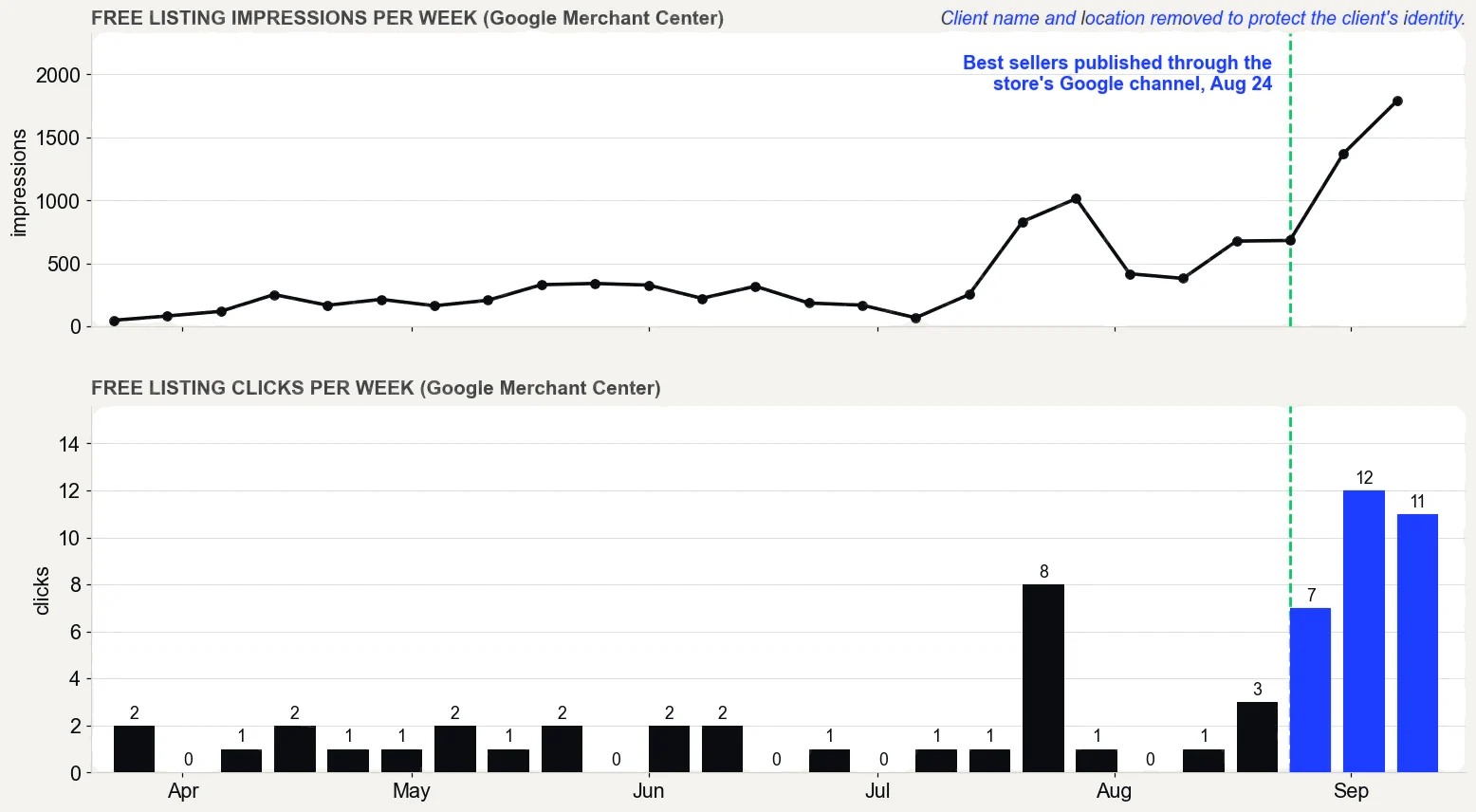
Best sellers missing from free product listings. On the store in the case study, the best sellers were not published through Shopify’s Google and YouTube channel until August 24, 2026. Before that, only thin versions Google had found on its own showed up.
Titles in the brand’s words, not the buyer’s. A product named after an internal collection name matches nothing customers type.
Collection pages with no words. A grid of photos gives a crawler little to work with.
It feels like shouting into an empty room while the ad bill climbs. It is not a verdict on the products or the brand. It is a set of fixable gaps, and they get fixed in order.
How do search engines find and rank an online store's pages?
In three stages: crawling (downloading pages), indexing (analyzing and storing them) and serving them when someone searches, as the guide to how Search works explains. Not every page makes it through each stage, and there is no guarantee that any page will.
Links are how crawlers find and weigh a store’s pages. The ecommerce site structure guide from the same source recommends links from menus to collections, and from collections to every product you want indexed.
As a general rule, it says, the more internal links point to a page, the more important that page looks. It suggests linking a best seller from the home page, so the most relevant products sit one click from the front door.
Submitting it in Search Console shows how many of those pages are indexed. The Shopify sitemap guide walks through it.
What ecommerce SEO strategy works for a store that already sells?
Start where the money already is, then widen. A store that already sells has something a new store lacks: its own numbers. An ecommerce SEO strategy for it runs in this order:
Read the numbers first. Open Shopify’s Total sales by referrer report and find the Google rows. Then open the Performance report in Search Console and list the searches that already bring clicks.
Make sure every product can be found. Check the Page indexing report, and check that the best sellers are published to the Google and YouTube channel.
Rewrite the best sellers first. Titles, descriptions, images and snippets, written around the words customers type.
Build collection pages for the broader searches. One collection per real buying query, with useful words on the page, not only a grid.
Answer buyer questions and earn links. Guides that link to products, and mentions from sites buyers already trust.
Check the result in Shopify every month. Sales, not rankings, are the scoreboard.
This is the Get Found stage of The Traffic to Sales Method. It begins with the Traffic to Sales Check, which lays the store’s own numbers side by side to find the gaps.
It ends with Show Proof: before and after figures from Shopify’s own reports, with the dates and the caveats.
Product pages, a blog or backlinks: which should come first?
Product pages come first for a store that already sells, then collection pages, then guides, and links last. Each step feeds the next, because a guide or a link pays off only through the page it points to.
If every answer you find says to blog more, build links and fix speed all at once, with a few spare hours a week, the missing piece is the order. Here is where each one fits:
Work
What it does for a store
When to start
Where to check it
Product pages
Match buyers who are ready to buy
First, beginning with the best sellers
Clicks and impressions per page in Search Console
Collection pages
Catch broader queries for a whole category
Once the best sellers are rewritten
The queries that show each collection
Guides (a blog)
Answer questions buyers ask before they buy
When customers keep asking the same questions
Clicks on each guide, then sales of the products it links to
Backlinks
Show that other sites value your pages
Earned all along, never bought
The Links report in Search Console, which shows a sample of the sites linking to you
Do you need a blog to rank an online store?
No, not to rank your products. A product page written in the words buyers type can rank without a single post behind it.
A blog earns its place when customers ask the same questions before they buy. Each guide answers one question and links to what you sell. A blog of posts nobody asked for adds pages, not sales.
Should a big catalog start with backlinks?
No. On a catalog of thousands of products, check indexing first. A page that is not indexed cannot rank, however many links point to the store, and the Page indexing report lists the reasons pages could not be indexed.
Backlinks still matter. They matter most once the pages they point to are worth landing on.
How do you choose keywords for product and collection pages?
Match each page to one main query, based on what the searcher wants to do. That goal is called search intent, and it is the first thing to understand about any keyword. Shopify’s SEO overview lists four kinds, and each fits a different page:
Search intent
What the buyer wants
Example query
Page that fits
Transactional
To buy now
buy linen duvet cover
Product page
Commercial investigation
To compare before buying
best linen duvet cover
Collection page or buying guide
Informational
To learn
how to wash linen sheets
A guide that links to products
Navigational
To reach one site
your store’s name
Home page
Google’s starter guide adds a useful warning: people who know a topic well search with different words than beginners do. Start with the words your buyers already use.
Search Console lists the searches that already find you. Shopify’s Searches by search query report shows what shoppers type into your own store’s search bar. Both are more relevant than any list from a tool, because they record real searches by people already finding your store.
How should you optimize product and collection pages?
Page by page, starting with the products that already sell. Optimizing a page means making each element do one job for search engines and one for the buyer.
Titles and meta descriptions
The title tag is the headline in search results, and the meta description is the short text under it. Shopify’s guide to adding keywords allows up to 70 characters in the title field and suggests keeping titles to 60, so they are not shortened.
Put the main keyword near the front. Search engines can still rewrite either one based on the page, so the page itself has to say the same thing. More in how to write a Shopify meta description.
Product descriptions
Write your own, for the buyer first. Shopify’s help center notes that search engines compare a page’s content with its headings, to check that the page is about what it claims. A unique write-up that answers buyer questions passes that test.
Cover what people ask before they buy: size, material, use, care and delivery. Some product description examples show the difference.
Images and alt text
Alt text is a short written label for an image, read by screen readers and by crawlers. Google’s image guidelines ask for useful, information-rich alt text and short, descriptive file names, and they warn against stuffing alt text with keywords.
Structured data is code that labels the facts on a page, such as price and stock, so machines can read and understand them. Shopify’s SEO overview says its themes include product schema markup automatically.
Collections catch the broader searches, such as a product type plus a quality buyers care about. Shopify recommends a structure that runs from general to specific: home page, then collections, then products.
Give each collection a short, useful introduction and link it from the menu. If a collection is empty, the URL structure guide for ecommerce sites suggests a noindex tag, so it stays out of results.
Discontinued products
When a product’s address changes or it is gone for good, use a 301 redirect: a permanent forward from the old URL to a relevant new one.
Less than most guides suggest, because Shopify handles the technical basics. Google’s URL guide for ecommerce says stores on an ecommerce platform can most likely skip its URL advice, because the platform has already considered it. The technical work is checking, not building.
Item
What Shopify handles
What to check
Sitemap
Generated and updated automatically
Submitted in Search Console, and how many listed pages are indexed
robots.txt
A default file that blocks cart, checkout, search and filtered collection pages
Leave it alone unless there is a specific reason to change it
Canonical tags
Added automatically to prevent duplicate content
Whether the theme links to collection versions of product URLs
HTTPS
SSL certificates on by default
Nothing to do
Title tags
Generated by the theme, including the store name
Your own titles on the best sellers
Product markup
Included in Shopify themes
Errors in Search Console
Redirects
A tool to create them
Old URLs of deleted or renamed products
Speed
Web performance reports in Shopify
Core Web Vitals on product pages
Two items deserve a closer look. First, Shopify’s developer documentation warns that a product shown inside a collection can load at a second URL with the same content.
Themes that link that way need their canonical tags checked. Second, Shopify’s robots.txt guide calls editing that file an unsupported customization and warns that a mistake can cost a store all its traffic.
Speed matters too, for rankings and for customers. Google’s Core Web Vitals page sets three targets: main content loaded within 2.5 seconds, a response to taps in under 200 milliseconds, and a layout shift score under 0.1.
Shopify’s web performance reports show where a store stands on the same measures. Shopify speed optimization covers the technical fixes.
Do free product listings count as SEO?
Yes. Free listings are unpaid product results, and they draw on product data as well as crawling. Google’s guide to sharing product data recommends both structured data on product pages and a Merchant Center feed.
It notes that web crawling is not guaranteed to find every product. It also says Merchant Center is mandatory for some surfaces, such as listings in the Shopping tab.
A Shopify store sends that feed through the Google and YouTube sales channel, which, according to Shopify’s guide to syncing products, syncs products available to the online store with Merchant Center. The first gap to check is simple: whether the best sellers are published to it.
On the store in the case study, they were published on August 24, 2026. From July 26 to August 24, the thin versions Google had found on its own drew 610 impressions and 3 clicks in free listings. From August 25 to September 15, after publishing, the listings drew 1,567 impressions and 10 clicks, according to Merchant Center.
Google Merchant Center performance report, free listings only, pulled September 16, 2026. What it does not prove: the product pages were rewritten in the same weeks, so not all of the change comes from publishing, and free listing clicks are still small numbers.
How do content and links help an online store rank?
Content gives search engines more to match a query to, and links show which pages other people value. Both work only when they are real.
Guides that answer buyer questions
The ecommerce site structure guide ends on a plain line: “The ultimate ecommerce SEO best practice is to create useful and interesting content that is valuable to users.”
For a store, that means guides that answer what buyers ask before they buy: how to choose, how to use, how to care for. Each guide links to the products it mentions. This is content marketing with a job to do: it brings relevant visitors and hands them to a product page.
Google’s guidance on helpful content calls this people-first content, made for the reader rather than for rankings. It is also where a small store can give a better answer than a big marketplace: first-hand, unique knowledge of its own products.
Links you earn, not buy
A backlink is a link to your store from another website. Google uses links as a signal of relevance and as a way to find new pages.
Its spam policies also say what not to do. The list includes buying links, trading goods or services for links, and sending someone a product in exchange for a post with a link.
The links worth having come from the business itself. Think of makers who list where their products are sold, local press, awards, and brand mentions in guides good enough that other sites cite them. They build slowly, and they last.
How does AI search change SEO for a store?
Less than the headlines suggest. The AI features guide in Search Central says there are no additional requirements to appear in AI Overviews or AI Mode.
What changes is how searches arrive. The guide describes query fan-out: the AI runs several related searches at once to build one answer.
A product page that answers the follow-up questions, not only the headline query, has more ways in. The same guide says Merchant Center feeds help products appear in AI responses, and that an llms.txt file neither helps nor hurts a site in Google’s results.
Shopify has moved too. As of September 2026, Shopify’s agentic storefronts are active by default for eligible stores.
That can put products in front of shoppers in ChatGPT, Google AI Mode and Gemini, Microsoft Copilot and Meta. Shopify’s product discovery guide adds that products can also be found in AI channels the same way they are listed in regular search results.
How do you check SEO results in Shopify's own reports?
Use the reports that count sales, not the ones that count positions. Every tool grades its own homework: a rank tracker reports rankings, and an app reports what the app did.
Shopify’s Total sales by referrer. Sales by the site each customer came from, with search engines grouped under the Search source. It shows the last interaction, so an order that began with an ad and ended with an organic visit counts under Search.
The Performance report in Search Console. Clicks, impressions and the searches behind them, straight from the source.
The branded queries filter. It splits searches for your store’s name from everything else, on sites with enough search volume.
“non-branded queries offer organic growth, as they show how new users find your content”
That split matters for a store. Branded clicks come from people who already know the brand. Non-branded clicks come from new visitors who found a product they did not know you sold.
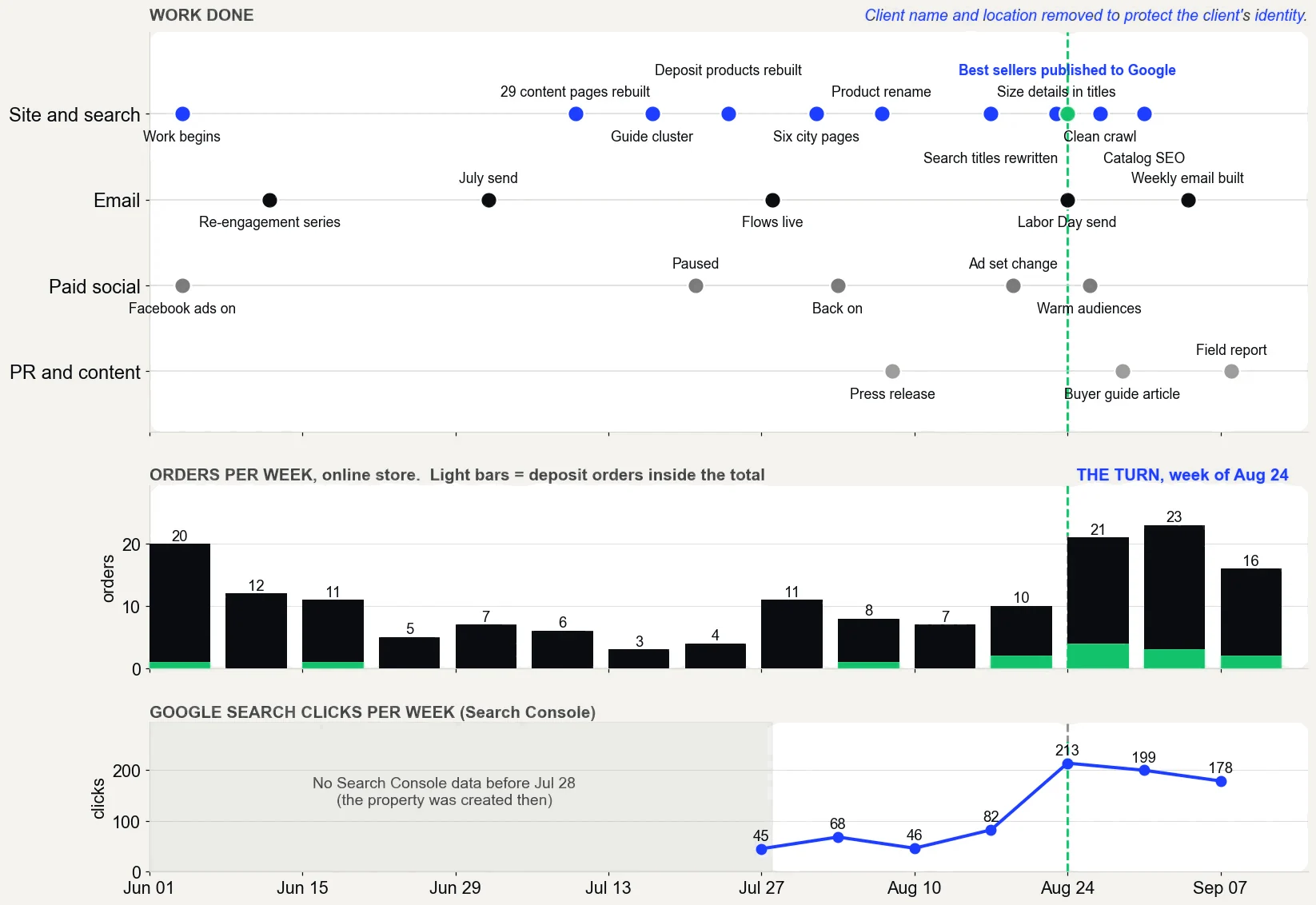
On the store in the case study, Search Console clicks went from 45 a week (the week of July 27, 2026) to 213 (the week of August 24). In the latest week there were 178.
That does not prove which change did it: the product pages were rewritten and the best sellers published in the same weeks. Use the dates to improve the next test, not to claim credit.
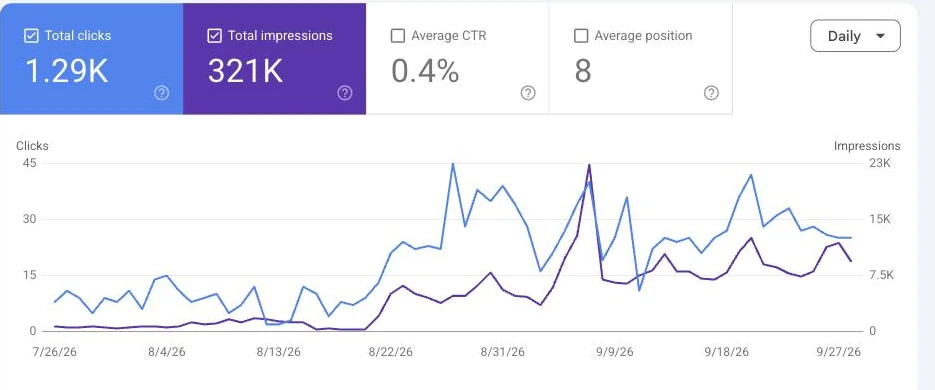
The work, week by week from June to September 2026, with orders per week and Google search clicks per week. Source: Shopify and Google Search Console.Google Search Console for the same store: clicks and impressions per day, July 26 to September 27, 2026. Store name cropped out.
The ones about order and proof. Most guides list tactics. These are the checks that decide whether the tactics pay:
Fix the best sellers first. Shopify’s Total sales by product report shows which products earn the most, so the first hours go where the money already is.
Check publishing before copy. A product that is not published to the Google and YouTube channel cannot appear in free listings, however good its page.
Judge by sales, not by rankings or traffic alone.Search Console’s help notes that results depend on the time, place, device and recent history of the person searching.
Date every change. Weekly clicks in Search Console only tell a story if you know what changed in which week.
Say what the numbers do not prove. A rise after several changes cannot be credited to one of them.
Either can work, as long as the work happens in your own accounts and the results show in your own reports. The same advice suggests giving anyone who audits your site read access to Search Console at first, not write access.
A done-for-you Shopify SEO service should work inside your own Shopify, Search Console and email accounts. It should show before and after figures from Shopify’s reports, as in the case study, and explain the technical changes in plain words.
What does it look like when ecommerce SEO works?
Your best sellers show up, unpaid, when buyers search for them: in the regular results, in free listings and in AI answers. The Google row in Shopify’s Total sales by referrer report grows, and more of the searches behind it do not include your store’s name.
Ad spend becomes a choice instead of a lifeline. That is the point of ecommerce SEO: a store that gets found by people who have never heard of it.
Left alone, the gaps stay open and every sale keeps its ad cost. To see where your store stands, the free Traffic to Sales Check reads Shopify, Google and email side by side and shows which gaps to close first.
The proof, from one store
Straight from the case study, with the source and what it does not prove. See all five results.
Result 3 · Google
Sales from Google: $354 to $5,418 in about 90 days
Before the work$354
→
About 90 days in$5,418
15x
Baseline: the 30 days before the work began
$354 from 2 orders that came in from Google, May 5 to June 3, 2026. The highest-value products in the catalog had never been published through the store's Google channel.
The work: what changed
Rewrote product names, titles, descriptions and search snippets around the terms buyers search, with real weights (August 7 to 30). Built six city landing pages (August 1 and 2). Published the store's highest-value products to the Google channel so they could show in free Shopping listings (August 24). Cleaned up crawl errors and expanded thin product pages to more than 400 words (August 27 to 30).
Result: about three months in
$5,418 from 17 orders that came in from Google, August 17 to September 15, 2026, 15 times the baseline.
Evidence source
Shopify Analytics, Total sales by referrer, Google row, pulled September 18, 2026.
What this does not prove
Shopify does not split Google search from free Shopping listings, so this cannot say which sold more. Four of the 17 orders were deposit orders, worth $2,070. Google Search Console only started collecting data on July 28, 2026, so there are no clicks from before the work to compare.
Test it on your store
In Shopify, open the Google and YouTube channel and check that your best sellers are published to it. In Search Console, open Performance, sort queries by impressions, and note the ones in positions 5 to 15. Then compare the Google row in Total sales by referrer for your most recent 30 days with the 30 days before your last change.
Want an ecommerce SEO agency to do this for your Shopify store?Shopify SEO, done for you. On one store, a month of sales from Google went from $354 to $5,418 in about 90 days. I work remotely with Shopify stores across the US.
Straight answers
Questions about this.
What is SEO for ecommerce?
SEO for ecommerce is the work that gets an online store's product and collection pages shown in unpaid search results, free product listings and AI answers. It covers keyword choice, product pages, product data, site structure and technical checks, and it is measured by sales in the store's own reports.
Is SEO still worth it in 2026?
For a store that already sells, yes. Organic clicks cost nothing per click, and Google's guidance says SEO best practices still apply to AI Overviews and AI Mode. It also reports that overall organic clicks have been relatively stable, while traffic shifts between sites. Judge it by the Google row in Shopify's sales reports.
How long does ecommerce SEO take to work?
Weeks for the first signs and months for steady results, with no guarantee. According to Search Central, crawling a changed page again can take anywhere from several days to several months. Start with pages that already get impressions in Search Console, because they are closest to earning more clicks.
What is the first step in SEO for online store owners?
Check that search engines can see what you sell. In Search Console, open the Page indexing report and look for product pages that are not indexed. In Shopify, confirm that your best sellers are published to the Google and YouTube channel. A product that cannot be found cannot rank, however well it is written.
What is the 80/20 rule in ecommerce?
It is the rule of thumb that a small share of causes produces most of the results, such as a few products bringing in most of the sales. For SEO, it means starting with those products. Shopify's Total sales by product report shows which ones they are in your store, so check rather than assume.
Should you hire an ecommerce SEO agency?
Only one that works in your own accounts and reports results from them. Search Central advises giving an auditor read access to Search Console at first, and walking away from anyone who guarantees first place. Ask for before and after figures from Shopify's own reports, not screenshots from a ranking tool.
Does Shopify have built-in SEO?
Yes, the basics. According to Shopify's help center, stores get automatic canonical tags, a generated sitemap.xml and robots.txt, theme-generated title tags, SSL by default and product schema markup in themes. What Shopify does not do is choose your keywords or write your product pages and collection pages for you.
How do you learn SEO as a beginner?
Start with the free SEO Starter Guide from Search Central, then open Search Console for your own store and read the Performance report. For a store, the fastest lessons come from its own numbers: which searches already bring clicks and which pages sell. Doing the work well still takes hours every week.
Can an online store grow with SEO alone, without ads?
It can, but more slowly than with ads, and nobody can promise when, because Google does not guarantee that any page will be crawled, indexed or shown. For a store that already sells, the realistic aim is to depend less on ads, with more of each month's sales coming from results you do not pay for per click.
Should product variants have their own pages?
Usually not. On Shopify, sizes and colors are variants that share one page, and a ?variant= link opens a specific one. Google's variant documentation describes both designs, one page for all variants or a page for each, so give a variant its own page only when buyers look for it on its own.