Home / Insights / How to rank in AI Overviews with a Shopify store
AI search · 17 min read
How to rank in AI Overviews with a Shopify store
Your store sells, and you may even rank on page one, but when a buyer asks Google what to buy, the AI Overview links to someone else. Here is what decides that, and what to check first.
The short answer
Here is how to rank in AI Overviews: make sure each page is indexed and can show in Google with a snippet, keep your site included in Search Console's generative AI setting, and publish specific, useful pages. Google says no special file or markup is needed. Nobody can guarantee a citation.
How to rank in AI Overviews: what does Google say?
You rank in AI Overviews the same way you rank in regular results, plus one new setting to check. Google’s guide for site owners says its AI features use its core ranking systems to pull relevant pages from the Search index, then link to the pages that support the answer (the guide to optimizing for generative AI features).
The audience is large right now. As of September 2026, Google says AI Overviews have over 2.5 billion monthly active users, and AI Mode has passed one billion (its update for website owners).
If a buyer asks which product fits their need and the answer names three other stores, you are not imagining the lost sale. A store should not have to pay for every sale, and an answer built on search results can send buyers to you for free.
The strategy is simple to say and slower to do: make your pages the ones the answer uses.
What are Google AI Overviews, and when do they show up?
An AI Overview is the short AI-written answer shown at the top of some results, with a link to each page behind it. AI Mode is the conversational version, which Google says helps most with exploration, reasoning and complex comparisons.
AI Overviews only show when Google’s systems decide they add something to classic results, so they often do not trigger at all (AI features and your website).
AI Overviews
AI Mode
Where it shows
Above the regular results, on some searches
A separate conversational mode
What it is for, per Google
Getting the gist of a topic quickly
Exploration, reasoning and complex comparisons
How it finds pages
Query fan-out: several related searches at once
Query fan-out, plus follow-ups
How position is counted
One position for every link in the overview
The same rules as a regular results page
Query fan-out means the model runs several related searches across subtopics to answer the user’s query. One query about a product can pull in pages about sizing, care or delivery.
“the average AI Mode search is triple the length of a traditional Search query.”
Longer queries carry more detail: a budget, a size, a use. A product page that states those details plainly has more to match.
What does a page need before it can appear in an AI Overview?
Three things, and each is a yes or no you can check. Miss one and nothing else in this guide matters.
Is the page indexed and eligible for a snippet?
Google’s technical requirements are short: Googlebot is not blocked, the page returns an HTTP 200 (success) status code, and it has indexable content. To be a supporting link in AI Overviews or AI Mode, the page must also be eligible to show with a snippet, the short text under a result.
“Meeting the technical requirements covers you for search generally, including AI formats.”
The basic checks come before any AI tactic. A page that is not indexed cannot be cited, however well it is written.
Is your site included in the generative AI control?
As of August 31, 2026, every website has a Search generative AI control in Search Console, under Settings. Including your site is the default. Excluding it keeps your links and content out of AI Overviews, AI Mode and generative AI features in Discover (the control’s help page).
“Sites that opt out will not receive traffic or impressions from our generative AI features.”
If a developer, an app or a past agency changed that setting, no content work will ever show up there. It takes a minute to check.
Are snippet controls holding the page back?
Four controls limit what a page can show: nosnippet, data-nosnippet, max-snippet and noindex. The robots meta tag documentation explains each one, and John Mueller’s post notes that more restrictive settings limit how content is featured in AI experiences.
If your theme or an SEO app adds one of these controls, it applies to AI features too.
Is AI Overviews SEO different from regular SEO?
No. Google’s guide says that optimizing for generative AI search is optimizing for the search experience, and thus still SEO. Its AI features are rooted in the same ranking and quality systems as the regular results.
That is good news for a store owner. The work that puts a product page in the top results is the same work that makes it a source for an AI answer. The ecommerce SEO guide covers that foundation, and the ChatGPT SEO guide covers the other AI engines.
So build pages around what buyers ask, not only the product name. Ecommerce keyword research shows how to find those queries, topic by topic.
Why does a page that ranks on page one not appear in the AI Overview?
Because the overview is not a copy of the top results. Google’s documentation says AI Overviews and AI Mode may use query fan-out, issuing several related searches across subtopics, and that its models find more supporting pages while the response is written. The result can be a wider and more diverse set of links than a classic results page (AI features and your website).
So the page that ranks first for your product’s name may not answer one of those side questions best. A buyer asking which size to order can see a competitor’s sizing guide cited above your product page. The documentation adds that AI Mode and AI Overviews may use different models, so the links they show vary too.
If you rank on page one and a competitor gets the mention, you are not imagining the gap. Search the question yourself, open each cited page, and write down what it answers that yours does not: a size chart, a comparison, a delivery date. That list is your next round of edits.
How do you get cited in AI Overviews?
By publishing the page that answers the query better than anything else Google can find. The guide names the traits: a unique point of view, first-hand experience, and non-commodity content, meaning detail that goes beyond common knowledge.
For a store, that content already lives in your business. It is what only you know:
What the product is made of, in plain words.
Sizes, weights or fit, written on the page, not only inside a variant picker.
Who it suits, and who it does not.
How it ships, how long delivery takes and what the return policy says.
What customers ask before they buy, answered on the page they ask about.
Google says trust is the most important part of what it calls E-E-A-T: experience, expertise, authoritativeness and trustworthiness (creating helpful, reliable, people-first content). A store shows trust with real contact details, clear policies and claims a buyer can check.
The key is to write for the buyer, not the bot. The guide’s own advice is to focus on what your users want, and avoid overdoing it. The product description examples show what specific looks like on a real page.
Which Shopify pages can show up in Google AI Overviews?
Any indexed page can be a source, but each page type answers a different kind of query.
Page
Queries it can answer
What it needs
Product page
Which size or material suits a given use
Specifics in text, with price and stock that match your product data
Collection page
Which type fits the need
A short guide above the grid that compares the options
Guide or blog post
How to choose, use or care for it
First-hand detail, plus a link to each product it mentions
Product listing from Merchant Center
Where to buy it, and what it costs
Complete, accurate product data sent from Shopify
Most stores have the first three. The fourth is easy to miss, because it lives in Merchant Center, not on your site. The product page optimization guide covers the first row in depth.
How do your products get into AI answers on Google?
Through the same product data used for Shopping. The guide says AI responses can include product listings and product information, and that Merchant Center feeds help products show in both AI responses and other results.
The scale is large. Google says people shop across its services more than a billion times a day, drawing on a Shopping Graph of over 60 billion product listings (the Universal Cart announcement). Shopify’s help center says products reach AI Mode and Gemini through the Google & YouTube sales channel or Merchant Center (Shopify agentic storefronts).
As of September 2026, Merchant Center also accepts optional conversational attributes, such as question and answer pairs, variant options and related products. Google says they help AI systems understand your products’ specific nuances on surfaces like AI Mode. It recommends adding them through a supplemental data source, and says they do not affect the approval of existing products (how to use conversational attributes).
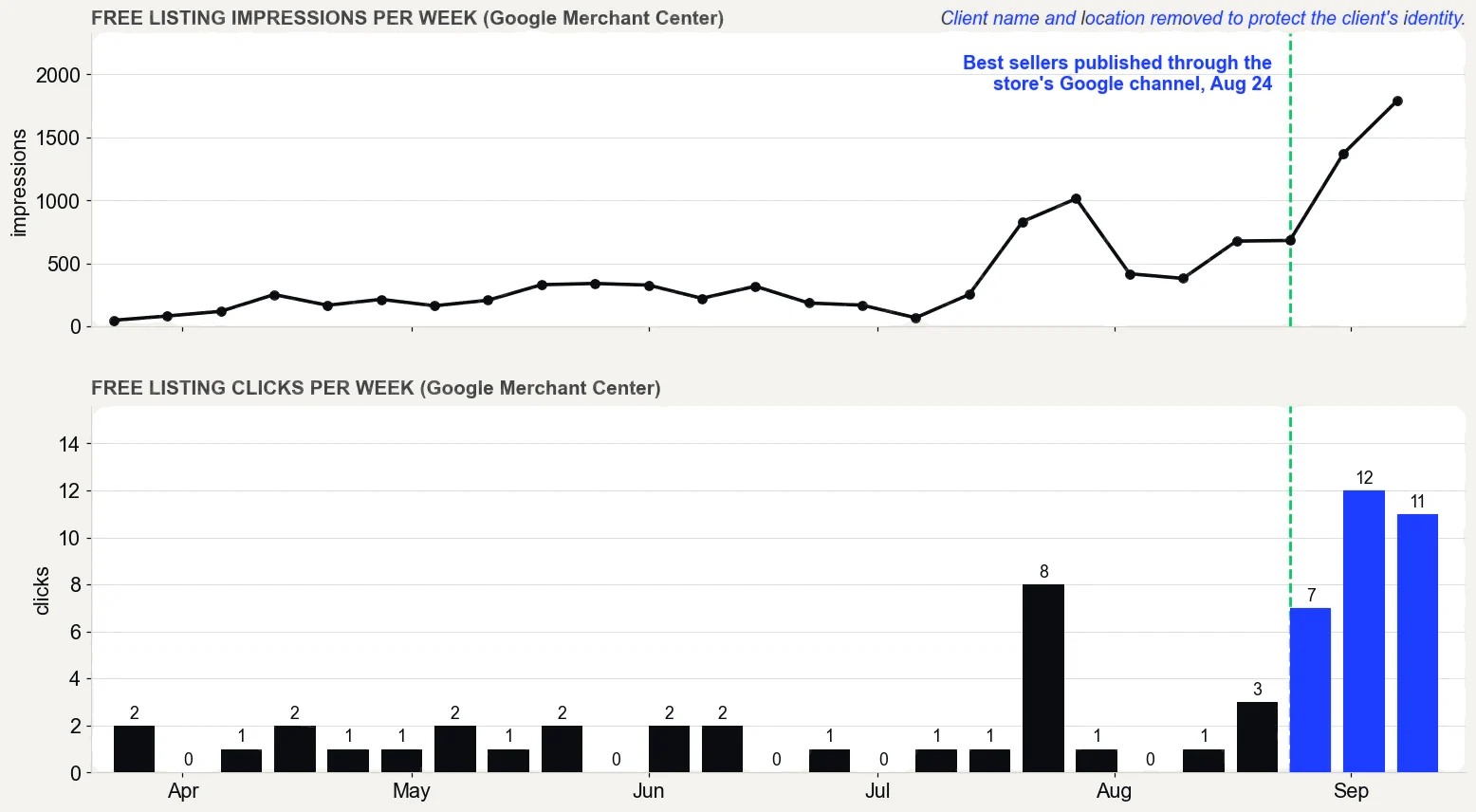
On one direct to consumer store on Shopify, the best sellers were not published through Shopify’s Google and YouTube channel until August 24, 2026. Before that, Google showed thin versions it found on its own: 610 impressions and 3 clicks from July 26 to August 24.
After publishing, those products earned 1,567 impressions and 10 clicks from August 25 to September 15, according to Merchant Center.
Google Merchant Center performance report, free listings only, pulled September 16, 2026. What it does not prove: the product pages were rewritten in the same weeks, so not all of the change comes from publishing, and free listing clicks are still small numbers.
A lot of what is being sold as AI Overviews SEO. The guide has a section on what you do not need to do for AI features, and it reads like a list of paid packages.
What you may be sold
What the guide says
An llms.txt file or other AI text file
Search ignores them. They neither help nor harm rankings
Breaking pages into small chunks
No requirement. The systems can find the relevant part of a longer page
Rewriting pages in a special AI style
Not needed. AI systems understand synonyms and general meaning
Buying or faking mentions on other sites
Not as helpful as it seems. Other systems block spam
Special schema markup for AI
Not required. There is no special schema.org markup to add
A page for every variation of a query
Doing it to manipulate AI responses breaks the scaled content abuse spam policy
The guide also says no third-party tool has access to Google’s internal ranking or AI systems. A tool that promises AI Overview placement is guessing. The llms.txt guide explains what that file does do, and the Shopify SEO tools guide covers which tools earn their fee.
Do you need structured data to appear in AI Overviews?
No. Google says structured data is not required for generative AI search, and there is no special schema.org markup to add. Structured data is code that describes a page to machines, such as a product’s price and availability.
It still helps pages qualify for rich results, so keep it. Keep it accurate, too: the AI features page asks site owners to make sure structured data matches the visible text. If an app adds price or review markup, check that the page shows the same price and the same reviews.
On Shopify, most of this is already in place. Shopify’s help center says all current Shopify-supported themes, and themes from the Theme Store, include structured data by default (Shopify’s sitemap help page).
How do you track AI Overview visibility?
With Google’s own report, not a third-party score. As of August 31, 2026, the generative AI performance report in Search Console is available to all websites. It shows how often links to your site appeared in AI Overviews and AI Mode, by page, country, device and date (the report’s help page).
It counts impressions. Clicks from AI features sit inside the regular Performance report, under the Web search type.
An AI Overview takes a single position in the results, and every link in it gets that same position (how impressions and position are counted). There is no rank inside the overview to track.
Neither report shows sales. Shopify’s reports show whether those visits bought, and the Shopify analytics guide shows which ones to open.
AI Overviews change from one query to the next, so one screenshot proves one moment.
How do you see your products in AI answers?
Merchant Center has its own report for that. As of September 2026, its AI performance report sits under Analytics, then Products. It shows how your brand appears for conversational shopping queries in AI Mode and AI Overviews, as a share of voice against the competitors you define (About AI performance insights).
It covers English-language queries for accounts in the U.S., Canada, Australia, New Zealand and India, and only organic traffic such as free listings. Paid ads are not included.
Do AI Overviews take clicks away from your store?
Google says no, overall. Its head of Search wrote in August 2025 that total organic click volume to websites was relatively stable year over year. The AI features page adds that clicks from results pages with AI Overviews are higher quality.
Those are Google’s measurements of its own product, and every tool grades its own homework. So check your own numbers.
Compare clicks in Search Console for the same months a year apart, then compare sales from Google in Shopify. If AI impressions rose while clicks fell, your pages are being shown but not chosen.
The fix is a better reason to click: the exact price, a sizing answer, real photos or content the summary cannot give in one line.
What should a Shopify store fix first, and in what order?
Fix the switches before the words, and the words before the reports. This order wastes the least time:
Check the control. In Search Console, open Settings, then Search generative AI, and confirm the site is included.
Check indexing. Confirm your best product and collection pages are indexed, return a 200 status and carry no nosnippet or noindex tag.
Publish the catalog. Send your products through Shopify’s Google & YouTube channel so Merchant Center has complete data.
Write the specifics. Put sizes, materials, shipping times and answers to what buyers ask in plain text on the pages that sell.
Measure it. Read the generative AI performance report each month, and judge the result in Shopify’s sales reports.
That order follows The Traffic to Sales Method: find the gaps first, then Get Found, then Show Proof from Shopify’s own reports. It is how to rank in AI Overviews without guessing, and it is the work the AI search service does inside your own Shopify and Merchant Center accounts.
What does it look like when a store gets cited?
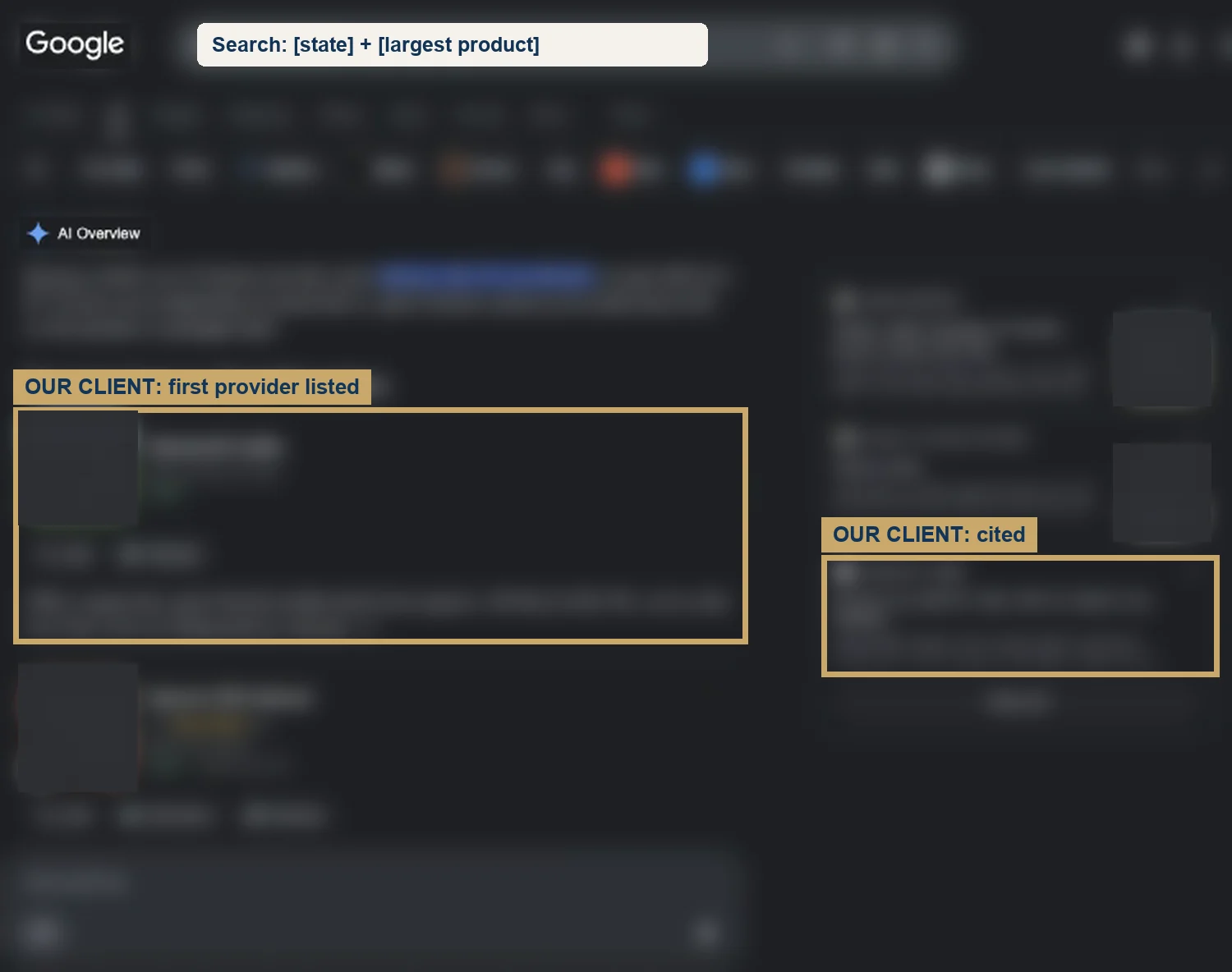
Here is one from a live search on Google on September 3, 2026. For a statewide query for its largest product, the store in the case study was the first provider listed and one of the sources the AI Overview cited.
A statewide search for the store’s largest product: the first provider listed, and cited in Google’s AI Overview. Names, places, photos and search words are blurred to protect the client. What it does not prove: AI Overviews change from search to search, and nobody controls which sources they cite.
The same store’s sales from Google, meaning organic search and free listings rather than paid ads, went from $354 in the 30 days before the work began (May 5 to June 3, 2026) to $5,418 in the 30 days about three months in (August 17 to September 15, 2026), by Shopify’s own reports. It is one store, and its Facebook ads ran in both periods.
What does a site look like before AI Overviews cite it?
It looks like this site on September 24, 2026, eight days after it went live. I asked Google’s AI Mode what the domain was, and it answered that the domain was “not an active or official website.” Gemini and Perplexity did not have the site either.
The site was not hidden. Its robots.txt names every AI crawler as allowed, and on that same day eleven AI crawler user agents all fetched a guide with a 200 response. Search Console showed 22 of 25 pages indexed by day eight, and each scheduled guide was crawled within a day of publishing.
Two assistants did find it. A ChatGPT-type model with search described the site accurately and cited its /expertise/ page, with utm_source=openai on the link. Grok described the domain accurately.
The difference was live search: those two read the site at the moment I asked. The engines that lean on their own index had nothing on a domain eight days old with no citations yet.
That is the honest middle of the process. The control is set, the site is indexed, and the answer still names nobody, or someone else. Search Console recorded 95 impressions and 0 clicks in the first 28 days.
What closes the gap is the list Google already gave: pages that answer real buyer questions, product data where it can be read, and genuine mentions on other sites. All of it takes longer than eight days. The store in the case study is further down that road; this site is at the start of it.
What does ranking in AI Overviews look like for your store?
When it works, a buyer asks a real question about what you sell, and the answer cites your page because it answers best. Search Console shows the impressions, and Shopify shows the orders that followed.
Knowing how to rank in AI Overviews stops being a guessing game. It becomes a monthly check of reports you already own, and a source of sales you do not pay for per click.
If you want to see where your store stands first, the free Traffic to Sales Check reads Shopify, Google and your email side by side. Leave it, and the answer still gets written, with someone else’s link.
The proof, from one store
Straight from the case study, with the source and what it does not prove. See all five results.
Result 3 · Google
Sales from Google: $354 to $5,418 in about 90 days
Before the work$354
→
About 90 days in$5,418
15x
Baseline: the 30 days before the work began
$354 from 2 orders that came in from Google, May 5 to June 3, 2026. The highest-value products in the catalog had never been published through the store's Google channel.
The work: what changed
Rewrote product names, titles, descriptions and search snippets around the terms buyers search, with real weights (August 7 to 30). Built six city landing pages (August 1 and 2). Published the store's highest-value products to the Google channel so they could show in free Shopping listings (August 24). Cleaned up crawl errors and expanded thin product pages to more than 400 words (August 27 to 30).
Result: about three months in
$5,418 from 17 orders that came in from Google, August 17 to September 15, 2026, 15 times the baseline.
Evidence source
Shopify Analytics, Total sales by referrer, Google row, pulled September 18, 2026.
What this does not prove
Shopify does not split Google search from free Shopping listings, so this cannot say which sold more. Four of the 17 orders were deposit orders, worth $2,070. Google Search Console only started collecting data on July 28, 2026, so there are no clicks from before the work to compare.
Test it on your store
In Shopify, open the Google and YouTube channel and check that your best sellers are published to it. In Search Console, open Performance, sort queries by impressions, and note the ones in positions 5 to 15. Then compare the Google row in Total sales by referrer for your most recent 30 days with the 30 days before your last change.
Want an AI SEO agency to do this for you?AI SEO services. I work remotely with Shopify stores across the US.
Straight answers
Questions about this.
How do you get cited in AI Overviews?
Publish the page that answers the query best, make sure it is indexed and can show with a snippet, and keep your site included in the generative AI setting in Search Console. Google says no special markup or file is needed. Nobody can guarantee which sources an AI Overview cites.
Does llms.txt help you rank in AI Overviews?
No. Google's own guide says its search engine does not use llms.txt files or other special AI text files, and that creating one will neither help nor harm your visibility or rankings there. You can still keep one for other services that read it.
Do you need schema markup for AI Overviews?
No. Google says structured data is not required for its generative AI features, and there is no special schema.org markup to add. It still helps pages qualify for rich results, so keep your product markup, and make sure it matches what the page actually shows.
How can you see if your site shows in AI Overviews?
Open the generative AI performance report in Search Console. It rolled out to all websites as of August 31, 2026. It shows impressions in AI Overviews and AI Mode by page, country, device and date. Clicks from AI features are counted in the regular Performance report.
Can you stop your site from being used in AI Overviews?
Yes. The generative AI control in Search Console lets you exclude your site from AI Overviews, AI Mode and generative AI features in Discover. Excluded sites get no traffic or impressions from those features, and the setting is not used as a ranking signal for the rest of Search.
Do AI Overviews show up for every query?
No. Google says AI Overviews show only when its systems decide they add something beyond classic results, so they often do not trigger. Its head of Search has said people use them for longer and more complex questions, so pages that answer real buyer queries have more to offer.
How long does it take to show up in AI Overviews?
There is no set time. Google says crawling can take anywhere from several days to several months, depending on how often its systems decide a page needs refreshing. Once a page is indexed, whether an AI Overview uses it depends on the query, and that can change from day to day.
Why are my products missing from AI Overviews?
Start with your product data. Google says Merchant Center feeds help products show in AI responses, and Shopify says products reach AI Mode and Gemini through its Google & YouTube channel or Merchant Center. Publish your best sellers there with complete details, then read Merchant Center's AI performance report to see your share of voice.
Do Reddit posts or mentions on other sites help you get into AI Overviews?
Genuine ones can show up; planted ones do not help. Google's guide says its AI features can show what people say about products in blogs, videos and forum discussions, but that seeking inauthentic mentions is not as helpful as it might seem, because other systems block spam. Earn reviews and coverage honestly instead.