A Shopify store audit that reads every tool at once
Shopify, Klaviyo and Google each say they are working. The audit checks them against what your store actually sold.
The short answer
A Shopify store audit reads Shopify, Klaviyo, Google Search Console, GA4 and Google Merchant Center side by side to find where they disagree. That is where sales go missing. You get a ranked list of fixes, biggest dollars first, and a plain answer if your store is not the bottleneck.
A Shopify store audit checks everything that decides whether a store's visitors turn into sales: what buyers can find, what emails the store sends them and which channels actually produced orders. This one reads five tools together instead of one at a time, because each tool on its own reports that it is working.
When does a Shopify store need an audit?
When the numbers stop adding up. The usual signs:
The ads carry most of the month, and sales drop whenever the budget does.
Shopify, Google and Klaviyo tell different stories about what sold.
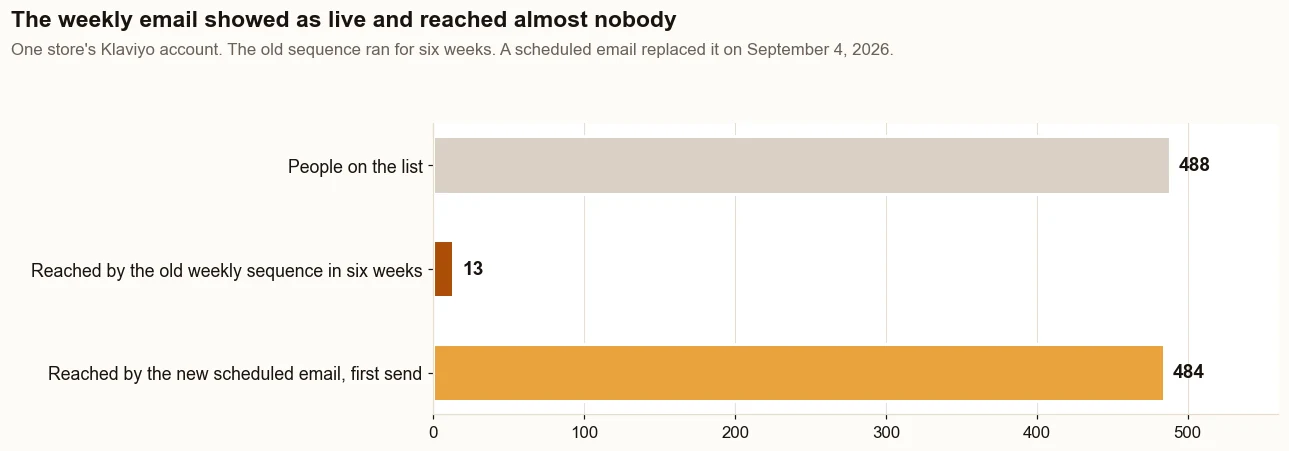
An email flow says live and reaches a handful of people.
The best products barely show on Google, or not at all in the free listings.
A new theme or app just went live. On one store, a theme switch on September 17, 2026 brought four side effects with it.
What gets checked?
Whether the products that earn the most are published where buyers search.
Which pages Google has indexed and which are quietly excluded.
Whether every email flow is actually sending, measured against list size.
How many visitors the store can identify for email.
What each channel really produced, from Shopify's Total sales by referrer report rather than each platform's report on itself.
What types of Shopify audit does it cover?
Type of audit
What it checks
Found on a real store
Shopify SEO audit
Which pages Google has indexed and which it leaves out, the searches sitting just off page one, titles, descriptions and the sitemap
A sitemap that had never been submitted, and 14 new pages that sat uncrawled until they were linked from the menu
Free listings audit (Google Merchant Center)
Which products are published to Google, which are disapproved and why
Merchant Center held no products until a shipping setting was fixed
Email audit (Klaviyo flows)
Each flow’s sends against the people it should reach, its triggers and filters, and what each email actually says
Seven live flow emails that were close to empty, and a broken unsubscribe link in every flow
Conversion audit (CRO)
Where buyers stop between the product page and the order, and where they first see the shipping cost
Four of six checkouts ended at the shipping step
Tracking audit
Whether GA4 records purchases, how much traffic is unlabeled, which tags fire on the live page
A Meta pixel that did not appear in the page’s source code
Performance audit (site speed)
Core Web Vitals from real visitors, and what the theme, apps and added code load
On this site, serving the fonts from the site took the home page’s layout shift from 0.19 to 0 in lab tests
App and theme audit
What each installed app adds to the storefront, code left behind by removed apps, what a theme switch changed
A theme switch that added a title suffix to every page and orphaned the blog
Agencies often sell these one at a time. Here they are one audit, because the findings depend on each other. On one store, an empty product feed traced back to a shipping setting.
Sources: each store’s own accounts and work records, September 2026, and Lighthouse lab tests on this site, October 1, 2026. None of these stores is the one in the case study.
What is on a Shopify store audit checklist?
Shopify: Total sales by referrer against what each platform claims; sessions by referrer; abandoned checkouts; web performance ratings; Page not found errors and redirects.
Google Search Console: the Page indexing report; searches sitting between positions 8 and 20; the sitemap.
Google Merchant Center: which products are published; which are disapproved and why; whether auto-tagging is on.
Klaviyo: every flow's sends against the people it should reach; triggers; the filters that stop reminders after a purchase; the share of visitors it can identify.
GA4: that it is installed and recording purchases.
Ads: how much of the month they carry, and what each order costs.
Checkout and shipping: where buyers stop between the product page and the order; what shipping costs, and the first place a buyer sees it.
Apps and theme: what each installed app loads on the storefront; code left behind by apps that were removed; what changed after the last theme switch.
What does each tool hide on its own?
Tool
What it tells you
What it can hide
What the audit checks it against
Shopify
Orders, sales by referrer, sessions
Best sellers that never reach Google; untagged traffic filed as direct
Merchant Center and GA4
Klaviyo
Flow status, sends, attributed revenue
A live flow that barely sends; revenue credited to automatic Apple Mail opens
Shopify's orders by referrer
Google Search Console
Clicks, impressions, indexed pages
Collections excluded along with filtered URLs
The pages that should rank
GA4
Sessions and conversions by channel
Paid traffic converting far below other channels
Shopify's own sales
Google Merchant Center
Products approved for free listings
Best sellers that were never sent to it
Shopify's top products by revenue
What does reading the accounts catch that an automated audit tool misses?
An automated audit tool can catch
Reading the accounts together catches
Missing page titles, meta descriptions and alt text
Best sellers that were never published to Google’s free listings
Broken links and slow pages
An email flow marked live that reached 13 people in six weeks
Duplicate URLs and missing sitemaps
Klaviyo crediting email with more orders than Shopify can trace
Pages blocked from crawling
Paid traffic that almost never reaches checkout
Both are useful. A tool reads the storefront. The audit reads the accounts behind it, and that is where the biggest problems on the store in the case study turned out to be.
Is there a free Shopify store audit?
Yes. The Traffic to Sales Check on this site is free: ten checks you run yourself, inside your own accounts, most in a few minutes.
Free automated tools exist too. They scan the storefront from the outside, so they catch missing titles, broken links and slow pages. They cannot see which emails sent or which channel produced the orders. The audit on this page is the same reading done for you, across every tool, followed by the fixes.
Can ChatGPT audit a Shopify store?
Part of one. ChatGPT, Claude and similar assistants can review what anyone can see: titles, descriptions, page text and structured data. Inside the Shopify admin, Sidekick, Shopify’s own assistant, can build reports from the store’s data.
What an assistant cannot do on its own is read Klaviyo, Search Console and Merchant Center next to Shopify’s sales, because each one needs its own access. The guide to connecting Shopify to AI covers what can be connected today and how to keep it read-only.
Why is tracking part of the audit?
A store cannot decide where to spend until its channel report tells the truth. Email and social links without tracking tags get counted as direct visits, which hides where the sales really came from.
GA4 installed through Shopify's web pixel does not show up in the page's code, so people assume it is missing when it is not. That is why Google Search Console and GA4 are read as part of this audit, not sold as a separate project.
What does the audit check in GA4?
Whether GA4 counts about as many purchases as Shopify records for the same dates.
How much traffic lands in Direct or Unassigned because links are not tagged.
Whether paid channels turn visits into purchases far less often than the rest.
GA4 does not have to match Shopify exactly. It has to be close enough to trust when deciding where the next dollar goes.
Does it include a Shopify speed and performance audit?
Yes, as a finding. Core Web Vitals are Google's measures of how fast a page loads, how quickly it responds and how steady it stays while loading. Shopify's web performance reports show them from real visitors over the last 30 days, rated Good, Moderate or Poor. Search Console's Core Web Vitals report rates the pages Google has indexed as Good, Need improvement or Poor. The audit reads both and lists the pages rated Poor.
Shopify names three things as the biggest factors in a store’s speed: the theme, the installed apps and any third-party code added by hand. So the audit reads those along with the pages.
Speed is one input, not the whole audit. A fast store whose best sellers are missing from Google and whose email never sends still loses the same sales.
Does the audit look at apps and the theme?
Yes. The audit lists what is installed and what each app loads on the storefront. Shopify notes that uninstalling an app does not automatically remove its code from the theme, so it also looks for what was left behind.
It reads the live page, not only the theme code. On one store, a Meta pixel did not appear in the page’s raw source. Shopify’s Facebook channel had installed it, and it only showed when the live page was checked in a browser.
After a theme switch, it compares before and after. On one store, crawling all 45 sitemap URLs before the switch and again after caught four side effects: a title suffix on every page, a doubled Article schema, an orphaned blog and lost variant weights.
What does the audit check at checkout?
Where buyers stop, and what they learn at that step. On one store, a high-ticket product sold on a deposit, GA4 recorded this funnel for the 60 days to September 18, 2026, after a cleaning rule had removed internal and data-center traffic:
Step
Count
Visits
307
Product views
154
Add to carts
15
Checkouts started
6
Past the shipping step
2
Purchases
2
Four of the six checkouts ended at the shipping step, the first place a buyer saw what shipping would cost. Shipping profiles set up at different times charged $35 flat on one profile, $38 on another, $12 on a third and $0 on the rest, so a starter product priced under $100 became $124 at checkout.
What it does not prove: six checkouts is a small number, and it is one store. The audit reads the same steps on yours. The method is in the guide to Shopify conversion rate optimization.
What has the audit found on real stores?
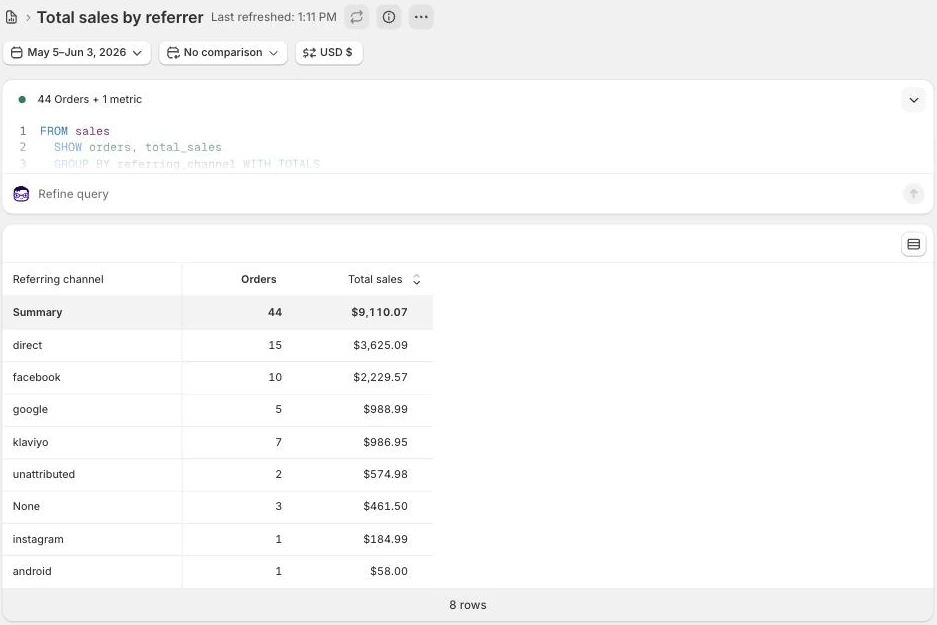
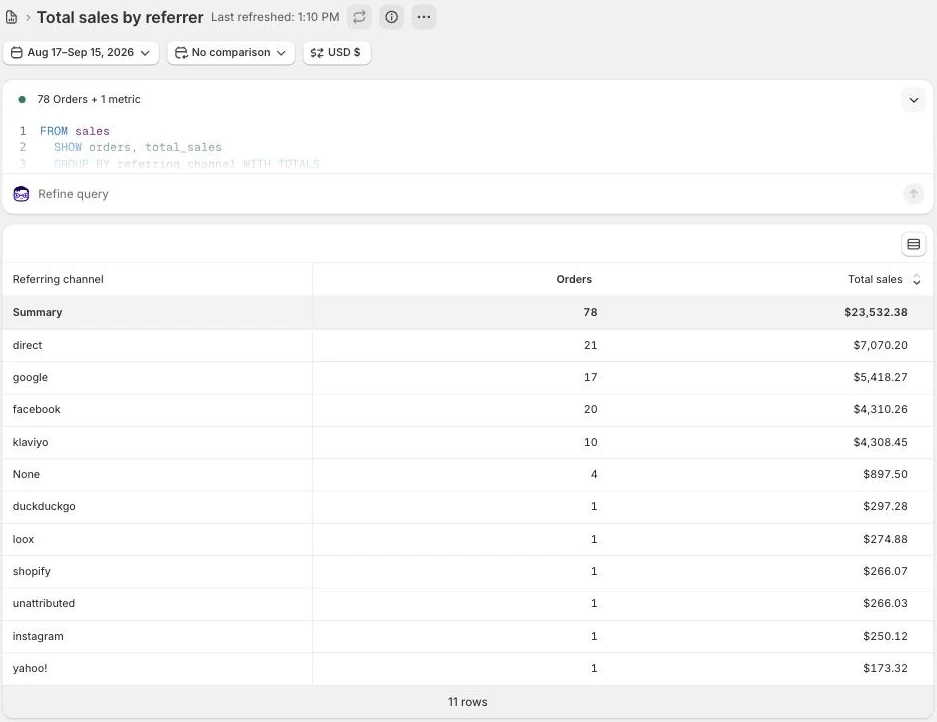
On the store in the case study, the checks found that its highest-value products had never been sent to Google from Shopify, that a weekly email had reached 13 people in six weeks, that only 1 in 1,793 Facebook visits completed checkout, and that the store could identify about 0.8 percent of its visitors. Sales went from $9,110 in the 30 days before the work began (May 5 to June 3, 2026) to $23,532 in the 30 days about three months in (August 17 to September 15, 2026), by Shopify's own reports.
The weekly sequence reached 13 people in six weeks while it showed as live. The scheduled email that replaced it reached 484 on its first send. Source: the store’s Klaviyo account.
On two other stores, the same reading found:
A site that ranked for 126 keywords, and 0 of them were local searches. The city it serves was mentioned 0 times on the site.
Of 541 orders in 90 days, 113 carried a customer email address. At the register it was 34 of the last 242.
A product whose price field held the deposit, so Google’s listing showed the deposit as the price. The full price, over $2,000, sat in paragraph four.
A catalog of 124 products where 71% of the images had no alt text.
Source: each store’s own accounts and work records, September 2026.
How does the audit work, step by step?
A thirty-minute call. You say what is not adding up. If the store is not the bottleneck, you hear that on the call.
You add the logins. A user for each tool, added by you: Shopify, Klaviyo, Google Search Console, Google Merchant Center and GA4. You keep ownership of every account.
The tools are read together. Each tool’s claim is checked against Shopify’s own sales reports for the same dates.
You get the ranked list. What is wrong, in the order that pays fastest, with the reason each item sits where it does.
The fixes run in that order, inside your accounts, each one counted from Shopify’s own reports.
What do you get at the end?
A plain list of what is wrong, in the order that pays fastest, with the reason each item sits where it does. If your store is not the bottleneck, the audit says so.
I make the fixes in that order inside your accounts. Every result is counted from Shopify's own reports.
What access does the audit need?
You add a user login for each tool yourself. In Shopify, that is a user under Settings, then Users. You also add a Klaviyo user and user access to Google Search Console, Google Merchant Center and GA4. You keep ownership of every account, and you can remove the access at any time.
What does an audit not do?
It does not guarantee rankings, AI citations or sales.
It does not replace your store's own records with a dashboard's opinion.
It does not sell a new platform when the tools you already pay for are switched off.
The proof, from one store
Straight from the case study, with the source and what it does not prove. See all five results.
Result 1 · Sales
Total sales: $9,110 to $23,532 in about 90 days
Before the work$9,110
→
About 90 days in$23,532
2.6x
Baseline: the 30 days before the work began
$9,110 in sales from 44 orders, May 5 to June 3, 2026: the 30 days before the work began on June 4, 2026. Google and email brought in 15% of it.
The work: what changed
Rewrote product names, page titles, descriptions and the text Google shows in search results around what buyers search for, with real weights (August 7 to 30). Built six city landing pages (August 1 and 2). Published the highest-value products to Google (August 24). Put welcome, abandoned cart and browse abandonment emails live (July 28) and replaced a weekly email that was not sending (September 4). Moved the Facebook budget to warm audiences (August 26).
Result: about three months in
$23,532 in sales from 78 orders, August 17 to September 15, 2026, 2.6 times the baseline. Google and email brought in 41% of it.
Evidence source
Shopify Analytics, Total sales over time and Total sales by referrer, pulled September 18, 2026.Shopify’s Total sales by referrer report, grouped by referring channel, for the 30 days before the work began (May 5 to June 3, 2026). Store name redacted.The same report for the 30 days about three months in (August 17 to September 15, 2026). Store name redacted.
What this does not prove
This compares the 30 days before the work began with the 30 days about three months in, not an average. That is why every month is in the table below. The store's largest orders are seasonal deposit orders, and one September order made up $2,080 of the result. The Facebook ads ran in both periods.
Test it on your store
In Shopify, go to Analytics, then Reports, and open Total sales over time. Take the 30 days before your last big change and compare them with your most recent 30 days.
$3,000, one time, for the audit and every fix it finds that can be done inside your existing theme, apps, Klaviyo and Google accounts.
What that is set against: on one store, the audit found a weekly email that had reached 13 of the 488 people on the list, and the store’s highest-value products missing from Google’s free listings. With all the work together, that store’s sales came to $23,532 in the 30 days about three months in, against $9,110 in the 30 days before the work began. Elsewhere, an audit alone runs $900 to $1,300, and the fixes are billed on top. See every price and its sources.
What changes when this works?
You know which channel actually pays, and the fixes go where the dollars are biggest. Or keep reading five dashboards that each say they are working, and keep paying for orders your own store could have sent.
Straight answers
Questions about this.
What is a Shopify store audit?
A check of the tools that decide whether a Shopify store's traffic becomes sales. This one reads Shopify, Klaviyo, Google Search Console, GA4 and Google Merchant Center together, finds where they disagree and ranks the fixes by the money involved.
What does a Shopify store audit check?
It reads Shopify, Klaviyo, Google Search Console, GA4 and Google Merchant Center together and finds where they disagree, because each tool on its own reports that it is working.
Is there a free Shopify store audit?
Yes. The Traffic to Sales Check on this site is free: ten checks you run yourself inside your own accounts, most in a few minutes. Free automated tools scan the storefront from outside and cannot see your email or sales data.
What happens after a Shopify store audit?
The fixes run in the order the audit ranks them, biggest dollars first, inside your own accounts. You keep every account and login, and each change is counted from Shopify's own reports.
Is a store audit worth it if sales are fine?
It is worth it if ads carry most of your sales, because that is profit leaving every month. If your free channels already do their share, the audit will say so.
What is the difference between a Shopify SEO audit and a store audit?
A Shopify SEO audit checks whether Google can find, index and rank the pages. A store audit includes that and also reads email, free listings, tracking, checkout and apps against what the store sold.
Can ChatGPT audit a Shopify store?
It can review what is public, such as titles, descriptions and page text. It cannot read Klaviyo, Search Console and Merchant Center next to Shopify's sales unless each one is connected to it.