Home / Insights / How to increase sales on Shopify without more ad spend
Sales · 20 min read
How to increase sales on Shopify without more ad spend
Your store sells, but the ads carry too much of it, the bill keeps rising, and every tip you try barely moves sales. Start by finding where your sales really come from, then pull the right lever first.
The short answer
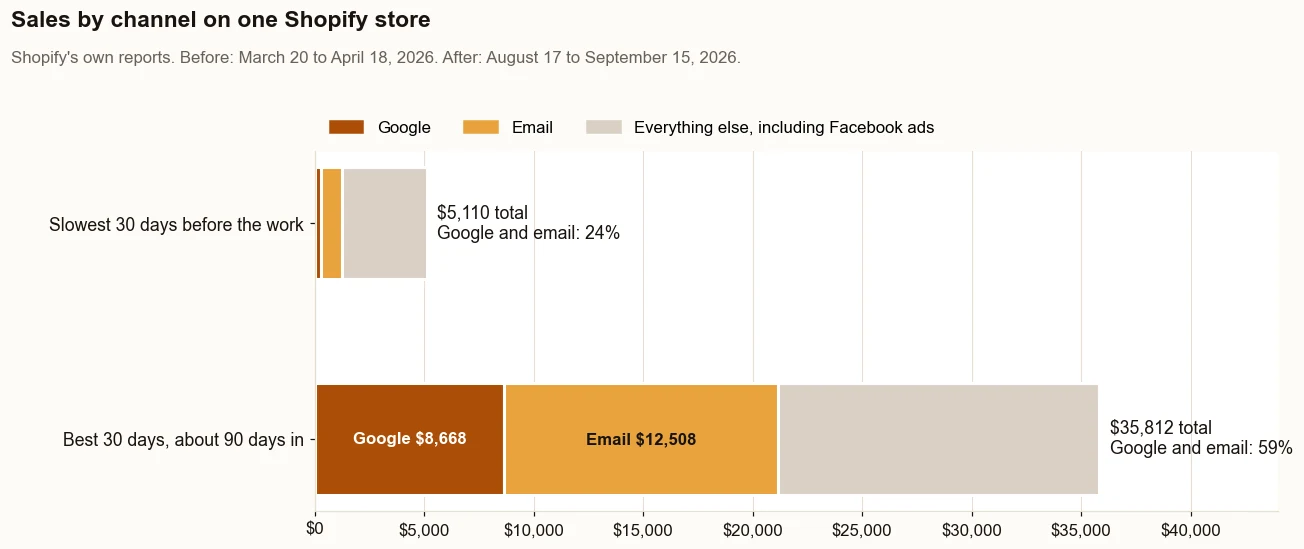
Here is how to increase sales on Shopify without more ad spend: win more customers from Google and AI search, collect more visitors' email addresses, make every product page earn trust, and raise each order's value. One store's sales went from $5,110 in its slowest 30 days to $35,812 in its best, about 90 days in, by Shopify's reports.
How to increase sales on Shopify: where do you start?
Start with the four numbers every sale is made of: visitors, the share of visitors who buy, the value of each order, and how often customers come back. Your Shopify sales are those four multiplied together, so you can increase sales by moving any one of them.
Most ecommerce advice on how to get more sales on Shopify jumps straight to tactics: a pop-up, a discount, one more app. Tactics work better once you know which number is holding your online store back.
If your store gets plenty of traffic and barely any sales, and every new tip changes nothing, you are not imagining it. The tips were probably aimed at a different number from the one that is stuck.
Two terms first. Conversion rate is the share of visits that end in an order. Average order value is total sales divided by the number of orders.
Lever
What moves it
Shopify report that shows it
Visitors
Search results, free listings, AI answers, email clicks, social media, ads
Bundles, recommendations, a free shipping threshold
Average order value over time
Repeat orders
Post-purchase and win-back emails
Returning customers
Conversion rate is not the only lever, and it is not always the one that moves. On one direct to consumer store on Shopify, it was 1.0% in the slowest 30 days before the work (March 20 to April 18, 2026) and 0.9% in the best 30 days after (August 17 to September 15, 2026).
Sales per visit still went from $1.93 to $4.49, because visits rose from 2,653 to 7,970 and orders got bigger. Source: Shopify’s own reports, set out in the case study. What it does not prove: this is one store, and its Facebook ads ran in both periods.
Where do your Shopify sales come from right now?
Shopify’s Total sales by referrer report answers that. Shopify’s help center says the Total sales by referrer report shows your sales by the site your customers came from, credited to their last interaction.
Every ad platform and marketing tool also reports on itself, and each one reports a win. Shopify is the referee, because it credits each order to one referrer.
Put three numbers side by side for the last 90 days: sessions by referrer, sales by referrer, and what you spent on each channel. A channel with lots of sessions and few sales is renting you attention. A channel with few sessions and steady sales is the one to grow.
On the store in the case study, Shopify’s sales attribution report for the 90 days to September 3, 2026 showed this split:
Google search, not paid24 ordersfrom 1,720 visits: 1.4 percent bought
Google search brought in more than 3.5 times the sales of the paid ads, from under a fifth of the traffic.
Source: Shopify’s sales attribution report for the 90 days before September 3, 2026. Google search brought $8,316 in sales and paid Facebook and Instagram $2,322, as charged. What it does not prove: the report credits each order to the visit it came from, so an ad that first introduced a buyer who later searched Google gets no credit.
Before the work, the store paid about $1,700 a month for Facebook ads: $1,200 in ad spend plus $500 to a prior vendor. That monthly bill is the number every free channel is measured against.
If your store gets visitors and no orders at all, start with the checks for a Shopify store getting no sales instead. For every report worth opening, see the Shopify analytics reports that trace each sale.
Which lever should you pull first?
Start with the lever that costs nothing per visit and reaches the most customers, then work down the list. For a store that already sells, that strategy follows The Traffic to Sales Method:
Lost Sales Check. Read Shopify, Google and email side by side to find the gaps. The free Lost Sales Check walks through ten of them.
Get Found. Put products and pages on Google without paying for ads.
Get Names. Collect contact details from more of your visitors.
Get Orders. Emails that actually send, and turn those names into orders.
Show Proof. A before and after from Shopify’s own reports, with dates and what the numbers do not prove.
Product pages, checkout and order value run alongside those stages, since every visitor lands on them. Ads come last, because they work best on people who already know the store.
What your reports say
Pull this lever first
Most sales ride on paid social; search and email are small
Get Found and Get Names
Plenty of visitors, few add to cart
Product page content and trust signals
Many reach checkout, few finish
Shipping costs, delivery times, payment options
Healthy orders, but small ones
Order value: thresholds, bundles, recommendations
Customers buy once and never return
Post-purchase and win-back emails
Change one lever at a time and give it a full month. Otherwise you will not know which change did the work.
How do you get more sales from Google without paying for ads?
List your products in the free listings, make every product page easy to find and read, and give AI search something worth quoting. Getting found this way costs nothing per click and needs no marketing budget. It also builds on itself: a page that ranks this month keeps working next month.
Publish your best sellers to the free listings
Shopify’s Google & YouTube channel syncs your products to Merchant Center. Shopify’s help center says that for eligible stores selling in the United States, synced products can appear in Shopping tab listings for free.
Merchant Center Help’s page on free listings says eligible products may appear on the Shopping tab, in Search and Images results, and on YouTube. To qualify, it asks for return policy information on your site, plus shipping settings or shipping costs in your product data.
Check which products are actually published, not only synced. On the store in the case study, the best sellers were published through the channel on August 24, 2026.
Free listing clicks went from 5 on 562 impressions (March 20 to April 18, 2026) to 34 on 5,026 (August 17 to September 15, 2026), per Merchant Center’s performance report. The product pages were rewritten in the same weeks, and free listing clicks are still small numbers. More in the guide to free listings.
How to get sales on Shopify from search results
Every Shopify store generates a sitemap.xml file automatically, with links to products, collections, pages and blog posts. Submit it in Search Console so every page can be found.
Then name products in the words customers type, and write content that answers their questions. The groundwork is in ecommerce SEO: how an online store gets found.
On the store in the case study, sales from Google search and free listings (not paid) went from $285 to $8,668 across the same two windows: 30 times. Rankings change by location and by day, so read that as one store’s result, not a promise.
Give AI search something to quote
Google’s guide to optimizing for its generative AI features, announced in May 2026, says Merchant Center feeds can help products appear in AI responses as well as regular results. It also says you do not need special AI files or markup, and that unique, useful content matters most in the long run.
As of September 2026, Shopify’s agentic storefronts are active by default for eligible stores. They list products in AI channels such as ChatGPT, Google AI Mode and Gemini, Microsoft Copilot and Meta.
“Focus on your visitors and provide them with unique, satisfying content.”
For a store, that means a page for every product, full of the facts a buyer needs, written in your own words. See ChatGPT shopping for Shopify stores.
How do you turn more visitors into people you can email?
Put sign-up forms where the traffic is, give people a reason to join, and track what share of visitors your email platform can identify. Every automated message is capped by that share, so getting more visitors identified raises all of them at once.
A visitor you cannot identify gets no welcome series, no browse reminder and no cart reminder. On the store in the case study, Klaviyo could identify about 0.8 percent of visitors over the 30 days to August 20, 2026. That is Klaviyo’s Active on Site metric measured against Shopify sessions.
That is about 8 in every 1,000 visitors. The rest of the store’s email marketing was working with that small pool.
The Shopify Forms app is free to install and use, which makes it an easy place to start. Shopify’s help center says you can add a new or existing discount to a form to encourage sign-ups.
Klaviyo and other marketing platforms have their own forms. Whichever you use:
Put a form where visitors land most: product pages, not only the home page and footer.
Offer something worth signing up for: early access, a buying guide, or a first-order discount if your margin allows it.
Ask for an email address and nothing else, so the form takes seconds.
Check the share of identified visitors every month.
Automated flows usually earn more per send than one-off marketing campaigns, as long as they actually send. A flow is an automatic series of emails that begins when a customer does something, such as joining your list, leaving checkout or placing an order.
Klaviyo’s 2026 benchmarks, drawn from over 183,000 Klaviyo customers, report that flows generate nearly 41% of total email revenue from just 5.3% of sends. That is Klaviyo’s figure, counted Klaviyo’s way, not a forecast for your store. It still points to where the effort pays.
Flow
Begins when
Why it earns
Welcome
Someone signs up
New subscribers are at their most interested
Abandoned checkout
Someone leaves checkout after giving their contact details
The buyer was one step from paying
Browse abandonment
An identified visitor views a product
It reminds someone who was already looking
Post-purchase
Someone places an order
It turns a first order into a second
Win-back
A customer has not ordered in a while
It brings back customers who already trust you
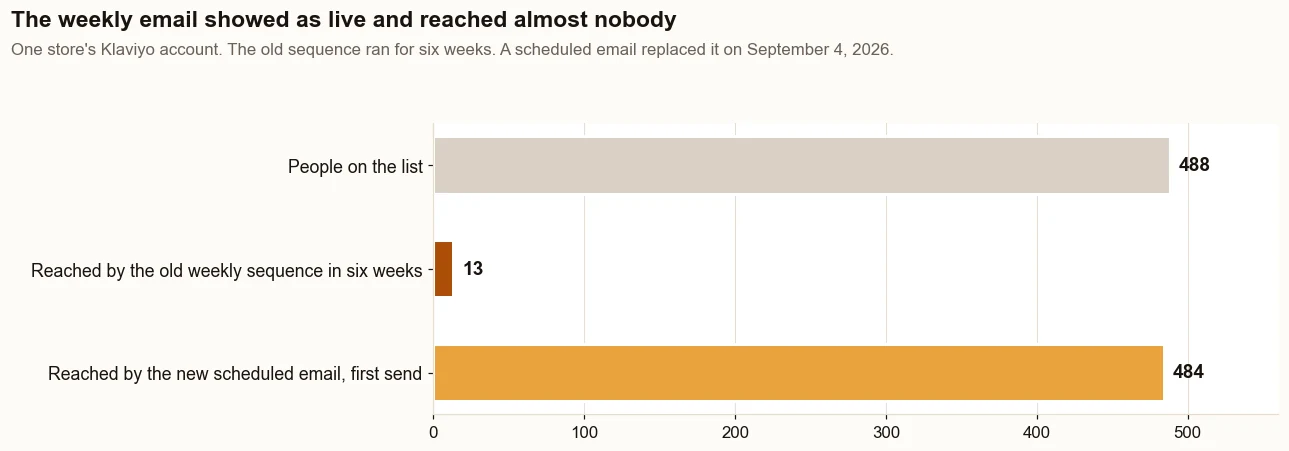
Then check that each flow sends. On the store in the case study, a weekly Klaviyo sequence built for 488 people showed as live for six weeks and reached 13 of them. It triggered on Added to List, and the list was built before the flow existed.
On August 20, 2026, Klaviyo showed 438 of the 488 had received nothing over the previous 30 days. A scheduled weekly email replaced it on September 4, 2026 and reached 484 people on its first send, on September 8.
The weekly sequence reached 13 people in six weeks while it showed as live. The scheduled email that replaced it reached 484 on its first send. Source: the store’s Klaviyo account.
Sales from email, by Shopify’s referring channel, went from $982 (19% of sales) in the slowest 30 days before the work to $12,508 (35%) in the best 30 days after. One deposit order of $9,480 came 17 minutes after a welcome email click. Without it, email was $3,028, still 3 times the starting point.
A product page sells when it answers the buyer’s questions without making them ask: what it is, what it costs delivered, when it arrives, and why this one. Shopify’s help center says a product description explains what a product is and why it is worth purchasing. It suggests specifications, uses, benefits with evidence, and stories.
What should every product page answer?
What is it? Use the words customers search in the product title and the first line of the description.
What does it cost, all in? Put shipping costs, or your free shipping threshold, on the page.
When will it arrive? Place a delivery estimate near the Add to cart button.
Will it fit or work for me? Sizes, materials, weights, care, and what comes in the box.
Can I trust it? Customer reviews, real photos, and a plain returns policy.
Cost belongs on the product page, not only at checkout. In Baymard’s cart abandonment survey, extra costs were the most common reason shoppers gave for leaving, ahead of slow delivery and trust (the full list is in the checkout section below).
Start with the product that sells most, then work down the list. Examples that answer these questions are in product description examples that help Shopify stores sell.
Do customer reviews and trust signals increase sales?
Yes, when they are real. Trust signals are the details that tell a first-time buyer the store is safe to pay: customer reviews, clear contact details, a returns policy, familiar payment options and honest delivery times.
In Baymard’s survey, 19% of US shoppers who abandoned a checkout for reasons other than browsing said they did not trust the site with their card information.
Ask every buyer for a review after delivery, with a post-purchase email. Put the star rating near the price and the full reviews lower on the page. Answer critical reviews in public, politely and with the fix.
Never buy, fake or filter reviews. The FTC’s final rule on fake reviews, announced August 14, 2024, bans fake reviews and incentives tied to a positive or negative review. It also bars presenting a filtered set of reviews as if it were all of them.
“Fake reviews not only waste people’s time and money, but also pollute the marketplace”
The practical rule for a store owner is simple: collect reviews from every real customer, display them all, and let the product earn its rating. That is the only kind of trust that holds up.
How do you make checkout easier to finish?
Remove the surprises. Baymard’s cart abandonment research puts the average documented cart abandonment rate at 70.22%, across 50 ecommerce studies, last updated September 22, 2025. Leaving aside shoppers who were just browsing, these were the most common reasons:
Reason shoppers gave (Baymard)
Share
What to do in your store
Extra costs too high (shipping, tax, fees)
40%
Put shipping costs on the product page; set a free shipping threshold
On Shopify, much of the checkout design is already set for you: Shopify’s pricing page lists checkout customization as limited on every plan below Plus. So the fixes that matter sit around it: the costs you reveal earlier, the payment options you turn on, and the policies you link.
Shopify’s help center says Shop Pay saves a customer’s contact, payment, shipping and billing details, so returning customers skip retyping them.
Check your own numbers first. In Shopify’s conversion rate breakdown, compare sessions that reached checkout with sessions that completed it.
On the store in the case study, 33 of the 41 people who started checkout finished over the 30 days to August 20, 2026. Sales were being lost before checkout, not at it. More in Shopify conversion rate optimization.
How do you raise the value of each order?
Give customers a reason to add one more thing: a free shipping threshold a little above your typical order, bundles of products bought together, and recommendations on the product page. Shopify’s Average order value over time report, one of its standard sales reports, tells you whether it moves.
Set a free shipping threshold
Shopify lets you set a minimum purchase amount on a free shipping discount, as a code or as an automatic discount. Set it just above what most orders already spend, so the offer nudges the order up instead of giving away shipping on orders that would have happened anyway.
Recommend products that go together
Shopify’s Search & Discovery app can display complementary products, which Shopify describes as products often bought in addition to a selected product, on product pages in compatible themes. Pick the pairings yourself for your best sellers, so each suggestion makes sense.
Price every discount with the fees in mind
A discount comes off the same order that pays the card fee. As of September 2026, Shopify’s pricing page lists 2.9% + 30¢ for standard online card payments on the Basic plan, so a $100 order pays $3.20 in card fees.
Shopify supports several discount types: money off, a percentage off, buy X get Y and free shipping, as codes or automatic discounts. A good discount strategy raises order value. Test each offer on one campaign first.
A discount in every campaign can teach repeat customers to wait for one.
How do you get more customers to buy again?
Email them after the first order, and measure it. Shopify’s customer reports include New vs returning customers and Returning customers. Shopify counts a returning customer as one whose order history already includes at least one order.
A post-purchase message that helps the customer use what they bought, then asks for a review.
A reorder reminder, timed to when the product usually runs out or wears out.
A win-back campaign for customers who have gone longer than your usual gap between orders.
Early access for past customers ahead of a sale or a restock.
New buyers feed all of this. On the store in the case study, first-time buyers went from 19 to 53 across the same two windows, and each one became a customer the store could reach again. See post purchase emails that turn buyers into repeat customers.
Where do social media and paid ads fit?
Ads work best on people who already know the store, and social media marketing works best when it sends people somewhere they can buy or sign up. Keep the ads, but stop asking them to carry every sale.
On the store in the case study, Facebook and Instagram campaigns aimed at cold audiences (August 3 to 25, 2026) brought 5,379 visits and 3 completed checkouts: 1 in 1,793. Warm audiences (August 26 to September 15, 2026) brought 3,589 visits and 20 checkouts: 1 in 179, 10 times better.
Cost per website visit fell from 45¢ to 13¢, 71% less, per the store’s Meta Ads Manager. The ads were rebuilt and still run. What it does not prove: the store’s Facebook checkout rate had already ranged from 1 in 71 (March 2026) to 1 in 811 (December 2025).
As of September 2026, Shopify’s help center also describes Campaign Autopilot. It creates and manages marketing through channels such as Shopify Messaging, Shop Campaigns, Meta Ads and Microsoft Advertising, with actions you approve or reject.
Judge it, and every paid social strategy, by Shopify’s Total sales by referrer, not by its own dashboard. Unpaid social posts earn their place the same way, by the sales Shopify credits to them. The math for deciding what an ad is worth is in are Facebook ads worth it?
What are the most common Shopify selling mistakes?
Most of them come from trusting the wrong number. These turn up again and again in stores that already sell:
Trusting each marketing tool’s report on itself. For August 17 to September 15, 2026, Klaviyo credited email with 23 orders on one store, while Shopify’s Total sales by referrer traced 10 to an email click. Both are defensible; they count differently.
Paying for traffic while the free channels sit unused. Free listings, search and your list cost nothing per visit.
Running ads with no strategy for the visitors they bring. With no sign-up form and no follow-up, a paid visitor who leaves is gone.
Believing the word live on a flow. Check its sends against the list it was built for.
Judging email by open rate. One account’s screen showed a 92 percent open rate while the click rate was 5.31 percent. Apple Mail Privacy Protection records machine opens.
Discounting everything. It trains customers to wait and costs margin on orders that would have happened anyway.
Changing five things at once. One lever at a time, one month at a time.
Adding an app for every problem. Add one only when it fixes the number your reports say is weak.
Tried everything and sales are still flat? Which advice should you trust?
Trust advice that names the number it will move and the Shopify report that will show it. A tip on how to increase sales on Shopify can be sound and still do nothing for your store, because it fixes a lever that was not holding sales back.
If you have added the apps, redone the pages, posted every day and paid for ads, and sales still sit where they were, that is not a lack of effort. The messages that arrive after your first ads, each offering to fix a different problem, only add to the noise.
Put every tip, app or offer through the same four questions before you act on it:
Which number will it move? Visitors, the share who buy, order value or repeat orders. Advice that cannot say is a guess.
Which report will show it? Name the Shopify report, such as Total sales by referrer or the conversion rate breakdown, not the dashboard of the tool being sold.
What is that number today? Write it down, with the dates, before anything changes.
When will you check it again? Pick a date a full month out and compare like with like.
Anyone offering to fix your store, a done-for-you expert included, should answer all four first. That is the Show Proof stage in practice, and it shrinks a long list of ideas to the few that fit your numbers.
How do you know your Shopify sales really increased?
Compare like with like, in Shopify’s own reports: the slowest 30 days before the work against the best 30 days after, in the same report, with the dates written down. Then write down what the numbers do not prove.
On the store in the case study, sales went from $5,110 (March 20 to April 18, 2026) to $35,812 (August 17 to September 15, 2026), about 90 days into the work: 7 times. Orders went from 27 to 75. It is one store, and its Facebook ads ran in both periods.
Google and email went from 24% of sales to 59%. Source: Shopify’s own reports. What it does not prove: this is one store, and the Facebook ads ran in both periods.
That is how to increase sales on Shopify without more ad spend: find where sales come from, switch on the channels that sell for free, email more of the people who visit, and make every page and order count.
When it works, search and email bring in a growing share of each month’s orders, the ads help instead of carrying the store, and your own reports prove it. Leave it, and every sale keeps its price tag.
A Shopify store audit reads those reports side by side and fixes the gaps in that order.
The proof, from one store
Straight from the case study, with the source and what it does not prove. See all five results.
Result 1 · Sales
Total sales: $5,110 to $35,812 in about 90 days
Before the work$5,110
→
About 90 days in$35,812
7x
Baseline: the worst case before the work
$5,110 in sales from 27 orders, March 20 to April 18, 2026: the slowest 30 days the store had before the work began on June 4, 2026. Google and email brought in 24% of it.
The work: what changed
Rewrote product names, page titles, descriptions and the text Google shows in search results around what buyers search for, with real weights (August 7 to 30). Built six city landing pages (August 1 and 2). Published the highest-value products to Google (August 24). Put welcome, abandoned cart and browse abandonment emails live (July 28) and replaced a weekly email that was not sending (September 4). Moved the Facebook budget to warm audiences (August 26).
Result: the best case after
$35,812 in sales from 75 orders, August 17 to September 15, 2026, 7 times the baseline. Google and email brought in 59% of it.
Evidence source
Shopify Analytics, Total sales over time and Total sales by referrer, pulled September 18, 2026.
What this does not prove
This compares the slowest 30 days before the work with the best 30 days after, not an average. That is why every month is in the table below. The store's largest orders are seasonal deposit orders, and one September order made up $9,480 of the result. The Facebook ads ran in both periods.
Test it on your store
In Shopify, go to Analytics, then Reports, and open Total sales over time. Find your slowest 30 days of the past year and compare them with your last 30.
On the Basic plan with Shopify Payments, a standard online card payment costs 2.9% plus 30 cents, so a $100 sale pays $3.20, as of September 2026, according to Shopify's pricing page. Premium cards cost 3.5% plus 30 cents, which is $3.80. Using a third-party payment provider adds a 2% Shopify transaction fee on Basic.
How do I attract customers to my Shopify store?
Start with the channels that do not charge per click. Publish your products to free listings through Shopify's Google and YouTube channel, submit your sitemap in Search Console, write product descriptions that answer customers' questions, and collect visitors' email addresses. Then point social media and ads at people who already know the store.
Why does my Shopify store get traffic but barely any sales?
Usually the visitors are the wrong fit, or the product page leaves their questions unanswered. Filter out bot traffic, then compare Shopify's Sessions by referrer with Total sales by referrer: a source with many sessions and few sales is sending browsers. The conversion rate breakdown then shows whether visitors stop before the cart, at the cart or at checkout.
How do I increase sales with the same traffic?
Raise the share of visitors who buy and the value of each order. Answer cost, delivery and fit on every product page, show real reviews, set a shipping threshold just above your typical order, and suggest products that go together. Then follow up by email with visitors who leave, so one visit is not the only chance.
How do I get more sales on Shopify without ads?
Use the channels that cost nothing per visit: free listings, search results, AI answers and your email list. On one store, Google and email went from 24% of sales in its slowest 30 days to 59% in its best 30 days, about 90 days in, by Shopify's reports. Results differ from store to store.
What are common Shopify selling mistakes?
Trusting each tool's report on itself, paying for traffic while free channels sit unused, believing a flow works because it says live, judging email by open rate, discounting everything, and changing several things at once. Shopify's Total sales by referrer report is the fairest referee of what is actually selling.
Is Shopify still worth it in 2026?
For a store that already sells, the platform is rarely what limits sales. As of September 2026, Shopify's pricing page lists the Basic plan at $39 a month, or $29 a month billed yearly. The bigger question is whether the free channels it connects to, like free listings and email flows, are actually switched on.
How long does it take to increase sales on Shopify?
Expect weeks, not days, for the free channels to start paying. Search engines have to find and rank pages, and a mailing list grows with traffic. On one store, the best 30 days came about 90 days into the work. Every store is different, and nobody can honestly promise a ranking or a sales figure.
Do Shopify apps increase sales?
Some do, but an app only helps when it fixes the lever holding your store back. Check Shopify's reports first: visitors, the share who buy, order value and repeat orders. Then add the one app that moves the weak number, and judge it in Total sales by referrer, not in the app's own dashboard.
Should I focus on traffic or conversion rate?
Neither on its own. Watch sales per visit, which is total sales divided by sessions for the same dates. On one store, the conversion rate barely moved, 1.0% to 0.9%, while sales per visit rose from $1.93 to $4.49 about 90 days in, by Shopify's reports, because better-matched visitors placed bigger orders. Results differ by store.