Home / Insights / Product description examples that help Shopify stores sell
Sales · 16 min read
Product description examples that help Shopify stores sell
Your product pages get visits, and buyers still leave with questions. Good descriptions answer them before anyone has to ask, even if writing is not your thing and the catalog runs to hundreds of items.
The short answer
The best product description examples share one pattern: a first line that says what the product is and who it is for, a few benefits each backed by a fact, then the specifics buyers check, such as size, materials and care. Below are six original product description examples, a before and after rewrite, and a fill-in template.
A product description is the text that tells a buyer what a product is, what it does for them and why it is worth the price. Shopify’s help center puts it simply: a product description explains what a product is and why it is worth purchasing.
On a Shopify store, the same text does three jobs. It persuades the person reading the page, and it gives Google the words it matches to searches.
Through Shopify’s Google channel, it also becomes part of the product data behind free listings and AI answers.
That is why the product description examples below are written for the buyer first and search second. A description that helps a buyer decide is usually the one Google can use too.
What do the best product description examples have in common?
They answer the buyer’s questions in the order the buyer asks them: what is it, is it for me, what will it do for me, and will it fit, last and arrive on time?
That order matters because nearly every shopper leans on the description at some point. In Baymard Institute’s product page testing, every participant used the description at some point to judge whether a product suited them.
“every single user relied on the product description at some point during test sessions”
Relying on it is not the same as reading every word. Most people scan, so the strongest examples put the key fact in the first line and the details in short lists.
“People rarely read Web pages word by word; instead, they scan the page”
The same study found that users disliked “marketese”, the boastful, promotional style of marketing writing. Baymard’s testing points the same way: users rarely look forward to reading a wall of text. Shopify’s own guide to writing engaging product descriptions lands in the same place, and its tips add up to four habits:
Write to one target customer. Picture the person who is buying and address them directly.
Turn features into benefits. A feature is what the product has. A benefit is what that does for the buyer.
Be specific, with proof. Numbers, materials and measurements instead of praise.
Make it easy to scan. Short paragraphs, then bullet points for the specs.
What does a product description look like before and after a rewrite?
Most weak descriptions fail the same way: they praise the product instead of describing it. Here is one for an invented ceramic planter, before and after.
Before:High quality ceramic planter, perfect for any home, with a modern, stylish design that makes a great gift!
After:A 6-inch ceramic planter with a drainage hole and a matching saucer, so you can water without leaving a puddle on the shelf. It fits nursery pots up to 5.5 inches across, and the matte glaze comes in sand, sage and charcoal. Each one is glazed by hand, so the color varies slightly from pot to pot.
What changed
Before
After
Size
Not given
6 inches; fits nursery pots up to 5.5 inches
The job it does
“Perfect for any home”
Water without a puddle on the shelf
Proof of quality
“High quality”
Drainage hole, saucer, glazed by hand
Choices
Not given
Three colors, named
Honest limits
Not given
Color varies slightly from pot to pot
Nothing in the rewrite is clever. Every sentence answers a question the buyer would otherwise have to email about before they purchase, or leave the page to find out.
Product description examples for six kinds of product
The six examples below are for invented products, written from scratch to show the pattern. Every figure in them is a placeholder. Use your own measured numbers, never a guess.
Example 1: a short description for a simple product
A heavy canvas tote that stands up on its own and carries a laptop, a water bottle and a change of clothes. The handles are double-stitched where they meet the bag, and an inside pocket keeps keys from sinking to the bottom.
Size: 16 x 15 x 6 inches
Material: 16 oz cotton canvas
Care: machine wash cold, hang to dry
Why it works: the first line says what it is and what it holds. Every claim is something the buyer can check the day it arrives.
Example 2: a benefit-led description for one kind of buyer
Hiking socks with cushioning under the heel and toe, where boots rub, and thin panels on top so your feet stay cool on all-day climbs. The merino blend pulls sweat away from your skin and dries overnight at camp.
Blend: 70% merino wool, 27% nylon, 3% elastane
Height: crew
Sizes: S to XL, with a chart by shoe size
Why it works: it names the buyer (hikers) and the problem (rubbing and sweat) before it names the fiber. The blend percentages turn a vague promise into a fact.
Example 3: a specs-led description for a technical product
A 24-ounce insulated steel bottle that keeps water cold for [your tested hours] and fits standard car cup holders. The lid locks with one twist, so it can ride in a bag on its side.
Capacity: 24 oz
Insulation: double-wall, vacuum sealed
Cold for: [your tested hours] with ice
Cleaning: lid is dishwasher safe; hand wash the bottle
Why it works: buyers of technical products compare numbers, so the numbers come first. The brackets are a reminder to publish only a figure you have tested.
Example 4: a sensory description for a scent people cannot smell online
Cedar and wood smoke up front, with a little orange peel underneath: the smell of a cabin after the fire has burned down. Hand-poured soy wax in a reusable amber glass jar, with a cotton wick.
Size: 8 oz
Burn time: about [your tested hours]
Care: trim the wick before each burn
Why it works: Shopify’s guide suggests sensory words and mini-stories because online shoppers cannot hold or smell the product. The words help them feel it; the facts underneath keep the story honest.
Example 5: a description written for the person who pays
A rain jacket made for the walk to school: taped seams, a hood that stays up in the wind, and reflective strips for dark winter mornings. It is cut roomy enough to fit over a school sweater.
Sizes: 3T to 12, with measurements in the size chart
Shell: waterproof polyester with taped seams
Care: machine wash cold, no fabric softener
Why it works: the child wears it, but a parent buys it. The description answers the parent’s worries: dry, easy to spot in the dark, and roomy enough for layers.
Example 6: a description for a product with options
A metal desk lamp with an arm that bends to where you need the light, and a dimmer in the base. Choose warm white for evening reading or daylight white for close, detailed work.
Height: 18 inches; the arm reaches 14 inches
Bulb: LED, rated for [the manufacturer’s rated hours]
Finish: black, white or brass
Why it works: it tells the buyer which option is right for them and why, so the variant menu stops being a guessing game.
How to write a product description, step by step
Use the same order every time. It keeps product descriptions consistent across the catalog and makes each one faster to write.
Name the buyer and the job. Who buys this, and what do they need it to do? Shopify’s guide starts here: imagine your ideal customer and address them directly.
Collect the facts. Sizes, materials, weights, care, what comes in the box, and the questions customers already ask in emails, chats and reviews.
Borrow your customers’ language. Shopify’s Searches by search query report shows what shoppers type into your store’s search. Pair it with keyword research on what buyers search.
Write the first line. What it is, who it is for and the main outcome, in one sentence.
Turn each feature into a benefit. Say what the feature does for the buyer, and keep the feature as the proof.
Answer the top three questions. Fit, care and what happens if it is wrong usually lead the list.
Format it for scanning. Two or three short paragraphs, then a list of specs.
Check every claim. If you cannot prove it, cut it.
Write the search title and meta description. Shopify suggests keeping titles to about 60 characters and descriptions to about 160. See how to write a Shopify meta description.
A product description template
Part
Fill in
First line
A [product] for [buyer] that [main outcome].
Benefits
[Feature], so [what it does for the buyer]. Two or three of these.
Proof
The measured number, material or test behind each benefit.
Specs
Size, materials, weight, what comes in the box.
Care and fit
How to look after it, and which size or option to pick.
Honest limit
What it is not for, or what varies from one to the next.
Steps 1 to 3 take the longest and matter the most. Once you understand who buys and the words they use, the writing itself goes quickly. For the rest of the page around the description, see Shopify product page optimization.
How do you handle descriptions for hundreds of products?
In order of sales, one batch at a time. Shopify’s Total sales by product report breaks down sales item by item, so start with the ten that earn the most and let the rest of the catalog wait.
If writing is not your favorite job and the list runs to hundreds of items, it can feel endless. It shrinks once you stop repeating what every page shares:
Share the layout, not the words. Shopify’s templates are groups of sections that give a store a consistent design, and an edit to a template applies to every page that uses it. Put shipping, returns and the size guide there once, and keep each description for what is unique to the item.
Put repeating specs in fields.Metafields let you attach your own custom data to each product, such as the Size chart and Care instructions fields in Shopify’s own examples. Fill them in once per item, and the theme can show them in the same place on every page. Collapsible tabs are fine for them: Google’s mobile-first indexing guidance suggests moving content into accordions or tabs rather than removing it.
Turn near-twins into variants. If two items differ only in size or color, Shopify lets you add variants to a product that comes in more than one option, so one page and one description cover both.
Draft faster, then check every fact. An AI draft can speed up the first pass, with the checks in the AI section below.
How long should a product description be?
Long enough to answer every question a buyer has, with the most important facts first. Shopify’s SEO guidance asks for at least 250 words of descriptive text on every page. Google’s Merchant Center specification suggests putting the most important details in the first 160 to 500 characters.
Those two fit together. Lead with a short summary, then add the detail below it for the buyers and search engines that want it.
Where the text appears
Length
What goes there
First line on the page
One sentence
What it is, who it is for, the main outcome
Main description
A few short paragraphs plus a list
Benefits with proof, specs, care, sizing
Meta description in search results
About 160 characters, per Shopify
The product and one reason to click
Merchant Center description
1 to 5,000 characters, key details in the first 160 to 500
The product itself, with no promotions or links
Answering the questions is the goal, not the word count. A description that repeats itself to reach a number helps nobody.
Should you use the manufacturer's product description?
No. Shopify’s SEO guidance says to avoid copying text a manufacturer provides, because that description might already be used by other websites. A great product with the same paragraph as a dozen other stores gives Google no reason to pick yours.
“making unique, non-commodity content that visitors from Search and your own readers will find helpful”
A manufacturer’s text is commodity content by definition: the same words on every store that sells the item. Use it as a fact sheet, then write your own description around your customers.
Thin product descriptions cost sales as well as rankings. Baymard’s researchers found that users often abandon a product when important information is missing from its description, and some leave the site altogether.
What claims can a product description make?
Only claims you can prove. The FTC’s guide to advertising for small business says advertising must be truthful and not deceptive, and that advertisers must have evidence to back up their claims before the ad runs. For a store, the product description is where most of those claims live.
Performance numbers. Publish the figure you measured, and say how you measured it.
Health and safety claims. The FTC says statements from satisfied customers usually are not enough to support them.
Made in USA. Under the FTC’s Made in USA standard, a product must be all or virtually all made in the United States to carry the claim without qualification.
Vague praise. Words like premium and high quality are marketing filler that proves nothing. Replace each with the fact behind it.
Shopify’s own guide says the same thing in one line: make sure any claims you make about your products are factual. Google has its own rules too; see how Merchant Center misrepresentation works.
What description problems turn up on real stores?
Wrong titles, missing fields, and a page that promises one thing while the checkout or the calendar says another.
On one store, a catalog pass went through all 124 products, and each was given a search title, a meta description, a product type and image alt text. Six products carried the wrong title, and a broken FAQ schema was fixed on the way. Source: the store’s work record, September 17, 2026.
On a second store, a high-ticket product sold on a deposit, the product page’s Shopify price was the deposit. So Google’s structured data, its listing and its snippet all showed the deposit as the price, while the full price, over $2,000, sat in paragraph four.
The theme’s “Ready in 24 hours” badge sat on a product that ships weeks out. Source: a read-only audit of the store, September 19, 2026.
Neither is a word choice. Each is a promise the page makes that the checkout, or the calendar, then breaks. The same store’s checkout funnel is in the guide to where visitors drop out.
How do Shopify product descriptions reach Google and AI search?
Two ways: through the page itself, which Google crawls like any other page, and through the product data your store sends to Merchant Center. Shopify’s Google & YouTube channel syncs products to Merchant Center, and Shopify’s guide to syncing products says a product with a Missing description error needs a description before it can sync.
Google’s rules for that description allow 1 to 5,000 characters and ask for the most important details first. They also say not to include promotional text such as price, sale dates, shipping or delivery dates, and no links to your store or other websites. Offers and shipping promises go in their own place on the page; the description stays about the product itself.
As of September 2026, the same Merchant Center specification says descriptions created with generative AI must be sent in a separate structured description attribute, marked as AI-generated, instead of the regular description attribute.
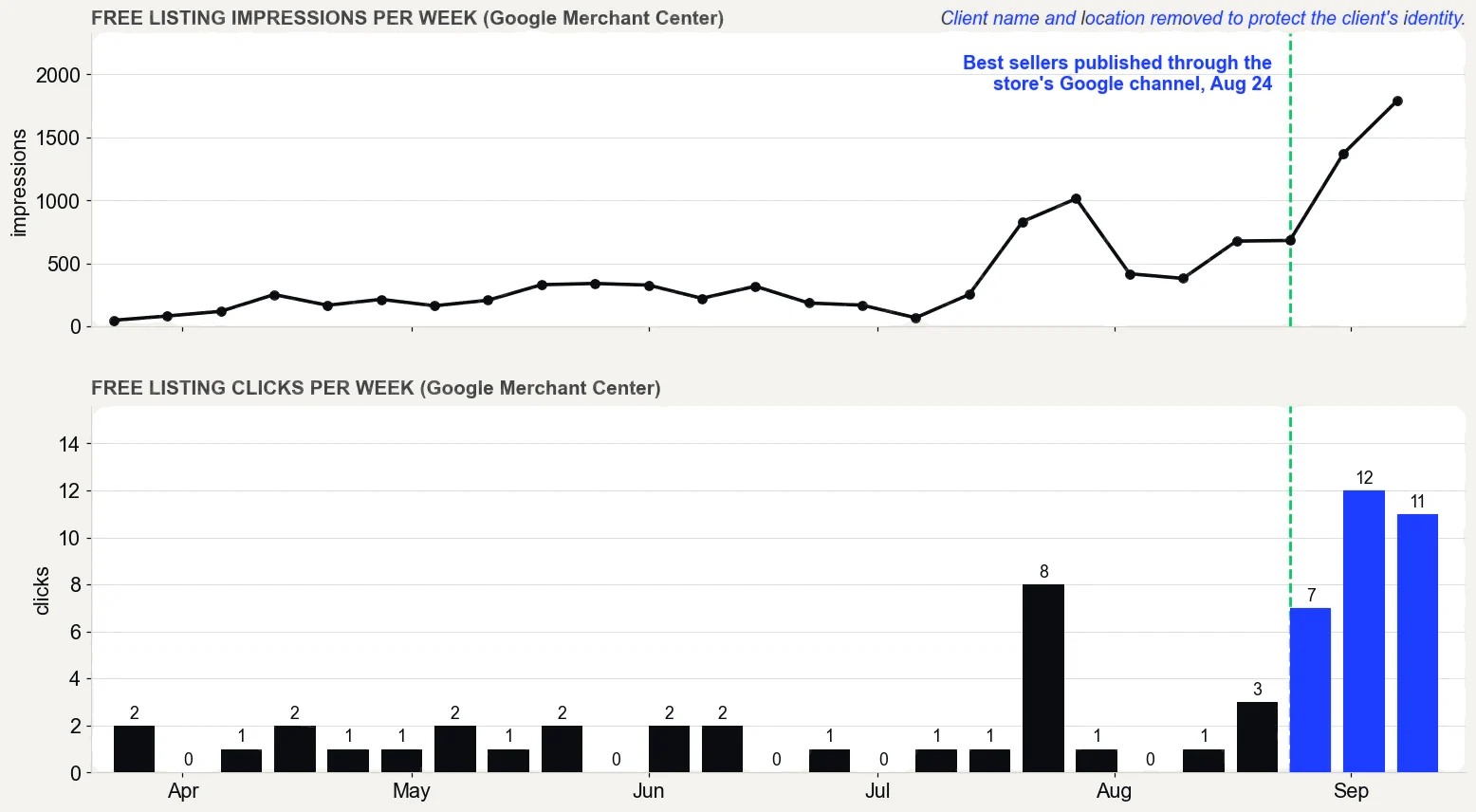
On one direct to consumer store on Shopify, the best sellers were published through the Google & YouTube channel on August 24, 2026, and their pages were rewritten in the same weeks. Free listing clicks went from 5 on 562 impressions (May 5 to June 3, 2026) to 34 on 5,026 (August 17 to September 15, 2026).
Google Merchant Center performance report, free listings only, pulled September 16, 2026. What it does not prove: the product pages were rewritten in the same weeks, so not all of the change comes from publishing, and free listing clicks are still small numbers.
Publishing and rewriting happened together, so the chart cannot credit the descriptions alone. The full story is in the case study.
Can AI write your product descriptions?
It can draft them, but you still own them. Shopify Magic, Shopify’s built-in AI, generates a suggested description from details you provide, such as the product title and keywords.
Shopify’s help center is plain about the catch: you are responsible for the accuracy of everything you publish, even when you use automatic text generation to create it. It asks you to read all generated content closely before publishing.
Use AI for a first draft, then check every fact against the product in your hand. An AI draft does not know your tested numbers, your customers’ questions or your brand voice.
Keep a note of which product descriptions an AI drafted, because Merchant Center treats them differently. More in what Shopify Magic and Sidekick do.
How do you know if a product description is working?
Measure it in Shopify, one product at a time. Shopify’s guide ends on the same advice: set metrics for your product pages so you can tell whether descriptions are leading to more sales.
In Shopify’s Sessions by landing page report, track visits that start on the product’s page, before and after the rewrite.
In Total sales by product, compare the product’s orders for the same number of days on each side of the change.
What the numbers do not prove: one rewrite rarely acts alone. Prices, traffic and seasons move in the same weeks, so change one thing at a time and write down the dates.
Good product description examples all do the same thing: they answer the buyer without making the buyer ask. When your product descriptions do that, more visitors add to cart, fewer write in with questions, and Google has something unique to show for your products. For the bigger picture, see how to increase sales on Shopify.
Straight from the case study, with the source and what it does not prove. See all five results.
Result 3 · Google
Sales from Google: $354 to $5,418 in about 90 days
Before the work$354
→
About 90 days in$5,418
15x
Baseline: the 30 days before the work began
$354 from 2 orders that came in from Google, May 5 to June 3, 2026. The highest-value products in the catalog had never been published through the store's Google channel.
The work: what changed
Rewrote product names, titles, descriptions and search snippets around the terms buyers search, with real weights (August 7 to 30). Built six city landing pages (August 1 and 2). Published the store's highest-value products to the Google channel so they could show in free Shopping listings (August 24). Cleaned up crawl errors and expanded thin product pages to more than 400 words (August 27 to 30).
Result: about three months in
$5,418 from 17 orders that came in from Google, August 17 to September 15, 2026, 15 times the baseline.
Evidence source
Shopify Analytics, Total sales by referrer, Google row, pulled September 18, 2026.
What this does not prove
Shopify does not split Google search from free Shopping listings, so this cannot say which sold more. Four of the 17 orders were deposit orders, worth $2,070. Google Search Console only started collecting data on July 28, 2026, so there are no clicks from before the work to compare.
Test it on your store
In Shopify, open the Google and YouTube channel and check that your best sellers are published to it. In Search Console, open Performance, sort queries by impressions, and note the ones in positions 5 to 15. Then compare the Google row in Total sales by referrer for your most recent 30 days with the 30 days before your last change.
A short example: a heavy canvas tote that stands up on its own and carries a laptop, a water bottle and a change of clothes, with double-stitched handles and an inside pocket for keys. It says what the product is, what it holds and why it lasts, then lists size, material and care.
How do you write a product description?
Name the buyer and the job the product does, collect the facts, and write a first line that says what it is and who it is for. Turn each feature into a benefit backed by a fact, answer the top questions, format it for scanning, and cut any claim you cannot prove.
How long should a product description be?
Enough words to answer every question a buyer has, with the key facts first. Shopify's SEO guidance asks for at least 250 words of descriptive text on every page, and Google's Merchant Center specification suggests putting the most important details in the first 160 to 500 characters.
Can I copy the manufacturer's product description?
It is better not to. Shopify's SEO guidance says to avoid copying manufacturer text because other websites might already use the same description, which gives search engines no reason to choose your page. Use the manufacturer's text as a fact sheet and write your own description.
Should a product description focus on one feature or all of them?
Lead with the one that matters most to the buyer, then list the rest. Nielsen Norman Group found people rarely read web pages word by word, so the first line should carry the main outcome. The other features go in a spec list below it, each stated as a fact the buyer can check.
Should I hire a copywriter for product descriptions?
Either way, the facts have to come from you. You know the sizes, the materials and the questions customers ask, and a copywriter can shape those but cannot invent them. If the budget is tight, draft the first line and the specs yourself, and pay for polish on the best sellers first.
What should a short product description include?
What the product is, who it is for and the main benefit, in one or two sentences, followed by the specifics buyers check first, such as size, material and care. Keep promotions and shipping details out of it, because Google's product data rules say descriptions should describe only the product.
Can Shopify write product descriptions for me?
Yes. Shopify Magic can suggest a product description from details you provide, such as the product title and keywords. Shopify's help center says you remain responsible for the accuracy of everything you publish, so check every fact in the draft against the product before it goes live.
Do product descriptions help SEO?
Yes. Search engines read the words on the page, and Shopify syncs product data to Google Merchant Center for free listings. Unique descriptions give Google a reason to show your page instead of the many stores repeating the same manufacturer text, though no description guarantees a ranking.
Do tabs or accordions hurt product description SEO?
Not when the text is part of the page. Google's mobile-first indexing guidance suggests moving content into accordions or tabs instead of removing it. What Google will not do is load content that needs a click, swipe or typing to load, so check that the text is in the page when it opens.