Home / Insights / Shopify product page optimization: SEO and sales fixes
Sales · 18 min read
Shopify product page optimization: SEO and sales fixes
Your product pages get visits and too few orders, or sit on page two of Google where nobody looks. This checklist fixes both jobs in the order that matters, and shows how to check the result in your own reports.
The short answer
Shopify product page optimization means making each product page easy for Google to read and easy for a buyer to say yes to. Work in order: indexing and product data first, then titles, descriptions, images, total cost and delivery, reviews and speed. Start with the pages that get the most views and the fewest carts.
Shopify product page optimization is the work of making each product page do two jobs at once: get found by search engines and get chosen by buyers. The SEO side covers titles, descriptions, images and structured data. The conversion side covers price, total cost, delivery, reviews and speed.
They are the same page, so they are the same project. Treating them separately is how a store ends up with pages that rank and do not sell, or pages that sell well to the few people who ever find them.
“The product page is the centerpiece of users’ product-purchasing decisions”
That is why the product page is where to start. Home page and blog tweaks matter less when the page where buyers decide is doing half its job.
Why do product pages get visits but no orders?
Usually because the page leaves a question unanswered, and the buyer leaves to answer it somewhere else. Baymard Institute’s benchmark of leading ecommerce sites, updated March 18, 2026, rates 52 percent of desktop sites, 62 percent of mobile sites and 64 percent of apps as mediocre or worse on product page usability.
Nielsen Norman Group’s research across 49 ecommerce sites found two results of a weak product page. Shoppers cannot tell whether the product fits their needs, so they abandon. Or they buy the wrong product and send it back.
On one store, 33 of the 41 people who started checkout during the 30 days to August 20, 2026 finished it (sources: Klaviyo and Shopify). The buyers were not lost at checkout. They were lost earlier, on the product pages and in the traffic that reached them.
It feels like a traffic problem. Often it is a page problem that more traffic only makes more expensive. If the whole store gets visits but no sales, start with Shopify traffic but no sales. The whole-funnel version of this check is in Shopify conversion rate optimization.
How do you find which product pages to fix first?
Start with the pages that get the most views and the fewest carts, then the ones Google shows often and people rarely click. Two reports you already have find both.
If every list of product page tips you find reads the same, this is the step those lists skip: which page to fix first.
Build a product report. In the admin, go to Analytics, then Reports, group by product title, and add Product viewed (session count) and Product added to cart rate.
Mark the leaks. Sort by views. A product with many views and a low add to cart rate is the first fix. Shopify’s own field reference says to improve product pages for items that get viewed but not added to cart.
Open Google Search Console. In the Performance report, open the Pages tab and look for product URLs with many impressions and a low click-through rate, or an average position between 8 and 20.
Confirm Google has indexed them. Paste each URL into the URL Inspection tool, which reports Google’s indexed version of the page.
Check the product data. In Google Merchant Center, where Google keeps the product data it shows in Shopping results, look for products that are disapproved or limited, since those cannot show in Google’s Shopping results.
Pick ten. List the ten products that combine the most attention with the weakest results, and fix those first.
Signal
Where to find it
What it usually means
Many views, low add to cart rate
Analytics in the admin
The page does not answer the buyer: cost, size, proof
Many impressions, few clicks
Search Console, Performance
The title and snippet do not win the click
Average position 8 to 20
Search Console, Performance
Close to page one; better content can move it
Not indexed
Search Console, URL Inspection
Google cannot rank a page it has not indexed
Disapproved or limited
Google Merchant Center
The product cannot appear in Shopping results
What should every Shopify product page include?
Everything a buyer would ask a salesperson, answered before they have to ask.
Nielsen Norman Group lists the must-haves: a descriptive product name, recognizable images with an enlarged view, and the price, including any product-specific charges. The list also covers clear options with a way to select them, availability, a clear add to cart button, and a concise, informative product description.
Here is the full checklist, in the order that usually pays:
A product name in the words buyers search, which the theme turns into the page’s main heading.
A unique SEO title and meta description for the search result.
A description in your own words that answers the real questions.
Large images, including one that shows scale, each with alt text.
The price, plus the shipping cost or a clear estimate, near the button.
A delivery date or window, not only a speed.
Variant choices that are easy to see and select.
Reviews from real customers, with replies to the negative ones.
A link to the return policy.
Structured data that Google can read.
Fast loading on a phone, with nothing covering the product.
Element
What buyers need from it
What Google needs from it
Product title
To know at a glance it is the right item
The words people search, once, without stuffing
Description
Answers on size, materials, use and delivery
Original content that explains the product
Images
Detail, scale and the product in use
Alt text and files it can crawl
Price and total cost
No surprise in the cart
Price and shipping it can match to Merchant Center
Reviews
Proof from people like them
Genuine reviews, never fake or filtered
Structured data
Nothing directly
Product details in a format it can read
How do you write a product title that ranks and sells?
Name the product the way a buyer would search for it, then add the one detail that separates it from the next result. Include the brand when people search for it by brand. The platform uses the product title you enter to generate the page’s H1 heading, according to its SEO help page, so the title does double duty.
Google’s title link guidance asks for titles that are unique, descriptive and concise, and warns against keyword stuffing and boilerplate. It gives a commerce example: titling every page “Cheap products for sale” makes it impossible for users to tell two pages apart.
Product title vs SEO title
Field
Where it shows
Length guide
Product title
The page heading, collections, the cart
As short as stays clear
SEO title
The blue link in Google results
Up to 70 characters in the admin; 60 or fewer avoids cut-offs
Meta description
The text under the link, when Google uses it
About 160 characters
Merchant Center title
Shopping listings on Google
Up to 150 characters
The admin’s limits and advice come from its SEO help page; the 150-character limit comes from Google’s product data specification, which also requires a brand name for most new products. Google can rewrite titles and descriptions it thinks do not match the page, so write them to match. The details are in how to write a Shopify meta description, and finding the words buyers use is covered in ecommerce keyword research.
Should you rank the product page or the collection page?
Match the page to the search. Type the search into Google and look at what already ranks: single products mean a product page can compete, and ranges of products mean a collection page is the better target.
Expect product pages to compete for searches that name one specific item, such as a brand and model, or a product with a size or material in the name. Expect broader searches for a type of product to favor collection pages. If your product pages sit on page two or three for a broad term, they may be chasing a search Google answers with collections.
Collection pages need words and links to compete. Google’s John Mueller has said category pages with nothing on them but links to products are really hard for Google to rank, as Search Engine Roundtable reported.
Google’s ecommerce site structure guidance also asks for links from menus to category pages and from category pages to every product. Googlebot might not find products it can only reach through a search box.
Give each search one page. Let the collection take the broad term and each product its own specific name, and link the two so they support each other instead of competing.
What should a product description include?
Answers, in your own words. The best product descriptions read like a patient salesperson covering the questions customers ask before they buy.
What is it, and who is it for? What size is it, what is it made of and what comes in the box? Add care tips, how to use it and when it arrives.
“Users are not looking for marketing fluff, but for a solid description of the product”
Fluff is also what every other store already has. The detail only you can give is what separates your page from the next result, on Google and in the buyer’s mind. Ecommerce tips that say to write longer descriptions miss this point.
Should you copy the manufacturer’s description?
No. The SEO help page warns against copying text a manufacturer gives you, because other websites may already use it.
Google’s guide to generative AI search, published in May 2026, makes the same point more broadly. Do not just recycle what others have already said, or what a generative AI model could easily produce.
How long should a product description be?
As long as the questions need. The same help page suggests at least 250 words of descriptive text on every page.
Google’s people-first content guidance says plainly that it has no preferred word count. Aim for descriptions that are complete, not long.
Enough to answer what text cannot: detail, scale and use.
Baymard’s testing found that 42 percent of users try to judge a product’s size from its images. Yet 37 percent of the sites it benchmarked offer no image that shows the product in scale. For anything worn, a photo on a real person matters too; 23 percent of sites skip it.
Size and format. The admin’s product media guide says a square image of 2048 x 2048 px usually displays best. Images can be up to 5000 x 5000 px, or 25 megapixels, and must be under 20 MB.
Google’s minimum is rising. As of September 2026, the Merchant Center product data specification announces a new minimum of 500 x 500 pixels for all product images, with enforcement from January 31, 2027.
Alt text on every image. Open the product, click the image, then Edit alt text, and describe what the image shows.
Google’s image SEO guidance says it uses alt text along with computer vision and the page’s content to understand an image. It also warns that stuffing alt text with keywords can make a site look like spam. Upload sizes and file types are covered in Shopify product image size.
Should shipping costs and returns show on the product page?
Yes, both belong near the buy button.
Extra costs such as shipping, tax and fees top the reasons US shoppers give for abandoning orders in Baymard’s cart abandonment research. Yet Baymard found 67 percent of sites give no estimate of the total order cost near the buy button. Its advice is to show the lowest full order cost on the product page by default, including the lowest shipping cost or at least an estimate.
Returns matter just as much. In Baymard’s study of 1,032 shoppers, 60 percent said they look for return policy information on the product page, yet 44 percent of sites neither display nor link to it there.
Google wants the same information. In November 2025, its Search Central blog announced that online merchants can add shipping and return policies directly in Search Console settings, or with organization-level structured data. Settings entered in Search Console take precedence over structured data, and the policies can appear in more search results, including product results.
How do reviews and social proof build trust?
Reviews are the social proof buyers look for, and a handful go a long way. Northwestern University’s Spiegel Research Center found the purchase likelihood for a product with five reviews was 270 percent greater than for one with none. Displaying reviews lifted the conversion rate 190 percent for a lower-priced product and 380 percent for a higher-priced one, in research first published in 2017.
Perfect is not the goal. The same research found purchase likelihood usually peaks at ratings between 4.0 and 4.7, and Baymard’s testing found that shoppers read the bad reviews closely.
Yet 89 percent of the sites it benchmarked never reply to negative reviews, which leaves buyers doubting the product and the customer service. A short, polite reply tells customers someone is paying attention, and the FTC’s own guidance confirms you can respond publicly to a review, as long as you watch what you say.
Keep it genuine. The FTC’s rule on consumer reviews and testimonials went into effect on October 21, 2024, and lets courts impose civil penalties for knowing violations. Fake reviews, and hiding negative ones while implying the rest are all of them, are exactly what it targets.
Does product page SEO need structured data?
It is not required, but it helps. Structured data is code on the page that labels product details, such as price and availability, in a format Google can read. Google’s ecommerce documentation says structured data can help Google understand a page and show it as a rich result, and can improve how accurately it reads price, discount and shipping costs.
Google splits product markup into two kinds. Merchant listings are for pages where customers can buy from you, and cover details such as shipping and return policy. Product snippets are for pages where people cannot buy directly, such as review pages.
Themes from the Theme Store handle the basics: the Theme Store requirements say themes must include Google’s rich product snippets. The Liquid structured_data filter outputs a product as a schema.org Product, or a ProductGroup when it has variants.
Custom code and apps can still change or duplicate that markup, so check. Test a product URL in Google’s Rich Results Test, then open the Merchant listings report under Shopping in Search Console.
How do product pages reach Google’s free listings?
Through Merchant Center. The Google & YouTube channel syncs your products to Google Merchant Center, and for eligible stores selling in the United States, synced products can appear in Google Shopping tab listings for free.
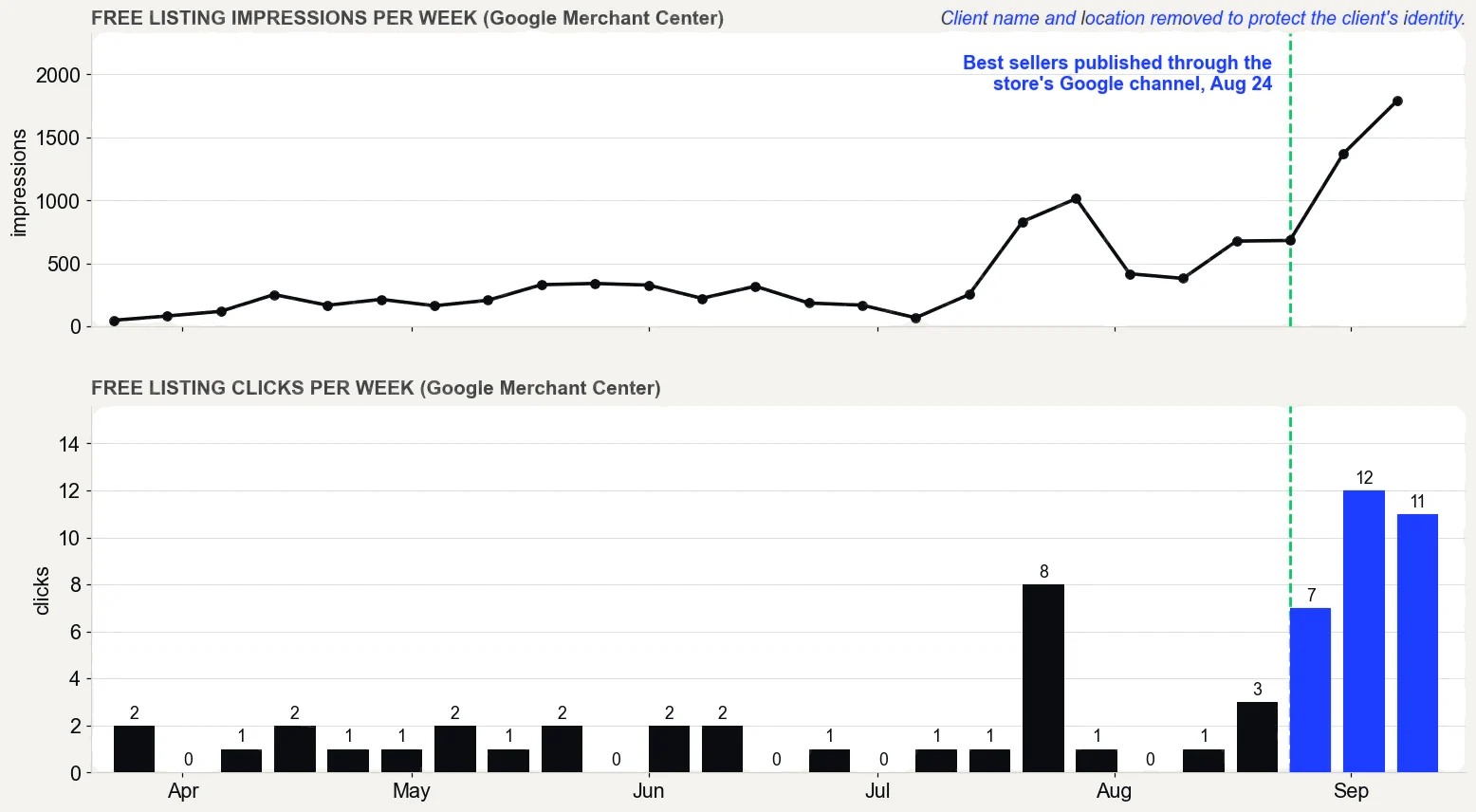
On one store, the best sellers were published through that channel on August 24, 2026.
Free listing clicks went from 5 on 562 impressions (May 5 to June 3, 2026) to 34 on 5,026 (August 17 to September 15, 2026). Before publishing, Google showed thinner versions of the products it had found on its own. Those drew 610 impressions and 3 clicks from July 26 to August 24, against 1,567 and 10 from August 25 to September 15.
Google Merchant Center performance report, free listings only, pulled September 16, 2026. What it does not prove: the product pages were rewritten in the same weeks, so not all of the change comes from publishing, and free listing clicks are still small numbers.
They can, through the same product data. Google’s generative AI guide says AI responses can include product listings and product information, and that Merchant Center feeds can help products appear in both AI responses and other Google Search results.
“SEO best practices remain relevant and foundational to success with our generative AI features”
In other words, the checklist above is the AI checklist, and it sits on top of the site-wide work covered in ecommerce SEO. The same guide says Google Search ignores special AI files such as llms.txt, which is why llms.txt is a low priority for a product page.
How fast should a product page load?
Fast enough to pass Google’s Core Web Vitals on a phone. That means Largest Contentful Paint within 2.5 seconds, Interaction to Next Paint of 200 milliseconds or less, and Cumulative Layout Shift of 0.1 or less. On a product page, the largest element is often the main image, so image weight matters.
Speed shows up in orders. Milliseconds Make Millions, a study commissioned by Google and run by 55 and Deloitte, tracked 37 brand sites in late 2019. A 0.1 second mobile speed improvement came with a 9.1 percent rise in retail shoppers moving from product page to basket.
The behavior reports in Analytics break Largest Contentful Paint down by page type, so you can see product pages on their own.
The quiet ones: copied descriptions, missing redirects and hidden shipping costs top the list. None of them break the page, so nobody notices until the numbers do. Most product page tips cover what to add; these are the things to remove.
Mistake
What it costs
The fix
Copying manufacturer descriptions
The same words as every other seller
Your own details and answers
Changing a URL or deleting a product without a redirect
Visitors and links land on a missing page
A redirect to the closest product
Hiding the shipping cost until checkout
Surprised buyers who leave
A cost or estimate near the button
Size options hidden in a drop-down
Slower, error-prone choices
Buttons, which 57 percent of sites still skip, per Baymard
Keyword-stuffed alt text
A spam signal, per Google
A plain description of the image
A pop-up over the product on a phone
Interrupted buyers and lost trust
A small banner
Filtered or fake reviews
FTC exposure and doubtful buyers
Every genuine review, with replies
The admin’s URL redirect help page explains that when you change a URL, a redirect helps customers still find what they are looking for. When and how to set one up is in Shopify redirects.
How do you know product page optimization worked?
Compare the same products before and after, in two places. Google Search Console reports impressions, clicks, click-through rate and average position for each page. The admin reports views, add to cart rate and, in Total sales by referrer, which channel each order came through.
Give it time. The admin’s SEO help page says you might need to wait a couple of weeks for edits to appear in search results. Search engines have to crawl and index the page again.
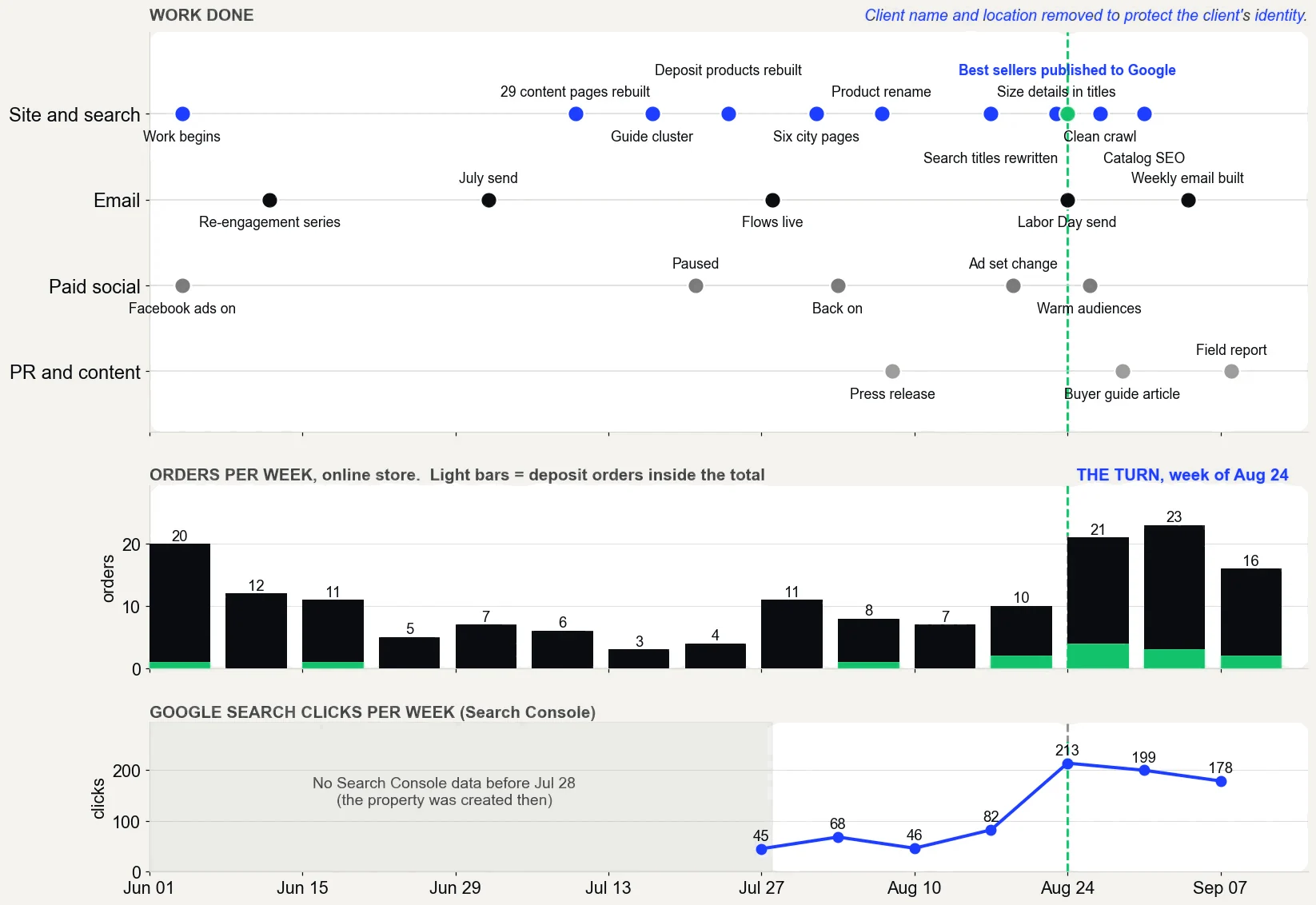
On one store, Google Search Console clicks went from 45 a week (week of July 27, 2026) to 213 (week of August 24), and 178 in the latest week. The product pages were rewritten and the best sellers were published to Google in the same weeks, so no single change gets the credit. The dip in the latest week is a reminder that search traffic moves week to week.
The work, week by week from June to September 2026, with orders per week and Google search clicks per week. Source: Shopify and Google Search Console.
That is the Show Proof stage of The Traffic to Sales Method: count every change in the store’s own reports, with the dates, and say what the numbers do not prove.
What does a fully optimized Shopify product page look like?
A buyer lands from Google and sees the right product at the right price. The total cost, a delivery date, real reviews and a clear way to buy are all there, with no pop-up in the way. Google, in turn, reads the same page and shows it in search results, Shopping listings and AI answers.
That is the whole point of Shopify product page optimization: one page that is easy to find and easy to say yes to, so the visitors you already have are worth more. Leaving the pages as they are means paying for traffic the page then wastes.
To see which of your pages lose buyers, the free Traffic to Sales Check reads Shopify, Google and email side by side. Shopify SEO, done for you, is the same work inside your own accounts, starting with the product pages that already get visits.
The proof, from one store
Straight from the case study, with the source and what it does not prove. See all five results.
Result 3 · Google
Sales from Google: $354 to $5,418 in about 90 days
Before the work$354
→
About 90 days in$5,418
15x
Baseline: the 30 days before the work began
$354 from 2 orders that came in from Google, May 5 to June 3, 2026. The highest-value products in the catalog had never been published through the store's Google channel.
The work: what changed
Rewrote product names, titles, descriptions and search snippets around the terms buyers search, with real weights (August 7 to 30). Built six city landing pages (August 1 and 2). Published the store's highest-value products to the Google channel so they could show in free Shopping listings (August 24). Cleaned up crawl errors and expanded thin product pages to more than 400 words (August 27 to 30).
Result: about three months in
$5,418 from 17 orders that came in from Google, August 17 to September 15, 2026, 15 times the baseline.
Evidence source
Shopify Analytics, Total sales by referrer, Google row, pulled September 18, 2026.
What this does not prove
Shopify does not split Google search from free Shopping listings, so this cannot say which sold more. Four of the 17 orders were deposit orders, worth $2,070. Google Search Console only started collecting data on July 28, 2026, so there are no clicks from before the work to compare.
Test it on your store
In Shopify, open the Google and YouTube channel and check that your best sellers are published to it. In Search Console, open Performance, sort queries by impressions, and note the ones in positions 5 to 15. Then compare the Google row in Total sales by referrer for your most recent 30 days with the 30 days before your last change.
Want a Shopify SEO expert to fix your product pages?Shopify SEO services. On one store, a month of sales from Google went from $354 to $5,418 in about 90 days. I work remotely with Shopify stores across the US.
Straight answers
Questions about this.
How do you optimize a product page?
Start with the pages that get the most views and the fewest carts. Write a title in the words buyers search, answer the real questions in your own description, add large images with alt text, and show the total cost, a delivery date and genuine reviews near the button. Then check structured data and mobile speed.
What is the best product page design for Shopify?
There is no single best design. The pages that work put the product name, price, images, variant choices and add to cart button first, with the shipping cost, delivery date and reviews close by. Pick a theme that loads fast on a phone and judge any change by sales per visit.
What is product page SEO?
Product page SEO is the part of ecommerce SEO that helps search engines find, understand and show a product page. It covers the title and meta description, an original description, image alt text, structured data, indexing and speed. On Shopify it also means product data that Google Merchant Center can use for free listings.
Which product fields count for SEO?
The ones Google reads: the product title, which Shopify turns into the page's H1 heading, the description, image alt text, and the SEO title and meta description that can appear in search results. Shopify's help center names four main places for keywords: page titles, meta descriptions, alt text and a page's body content.
Should product variants be separate product pages?
Usually not. The admin lets you add variants to a product that comes in more than one option, such as size or color, so buyers choose on one page. Google supports both designs, one page with selectable variants or a page per variant. Split a version out only when buyers search for it by name.
How long should a product description be on Shopify?
As long as the buyer's questions need. Shopify's SEO guidance suggests at least 250 words of descriptive text on every page, while Google says it has no preferred word count. Cover what it is, who it is for, size, materials, what is included, care and delivery, then stop.
Do reviews help a product page convert?
Yes. Northwestern University's Spiegel Research Center found purchase likelihood for a product with five reviews was 270 percent greater than for one with none, with the effect larger on higher-priced products. Purchase likelihood usually peaked at ratings of 4.0 to 4.7, so honest mixed reviews can help.
Does my Shopify theme add product structured data?
Themes in the Shopify Theme Store must include Google's rich product snippets. Custom code and apps can change or duplicate that markup, so test a product URL in Google's Rich Results Test and check the Merchant listings report under Shopping in Search Console to confirm Google can read it.
Why is my product page not showing on Google?
Often Google has not indexed it, or it ranks too low to be seen. Check the URL in Search Console's URL Inspection tool, then the Performance report for impressions and position. For Shopping listings, make sure the product is synced through the Google and YouTube channel and approved in Merchant Center.
Should shipping costs show on the product page?
Yes. Baymard found 67 percent of sites give no estimate of the total order cost near the buy button, and extra costs are a leading reason shoppers abandon orders. Show the lowest shipping cost, or a clear estimate, and a delivery date near the add to cart button.