Home / Services / Google Merchant Center and product feeds
Stage 02 · Get Found
Google Merchant Center and free listings for Shopify stores
Google's free product listings cost nothing, and your store can already use them. Most owners have never checked which of their products actually show up there.
The short answer
Google Merchant Center holds your product data for Google's free listings and Shopping ads. A Shopify store connects to it through the Google & YouTube channel. The work is getting the best-selling products published, fixing the data Google rejects, and tracking which orders the listings actually bring in.
Google Merchant Center is where a store's product data lives for Google: titles, prices, images, availability and shipping. Google uses that data to show products in free listings across Search, the Shopping tab, Images, YouTube, Maps and Gemini, and in paid Shopping ads if the store runs them.
How do you get into Google Merchant Center?
Go to merchants.google.com and sign in with the Google account that owns it. A Shopify store usually connects through Shopify's Google & YouTube channel, which links the store to a Merchant Center account during setup. To let someone else work in it, the owner adds them as a person under Access and services, and can remove them at any time.
Do you need Google Merchant Center?
If you want your products in Google's free listings or Shopping ads, yes. You do not have to load products into it by hand. The Google & YouTube channel in Shopify sends them over and keeps them in sync. What still needs a person is checking that the right products are published and approved.
What is the difference between Merchant Center and the Google and YouTube channel?
Merchant Center is Google's account that holds your product data. The Google & YouTube channel is the Shopify app that sends your products to it and keeps them in sync.
Because the channel syncs from Shopify, product data fixed only in Merchant Center can be replaced at the next sync. Fix it in Shopify, at the source.
How much does it cost?
Google does not charge per click for free listings. Shopping ads are a separate, paid Google Ads product. The real cost of neglecting Merchant Center is the listings a store never gets, like best sellers that were never published.
Which check usually finds money?
Open your top products by revenue in Shopify and confirm each is published to the Google and YouTube channel. On the store in the case study, the three highest value items in the catalog were published only to the online store and point of sale.
How does a Shopify store connect to Merchant Center?
In Shopify, go to Sales channels, then Google & YouTube, installing the channel first if it is not there.
Click Connect Google Account and choose the Google account that should own the listings.
Review the setup requirements Shopify lists for your online store, and fix anything it flags.
Select your Merchant Center account or create one, then verify yourself as the owner with the code Google sends to your phone.
Publish your products to the channel, starting with your best sellers, and confirm each one is approved in Merchant Center.
Add shipping and return information, and fix any disapproval in Shopify so the fix survives the next sync.
According to Shopify’s help center, products synced this way can show in Google’s Shopping tab for free for eligible stores selling in the United States.
What does the done-for-you work include?
Connecting or repairing the link between the Google & YouTube channel and Merchant Center.
Publishing the best sellers, and any products added since setup, to the channel.
Fixing disapprovals and warnings in Shopify, at the source.
Adding the shipping and return information Google shows shoppers.
Turning on auto-tagging, which adds a tracking tag to clicks from your Google listings, then counting the orders that arrive through Merchant Center each month.
Keeping free listings separate from any Shopping ads in the reporting.
Why does feed quality decide what shows?
Your titles, product types, variants and images decide which searches a product shows up for, and whether Google quietly rejects it. Product feed optimization means fixing that data in Shopify, where it starts, instead of patching it in Merchant Center.
What goes wrong most often?
Problem
What you see
The fix
Best sellers never published
Top products missing from free listings
Publish them to the Google & YouTube channel
Disapproved products
Issues listed in Merchant Center diagnostics
Fix the product data in Shopify at the source
Weak titles
Products shown for the wrong searches, or not at all
Titles with the terms buyers actually search
Missing identifiers
Warnings about brand or GTIN
Add brand and GTIN where the product has them
No tracking
Nobody can tell which orders came from listings
Turn on auto-tagging and look for srsltid, the tag Google adds to listing clicks, on each order's landing page
What product data does Google require?
According to Google's Merchant Center help, free listings need core product details and correct shipping and returns information:
An ID, title, description, link and image for each product.
Price and availability, and condition for used items.
Brand and GTIN or MPN where the product has them.
Category details such as color and size for clothing.
Shipping settings or shipping costs, plus return policy information.
Shopify fills most of this from the product record, so the fixes belong in Shopify, not in Merchant Center.
How can you tell which orders came from free listings?
Shopify records each order's landing page, and the conversion summary on the order page shows where the customer's visit came from. When Merchant Center auto-tagging is on, Google adds a tag called srsltid to the web address a shopper lands on. An order whose landing page carries srsltid came through Merchant Center, which covers free listings and some regular search results. Read orders that way before giving credit to any one place on Google.
Why keep free listings separate from ads?
Free listings cost nothing and are separate from paid Shopping campaigns. Keep them separate in reporting, or you cannot tell which one is earning.
Merchant Center auto-tagging adds srsltid to clicks from listings. Google Ads auto-tagging adds a different tag, gclid, to ad clicks. Each order's landing page shows which of the two brought the visit.
Which Google surfaces use Merchant Center, and what does each need?
Surface
What it shows
Cost
What it needs
Free listings
Products across Search, the Shopping tab, Images, YouTube and more
No cost per click
Approved product data in Merchant Center
Shopping ads
The same products as paid placements
Paid per click
A Google Ads account and budget
Free local listings
Products in stock at a physical store
No cost per click
Local inventory data and a linked Business Profile
Google Business Profile
The business itself on Search and Maps
Free
A verified profile, separate from product data
This service works on the first row: getting the right products into free listings and keeping them approved.
What did it produce on one store?
Orders that arrived from a Merchant Center listing went from 6 in the 30 days before the work began (May 5 to June 3, 2026) to 17 in the 30 days about three months in (August 17 to September 15, 2026). Each one was counted by the Merchant Center tag on the Shopify order's landing page. Shopify's own channel report files some of those orders under other channels. By that report, sales from Google went from $354 to $5,418.
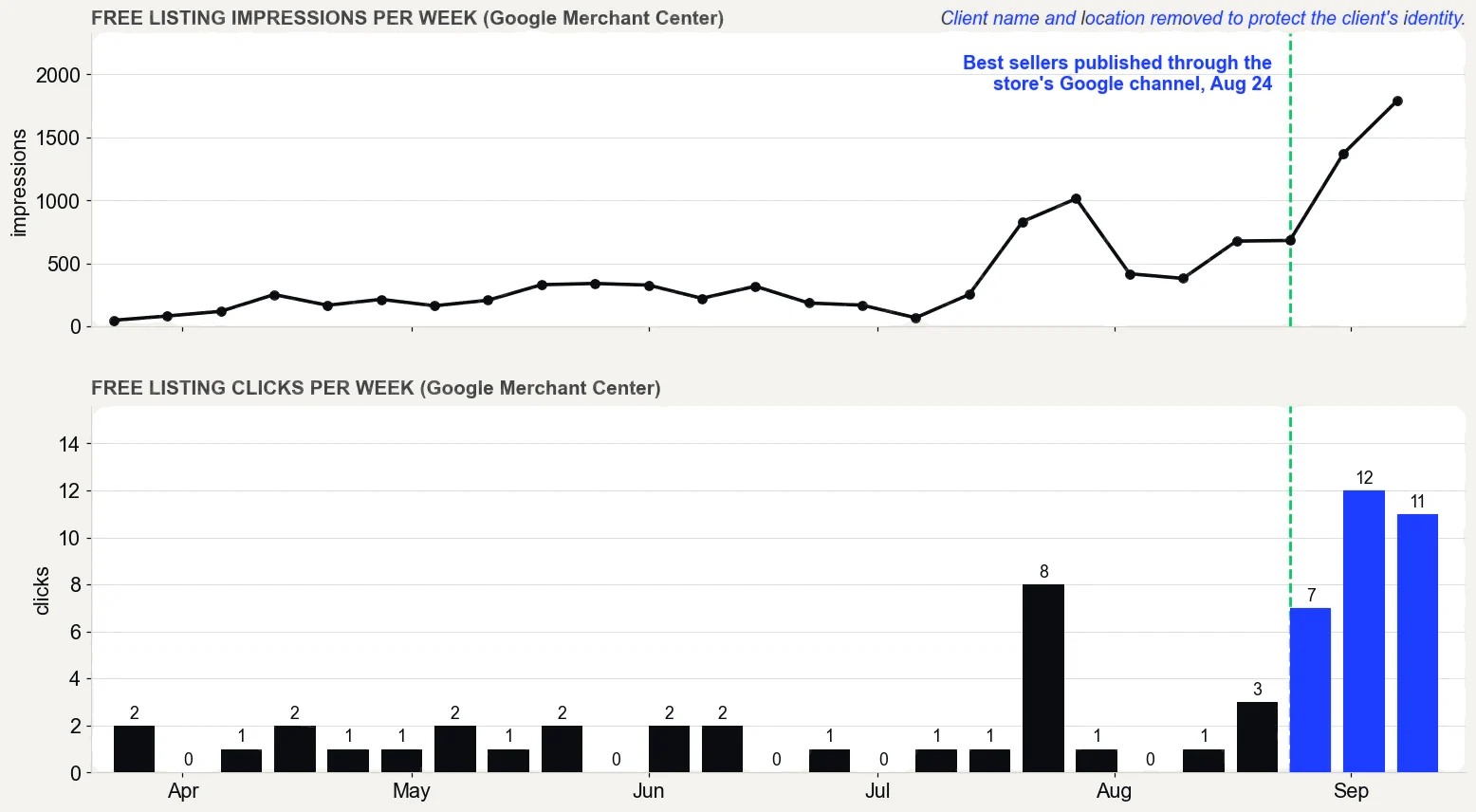
Free listing clicks went from 5 in the 30 days before the work began to 34 in the 30 days about three months in, and impressions from 562 to 5,026, according to Merchant Center.
Google Merchant Center performance report, free listings only, pulled September 16, 2026. What it does not prove: the product pages were rewritten in the same weeks, so not all of the change comes from publishing, and free listing clicks are still small numbers.
The proof, from one store
Straight from the case study, with the source and what it does not prove. See all five results.
Result 3 · Google
Sales from Google: $354 to $5,418 in about 90 days
Before the work$354
→
About 90 days in$5,418
15x
Baseline: the 30 days before the work began
$354 from 2 orders that came in from Google, May 5 to June 3, 2026. The highest-value products in the catalog had never been published through the store's Google channel.
The work: what changed
Rewrote product names, titles, descriptions and search snippets around the terms buyers search, with real weights (August 7 to 30). Built six city landing pages (August 1 and 2). Published the store's highest-value products to the Google channel so they could show in free Shopping listings (August 24). Cleaned up crawl errors and expanded thin product pages to more than 400 words (August 27 to 30).
Result: about three months in
$5,418 from 17 orders that came in from Google, August 17 to September 15, 2026, 15 times the baseline.
Evidence source
Shopify Analytics, Total sales by referrer, Google row, pulled September 18, 2026.
What this does not prove
Shopify does not split Google search from free Shopping listings, so this cannot say which sold more. Four of the 17 orders were deposit orders, worth $2,070. Google Search Console only started collecting data on July 28, 2026, so there are no clicks from before the work to compare.
Test it on your store
In Shopify, open the Google and YouTube channel and check that your best sellers are published to it. In Search Console, open Performance, sort queries by impressions, and note the ones in positions 5 to 15. Then compare the Google row in Total sales by referrer for your most recent 30 days with the 30 days before your last change.
Merchant Center itself is free. The done-for-you work is priced with Shopify SEO: from $1,500 a month, quoted by the size of your catalog.
What that is set against: on one store, free listing clicks went from 5 in the 30 days before the work began to 34 in the 30 days about three months in, according to Merchant Center, and sales from Google reached $5,418. See every price and its sources.
What changes when this works?
Your best products show up in Google’s free listings and bring in orders without a bill attached. Or leave Merchant Center idle, and keep paying for orders your own store could have sent.
Straight answers
Questions about this.
What is Google Merchant Center?
The Google account that holds your product data, such as titles, prices, images and availability, and uses it to show products in free listings and Shopping ads. A Shopify store connects to it through the Google and YouTube channel.
How do I get my Shopify products into Google Merchant Center?
Publish them to the Google and YouTube channel in Shopify, then fix whatever the feed rejects. The more common failure is simpler: the highest value products were never submitted at all.
Do I need Google Merchant Center for my Shopify store?
Only if you want products in Google's free listings or Shopping ads, and most stores do, because free listings cost nothing per click. The Google and YouTube channel syncs your products, so the ongoing work is keeping the right ones published and approved.
How much does Google Merchant Center cost?
Google does not charge per click for free listings. Shopping ads are a separate, paid Google Ads product.
How do I access Google Merchant Center?
Sign in to Merchant Center at merchants.google.com with the Google account connected to your store. If your Shopify store uses the Google and YouTube channel, that is the account linked in the channel's settings.
Why are my products not showing on Google Shopping?
Usually one of three reasons: they were never published to the Google and YouTube channel, Merchant Center disapproved them, or required data such as shipping information or an identifier is missing. Merchant Center's diagnostics list the reason for each product.