Home / Insights / Klaviyo flows: the ones every Shopify store needs
Email · 18 min read
Klaviyo flows: the ones every Shopify store needs
Your flows say live, the Klaviyo bill feels steep, and email still brings in little. Here are the flows worth building first, how many emails each one needs, the settings that quietly stop them, and how to check what they really earn.
The short answer
Klaviyo flows are automatic emails that start when a shopper does something, such as subscribing, starting checkout or buying. Its help center puts four first: welcome series, abandoned cart, post-purchase and winback. Then check that each one actually sends. On one Shopify store, a flow built for 488 people reached 13.
A trigger, the event that lets a person in, such as Started Checkout or Viewed Product.
Filters, the rules that decide who stays in, such as skipping anyone who has bought since entering.
Steps: time delays, messages, and splits that send different people down different paths.
Each customer moves through a flow on their own clock. That is what makes flows useful. It is also why a flow can look busy on the screen while almost nobody is in it.
A Klaviyo flow is not the same thing as Shopify Flow, Shopify’s app for automating store tasks such as tagging high-value customers. The two connect through the Track an event action, which passes an event from Shopify Flow to Klaviyo, where it can start a flow.
What is the difference between Klaviyo campaigns and flows?
A campaign is a one-time send to a list or segment at a time you choose. A flow sends by itself to each person who meets its trigger, from the moment it goes live. Campaigns reach the people on your list today; flows reach people as they act.
Campaign
Flow
Who gets it
Everyone in the list or segment you pick
Each person who meets the trigger and filters
When it sends
Once, when you schedule it
Automatically, on each person's own timeline
Typical use
A weekly email or a sale announcement
Welcome, abandoned cart, winback
Reaches people already on the list?
Yes
Only if they trigger it after it goes live, or you add past profiles
How to judge it
Clicks and orders from that send
Recipients against eligible people, then orders
As of September 2026, Klaviyo's 2026 email benchmarks, drawn from more than 183,000 of its customers, say flows generate nearly 41% of email revenue from 5.3% of sends. That is revenue the platform attributes to itself, by its own rules. Read it as the vendor's figure, not a forecast for your store.
Which flows does a Shopify store need first?
Start with four, in the order Klaviyo's getting started guide recommends: welcome series, abandoned cart, post-purchase and winback. Add browse abandonment and a sunset flow once those four send reliably.
These are the best Klaviyo flows for most stores because they cover the moments a customer is paying attention: joining, almost buying, buying, and drifting away. The email flows ecommerce stores lean on most are the same six:
Flow
Usual trigger
What it needs before it can sell
Welcome series
Added to a list (a new subscriber)
Sign-up forms visitors actually see
Abandoned cart
Started Checkout
Shoppers who reach checkout and give an email
Post-purchase
Placed Order
Accurate purchase data from Shopify
Winback
Placed Order, then a long time delay
Enough repeat buyers to know your buying cycle
Browse abandonment
Viewed Product
Onsite tracking and identified visitors
Sunset
Added to a segment of unengaged profiles
A clear definition of unengaged
Welcome series
The welcome series starts when someone joins your list, usually through a sign-up form. The help center recommends separate welcome flows for email and SMS, because each welcome series flow can only be entered once. It is usually the first email a new subscriber gets from your brand.
Abandoned cart
The abandoned cart flow usually triggers on Started Checkout, with a filter that drops anyone who buys. Before you rewrite it, count how many people it can reach; the arithmetic is in why an abandoned cart email makes so few sales.
A winback flow starts at each purchase and waits, so it only sends to a customer who has not bought again within the delay. Klaviyo suggests setting that delay a little longer than your average buying cycle. The catch with a brand-new winback flow is covered in how to run a win back campaign.
Browse abandonment
Browse abandonment triggers on Viewed Product, which Klaviyo only records for visitors it can identify. That is why it comes fifth, not first; see why browse abandonment emails get no orders.
Sunset
A sunset flow triggers when a profile joins a segment of people who have not engaged in a long time. The setup guide advises no more than three emails, then a tag on everyone who still does not respond so you can suppress them. The point is deliverability, and keeping inactive profiles off your bill.
The flow library holds more than 60 pre-built templates, including back in stock and price drop reminders. More flows do not mean more sales, because each one can only reach the people who trigger it.
Treat the chart as a starting point. The same page says the right frequency varies from business to business, and suggests testing time delays with a conditional split set to a random sample.
A longer flow does not reach more people. Every extra email goes to the same people, or fewer once filters and skips take some out, so a bigger pool beats a longer flow.
How do flow triggers work?
A trigger is the event that lets someone into a flow, and it decides who the flow can ever reach. Klaviyo's guide to flow triggers and filters lists six types: added to a list, added to a segment, a metric (an action such as Started Checkout), a date property such as a birthday, a price drop on an item someone viewed, and low inventory. Performance metrics such as Opened Email and Clicked Email cannot trigger a flow.
Three details decide whether a flow reaches the people you built it for:
List and segment triggers only fire for people who newly join. Someone already on a specific list when its flow goes live does not enter on their own. Importing profiles to a list does fire list triggers, so the help center says to turn list-triggered flows off before an import.
A trigger cannot be changed once it is set. The advice is to copy the flow and pick a new trigger, because the filters and email content depend on it.
Re-entry decides whether people can come back. New list and segment flows default to no re-entry, and metric flows default to allowing it. The help center lists winback flows as a use for re-entry after a set time period.
For people who qualified before the flow existed, the add past profiles tool can queue them as if the flow had been live. It has limits. It does not work for price drop or date property flows, and a metric flow only picks up people whose action still falls inside the flow's timeline.
What are Klaviyo flow filters?
Flow filters decide who stays in a flow after the trigger lets them in. The help center uses two names for the main kind, profile filters and flow filters, and there are two other kinds worth knowing:
Filter
What it checks
When it is checked
Example
Trigger filter
Data from the event that started the flow
Once, when someone enters a metric-triggered flow
Only purchases that include a specific product category
Profile (flow) filter
Who the person is and what they have done
At entry, and again before every message
Has placed an order zero times since starting this flow
Additional message filter
The same, for one message only
Before that one message
Skip email three for anyone who has bought
The profile filter matters most, because it is checked again before every step. That is how an abandoned cart flow stops the moment someone buys. Klaviyo's guide to skipped profiles says abandoned cart flows should always show a lot of skips for exactly that reason.
Someone who fails a profile filter at one step is skipped for that message and stays in line for the following step. Trigger filters on a metric flow are never checked again after entry.
How do you set up a flow in Klaviyo?
Build from a template, set the trigger and filters with care, and set every message live. Then let it run a week and check the sends. Step by step:
Start from the flow library. The help center recommends pre-built templates for your first flows, and they come with suggested timing.
Choose the trigger. Pick it deliberately, because it cannot be changed later.
Add the profile filters. Add the rule that stops the flow at the right moment, usually a purchase.
Add time delays between messages. Steps placed back to back with no delay all happen at once.
Check Smart Sending on each message. It is off by default in a new flow message, but many pre-built flows turn it on.
Set each message to live. A draft message schedules nobody, and a manual message waits for someone to send it by hand.
Add past profiles if needed. Use it when the flow should also reach people who qualified before it went live.
Compare recipients with eligible people a week later. A live flow that has sent to a small share of the people who should have entered it is the first thing to fix.
Those statuses come straight from Klaviyo's flow setup guide. Every flow and every message is draft, manual or live, and only live messages send by themselves.
Why does a flow say live and send nothing?
Usually because something between the trigger and the inbox is filtering people out, while the flow still shows as live. If Klaviyo says your flows are running and your bank balance disagrees, you are not imagining it.
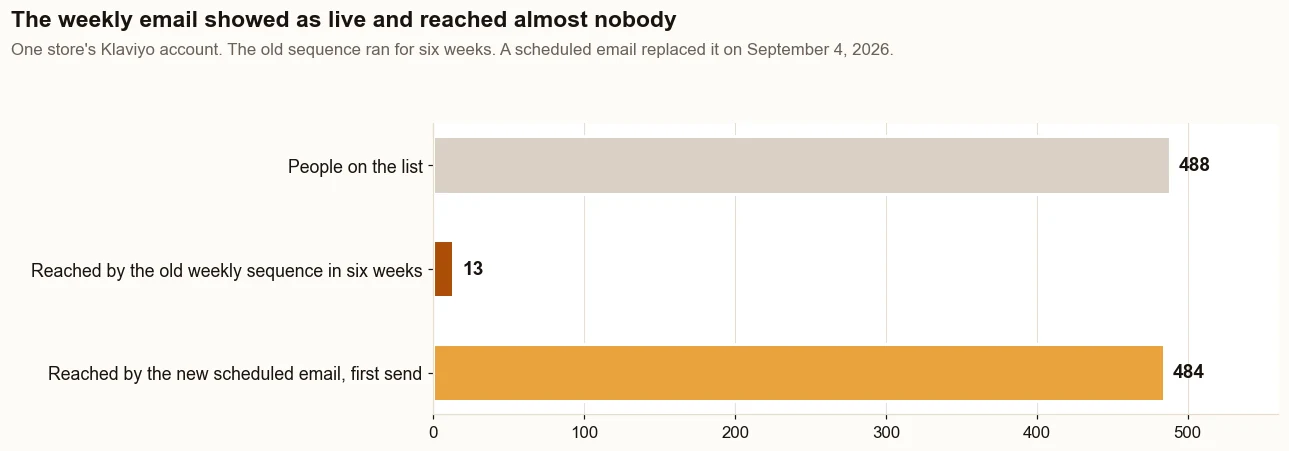
On one direct to consumer store on Shopify, a weekly sequence built for 488 people used the Added to List trigger on a list that existed before the flow did. It showed as live for six weeks and reached 13 of them. On August 20, 2026, Klaviyo showed 438 of the 488 had received nothing in the previous 30 days.
A scheduled weekly email replaced it on September 4, 2026, and reached 484 people on its first send, September 8. Source: the store's Klaviyo account.
The weekly sequence reached 13 people in six weeks while it showed as live. The scheduled email that replaced it reached 484 on its first send. Source: the store’s Klaviyo account.
“Flows break for reasons that have nothing to do with copy or design”
His examples read like a checklist: an integration stops firing, a trigger condition changes, a filter shuts out too many subscribers. Each one can leave a flow marked live, and each shows up in a specific place:
Cause
Where to look
What you see
A message still in draft or manual
The status on each message card
Nobody scheduled, or a pile in Needs review
A trigger that only fires for new joiners
The trigger card
Far fewer recipients than list members
A profile filter that is too strict
Recipient activity, Skipped, Fails flow filters
Many skipped, few delivered
Smart Sending
Recipient activity, Skipped, Smart Sending
Skips after another email went out recently
Suppressed profiles
Recipient activity, Skipped, Person suppressed
People who unsubscribed or hard bounced
A recent edit
The flow's history panel
A change dated the week the sends dropped
Two of those need context. When it is on, Smart Sending skips anyone who got an email within its window, 16 hours by default for email, and skipped messages are not rescheduled. And the troubleshooting guide says to read the flow's history first when a working flow changes, because it shows what changed, who changed it and when.
How many people can each flow reach?
Fewer than most owners expect, because a flow can only email people Klaviyo can identify. Its conversion tracking guide says web tracking only follows known browsers: people who clicked through one of its emails or texts, or signed up through one of its forms.
“Solve identification first, since a better flow only helps once you know who it's reaching.”
That advice comes from the company's own recap of its September 2026 conference, and it matches what one store's numbers showed. In the 30 days to August 20, 2026, 41 people started checkout and 33 finished, leaving 8 for the abandoned cart email, on about 7,500 sessions a month. The same store could identify about 0.8 percent of its visitors (Klaviyo's Active on Site against Shopify sessions).
Count the pool for each flow before you add another one:
Flow
Who can enter
Where to count it
Welcome
New subscribers
New profiles on the list for the month
Abandoned cart
People who start checkout and do not buy
Started Checkout minus Placed Order, unique people
Browse abandonment
Identified visitors who view a product
Viewed Product, unique people
Winback
Customers whose latest purchase is older than the delay
A small pool is not a copy problem. The fix is more identified visitors, which is why Get Names comes before Get Orders in The Traffic to Sales Method.
How do you measure whether flows make money?
Read two numbers side by side: the revenue Klaviyo attributes to each flow, and the orders Shopify ties to email. They count differently, and both are defensible, so report both and label them.
Klaviyo counts a conversion when someone opens or clicks a message and then orders within its attribution window. Its help center sets that window at five days by default for email, for customers who joined after October 9, 2024. Automatic opens from Apple Mail Privacy Protection count too, and Apple says the feature stops senders seeing whether you opened their email.
Shopify's Total sales by referrer report works differently: it shows sales by the specific site your customers came from. On the store in the case study, for August 17 to September 15, 2026, Klaviyo credited email with 23 orders; Shopify's report traced 10 to an email click.
By Shopify's count, sales from email went from $987 (11% of sales) in the 30 days before the work began, May 5 to June 3, 2026, to $4,308 (18%) in the 30 days about three months in, August 17 to September 15, 2026. One deposit order of $2,080 came 17 minutes after a welcome email click; without it, email brought in $2,228, still 2 times the baseline. It is one store, and its Facebook ads ran in both periods; the details are on the results page.
“Built-in testing measures lift against a real holdout of actual customers”
He was describing a new personalization feature, but the standard fits flows too. The question is how many orders a flow adds, not how many it is credited with. A monthly flow report worth trusting shows four columns:
Recipients per flow, beside the number of people who should have entered it.
Klaviyo is widely used: its September 2026 press release names Mattel, TaylorMade and Glossier among more than 205,000 paying customers. Its limits are still worth knowing before you trust it with your email revenue:
You pay for profiles, not results.It bills by billable profiles, the ones still eligible to receive marketing. A list full of people who never engage costs money until you suppress them, and that can leave the bill out of step with what email earns. See what the plans cost as your list grows.
It credits itself generously. Opens, including Apple's automatic ones, can earn an email credit for a purchase made days later.
Some choices are hard to undo. A trigger cannot be changed once set; you copy the flow and start again.
Live does not mean sending. Statuses, filters, Smart Sending or a list trigger can keep almost everyone out of a live flow.
The clever features need volume.Predictive analytics need at least 500 customers who have ordered and at least 180 days of order history, among other conditions.
None of these is a reason to leave. They are reasons to check.
Shopify also has its own option: Shopify Messaging marketing automations cover abandoned browse, cart and checkout, welcome, thank-you and upsell, win back, and customer appreciation emails, sent by default only to customers subscribed to email marketing. If you run both, turn one off for each job, or a shopper can get two reminders for one checkout. The trade-offs are in Shopify Email or Klaviyo.
What should you fix first?
Fix what sends before you fix what it says. The steps below follow the stages of The Traffic to Sales Method, and each one makes the next worth doing:
Check what really sends. Compare every live flow's recipients with the people who should have entered it, and put the email platform's orders beside Shopify's. That is the Traffic to Sales Check stage.
Fix triggers, statuses and filters. A flow that reaches the right people with plain copy beats a beautiful one that reaches nobody.
Grow the pool. Put sign-up forms where visitors land, including your best product pages, so more of your traffic can be identified. That is Get Names.
Build the core flows in the recommended order. Welcome, abandoned cart, post-purchase and winback, then browse abandonment and sunset. That is Get Orders.
Report in Shopify's numbers. Show before and after from Shopify's own reports, with the email platform's view beside it. That is Show Proof.
This is the work behind Klaviyo email, done for you: logging into your own email and Shopify accounts, checking sends against list size, fixing triggers and filters, and reporting both sets of numbers every month.
What do Klaviyo flows look like when they work?
Working Klaviyo flows look almost boring. Each one sends to close to the number of people who should enter it. The welcome series reaches every new subscriber, the abandoned cart flow skips everyone who bought, and the winback flow waits for your real buying cycle.
Your monthly report shows the platform's revenue beside Shopify's orders, and you know which is which. You add a new flow only when the pool behind it is big enough to matter, and you know that because you counted it.
If you want to know which of your flows send and which only say live, the free Traffic to Sales Check reads Klaviyo and Shopify side by side. Left unchecked, a quiet flow costs the orders nobody sees go missing.
The proof, from one store
Straight from the case study, with the source and what it does not prove. See all five results.
Result 2 · Email
Sales from email: $987 to $4,308 in about 90 days
Before the work$987
→
About 90 days in$4,308
4.4x
Baseline: the 30 days before the work began
$987 from 7 orders that came in through an email, 11% of sales, May 5 to June 3, 2026.
The work: what changed
Built welcome, abandoned cart, browse abandonment, win-back and high-ticket follow-up emails in Klaviyo (live July 28). Found that the weekly email only went to people who joined the list after it was switched on, so it reached 13 people in six weeks. Replaced it with a scheduled weekly email (September 4) that reached 484 people on its first send (September 8).
Result: about three months in
$4,308 from 10 orders that came in through an email, 18% of sales, August 17 to September 15, 2026, 4.4 times the baseline.
Evidence source
Shopify Analytics, Total sales by referrer, Klaviyo row, pulled September 18, 2026.
What this does not prove
One deposit order, worth $2,080, was placed 17 minutes after the buyer clicked a welcome email. Without it, email brought in $2,228, still 2 times the baseline. Klaviyo credits email with more, 23 orders for the same dates, because it counts any order placed within days of someone opening or clicking an email.
Test it on your store
In Klaviyo, open each flow and compare recipients over the last 30 days with the size of the list it should reach. Then open Total sales by referrer in Shopify for the same 30 days and find the Klaviyo row. A flow reaching a fraction of its list, or a Klaviyo row near zero, is the place to start.
Want a Klaviyo expert to fix your flows?Klaviyo, done for you. On one store, a month of sales from email went from $987 to $4,308 in about 90 days. I work remotely with Shopify stores across the US.
Straight answers
Questions about this.
What is a flow in Klaviyo?
A flow is an automated series of emails or texts that starts when someone takes an action, such as subscribing, starting checkout or buying, or when a date arrives. Each customer moves through the flow on their own timeline, with time delays, filters and splits deciding what they receive and when.
What is the difference between Klaviyo campaigns and flows?
A campaign is a one-time send to a list or segment at a time you schedule. A flow sends automatically to each person who meets its trigger, from the moment it goes live. Campaigns reach everyone on the list today. Flows only reach people as they act, unless you add past profiles.
What are the best Klaviyo flows for a Shopify store?
Start with the four Klaviyo recommends, in order: welcome series, abandoned cart, post-purchase and winback. Add browse abandonment and a sunset flow once those send reliably. Before building more, count how many people each flow can reach, because a flow with a tiny pool cannot produce many orders.
Why is my Klaviyo flow not sending?
Check the message statuses first: draft messages schedule nobody and manual messages wait for review. Then check the trigger, because list triggers only fire for people who join after the flow goes live. Finally, open the Skipped tab to see whether filters, Smart Sending or suppressed profiles are keeping people out.
Can a Klaviyo flow reach people already on my list?
Not by itself. A list-triggered flow starts when someone newly joins the list, so people who were already there do not enter. The add past profiles tool can queue people who would have qualified earlier. A scheduled campaign is the simplest way to reach everyone on the list today.
What are the weaknesses of Klaviyo?
Pricing rises with billable profiles, so an unengaged list costs money until you suppress it. Its revenue numbers credit opens, including Apple's automatic ones. A flow's trigger cannot be changed once set, a flow can show as live while sending little, and predictive features need at least 500 customers who have ordered.
What big brands use Klaviyo?
Klaviyo's September 2026 press release names Mattel, TaylorMade, Glossier, Liquid Death and Daily Harvest among more than 205,000 paying customers. Big names say little about your store, though. Judge your own flows by how many eligible people they reach and by the orders Shopify ties to email clicks.
How do I know if my Klaviyo flows make money?
Compare the orders Klaviyo attributes to each flow with the orders Shopify's Total sales by referrer report ties to email for the same dates. It counts orders within days of an open or click, so its number is usually higher. Report both, and judge each flow on clicks and orders, not opens.
Can I use Klaviyo for flows and Shopify Email for campaigns?
You can, but it may not shrink the bill much. Klaviyo's plans are based on active profiles as well as emails sent, and any profile it can email counts, even a shopper who gave an email at checkout without opting in. Suppressing people who never engage lowers that count. If you split tools, give each job to one tool.
Is Shopify Flow the same as a Klaviyo flow?
No. Shopify Flow is Shopify's app for automating store tasks, such as tagging high-value customers. A Klaviyo flow sends emails and texts. They connect through Klaviyo's Track an event action, which sends an event from Shopify Flow to Klaviyo, where it can start a flow. The older Create a campaign action was retired in October 2025.