Home / Insights / Klaviyo pricing: what you will actually pay as you grow
Email · 16 min read
Klaviyo pricing: what you will actually pay as you grow
Your Klaviyo bill grows with your list, not your sales, which is how a bill can double while revenue stays flat. Here is what each tier costs as of September 2026, what quietly pushes you up a tier, how to stop spending on people who never open, and how to check the bill is earning its keep in Shopify's own reports.
The short answer
Klaviyo pricing starts free, for up to 250 active profiles and 500 emails a month. As of September 2026, Klaviyo's pricing page lists paid email plans from $20 a month for 500 profiles, $60 for 2,500, $150 for 10,000 and $400 for 25,000. SMS and add-ons cost extra.
Klaviyo costs nothing for up to 250 active profiles and 500 emails a month. After that, the email plan runs from $20 a month for 500 profiles to $1,955 for 150,000, as of September 2026, according to Klaviyo’s pricing page.
Every paid tier includes ten sends a month for each person it covers. SMS and add-ons are billed on top of the email plan.
Active profiles, up to
Email plan per month
Email sends included
250
Free
500
500
$20
5,000
1,000
$30
10,000
2,500
$60
25,000
5,000
$100
50,000
10,000
$150
100,000
15,000
$350
150,000
25,000
$400
250,000
50,000
$720
500,000
100,000
$1,380
1,000,000
150,000
$1,955
1,500,000
Over 150,000
Talk to sales
Set by contract
Source: the price calculator on Klaviyo’s pricing page, read on September 18, 2026. There are more tiers between these rows, and the calculator shows the exact price for your count.
How does Klaviyo pricing work?
Klaviyo pricing rests on two numbers: how many active profiles you have, and how much you send in a billing cycle. Klaviyo’s billing guide says your plan must cover your active profile count, or you are moved to a plan that does at the next billing cycle.
“our combined marketing platform and customer database, uses profiles as the primary pricing unit.”
That one design choice explains the whole bill. You pay for the people Klaviyo can reach, not for the orders they place, so brands whose list grows faster than sales pay more every month.
If you are new to the platform, start with what Klaviyo does for a Shopify store: email, SMS and marketing automation built for ecommerce.
What counts as a send?
Every message that leaves Klaviyo counts toward your allowance, whether it is delivered or bounces. Skipped messages do not count, and double opt-in confirmation messages never count, on any plan.
“great relationships might be built over a few messages or many”
That is why sending comes bundled with each tier instead of billed per message. The catch: the allowance grows with the list, so a bigger list buys more capacity whether you use it or not.
All plans bill monthly, in advance. A paid plan renews on the date you first started paying.
What counts as an active profile?
An active profile is anyone Klaviyo can email, subscribed or not. Klaviyo’s billing guide includes people who shared an email address on a store’s checkout page without opting in to marketing.
That matters for an ecommerce store on Shopify. Every checkout can add a billable person, including one-time buyers who never read a single campaign.
People who unsubscribe, and people you suppress or delete, stop counting once Klaviyo finishes processing them. That refresh can take up to 72 hours.
Where do you see your active profile count?
Click your organization name in the lower left corner of Klaviyo, then Billing. The Overview tab shows the plans you pay for, and the usage view shows how many profiles are billable right now.
What do you get on the Klaviyo free plan?
The free plan gives you up to 250 active profiles, 500 email sends a month, $5 of mobile messages a month and email support for the first 60 days, according to Klaviyo’s pricing page. You can build flows, segmentation and reports on it.
Help gets thinner. After 60 days, free users get the Community and help articles instead of direct support.
Going over stops sending. An account past the 250 limit cannot send or set flow messages live until it drops back under.
For a store that already sells, 250 people fill up fast. Treat the free plan as a trial, not a home.
How is Klaviyo SMS pricing calculated?
SMS is billed separately from the email plan. You choose a monthly amount to spend, each text draws down a dollar rate, and unused spend does not roll over, according to Klaviyo’s guide to its mobile messaging system.
So Klaviyo email SMS pricing is really two lines on one bill. Klaviyo’s billing guide gives $15 or $25 a month as examples of SMS spend, and every account gets $5 of mobile messages free each month.
The rate depends on the channel (SMS, MMS, WhatsApp or RCS), the country and, for US and Canada SMS, whether you text from a toll-free number or a short code. Klaviyo’s formula for one send is rate times recipients times message segments.
What makes an SMS campaign cost more?
Long messages. An SMS over 160 characters, or over 70 with an emoji, splits into segments, and each segment is billed.
Pictures. MMS costs more than a plain SMS.
Failed deliveries. They are billable. Skipped SMS and inbound replies are not.
Volume. Klaviyo recommends a short code once you text more than 95,000 people a month, and the short code costs extra.
Carrier fees are built into Klaviyo’s SMS rates, so compare other platforms on the all-in price. The exact rates for your account sit under Settings, Billing, Account Usage.
What are the hidden costs with Klaviyo?
The costs people miss are add-ons, automatic upgrades when the list grows, overage charges in busy months, and people you pay for but never reach. None of them are secret. They sit in different corners of the pricing page and the help center.
Add-on
What sets the price
Starts at, September 2026
Mobile messages (SMS, MMS, WhatsApp, RCS)
The monthly spend you choose, used up at per-message rates
$5 a month included free
Personalization, formerly Marketing Analytics
Active profile count
$100 a month
Composer, the AI marketing agent
Usage credits
$20 a month
Customer Agent
Conversations it resolves
$50 a month for up to 75
Helpdesk
Support tickets
$10 a month for up to 50
Reviews
Orders placed each month
Priced by order volume
Advanced Klaviyo Data Platform
Total profile count, suppressed people included
Priced by total profile count
Sources: Klaviyo’s pricing page and billing guide, read September 18, 2026.
The Personalization name is new. Andrew Bialecki announced on September 9, 2026 that Marketing Analytics was becoming Personalization, in Klaviyo’s K:BOS 2026 update, and Klaviyo’s billing guide still lists Marketing Analytics from $100 a month for up to 13,500 active profiles.
Two billing rules cost money too. Klaviyo does not refund mid-cycle downgrades, and a downgrade made within 24 hours of your billing date does not take effect.
The biggest hidden cost never shows on an invoice: the people no flow ever reaches.
Why does Klaviyo get so expensive as you grow?
Because the bill follows active profiles, and a Shopify store adds people with every sign-up and checkout, whether they buy again or not. The tiers are also uneven.
At 10,000 active profiles the email plan is $150 a month. At 15,000 it is $350: 50 percent more people for more than double the price. Per person, a 15,000 list costs more than either 10,000 or 25,000.
Since February 18, 2025, Klaviyo’s billing changes require accounts that pay by card to be on an email plan that matches or exceeds their active profile count. Paid plans upgrade automatically at the start of the next billing cycle.
Nothing in that rule asks whether the extra people ever opened anything. A store should not have to pay more every month for people who stopped listening a year ago.
What happens when you go over your Klaviyo plan?
If your list passes your tier, Klaviyo keeps sending and moves you to a plan that covers it at the next billing cycle. If you reach the send limit, what happens depends on a billing preference you set in advance.
Billing preference
What happens when the allowance runs out
Fits
Flexible overages
You buy the next tier’s extra capacity once, at your current plan’s rate, and return to your plan next cycle
A one-off spike, like a holiday sale
Automatically upgrade
You move up a tier the moment you run out, and you stay there
Steady growth
None
Sending stops until the next cycle or until you upgrade, and messages scheduled for the cycle are canceled
A strict budget
Klaviyo’s own worked example: an $80 plan with 35,000 emails that needs 10,000 more flexes to the next tier and pays for all 15,000 extra at $1.14 per thousand, $17.10. You pay for the whole step, not only the part you needed.
Klaviyo says upgrading is generally cheaper than flexing when your extra needs are steady. If one holiday campaign is the only reason, read what to send around Black Friday before you choose.
How do you lower your Klaviyo bill without losing sales?
Stop paying for people who never engage. Find them, give them one last chance, suppress the ones who stay silent, then pick the lower tier yourself.
Check your count. In Billing, note your billable count and the ceiling of your current tier.
Find the silent people. Use Klaviyo’s segmentation to list everyone with no clicks and no orders in the last six months. Use clicks, not opens, because Apple Mail records opens nobody made.
Ask once more. Send that segment a short re-engagement series first, as Klaviyo’s billing FAQ suggests. A win back campaign does the same job for past buyers.
Suppress the rest. Suppressed people keep their history for reports but stop counting toward billing once processed. Deleting cannot be undone, so suppress unless you are sure.
Wait, then downgrade. Give the count up to 72 hours to refresh, then choose the lower tier in Billing more than 24 hours before your billing cycle turns over.
Klaviyo will not downgrade you on its own unless you turn on auto-downgrade, which is available only with flexible overages. The payoff can be large: cleaning a list from 15,000 to 10,000 people moves the email plan from $350 to $150 a month at September 2026 prices.
How do you keep your Klaviyo bill from creeping back up?
Make the cleanup a habit, because a one-off purge starts refilling the day it ends. Every sign-up and checkout adds a billable person, so a store whose revenue has not moved can still watch the bill climb.
If that is your bill, the problem is not you and not your sends. It is people who stopped listening, and Klaviyo now has built-in ways to find them.
Suppression recommendations. Klaviyo’s guide to suppressing and deleting profiles in bulk describes a banner on the Suppressed profiles page. It flags people created at least 365 days ago who got 5 or more emails in about 72 weeks and never opened, clicked, visited or bought.
A safer bulk suppress. When you suppress a segment, Klaviyo offers to suppress only the inactive people, keeping subscribers with a verified human click or an order in about the last six months.
A sunset flow. Klaviyo’s billing FAQ points to a sunset flow to re-engage lapsed people on an ongoing basis, so everyone gets a last chance before suppression.
Can you suppress people before the bill and bring them back after?
Not as a monthly routine. Klaviyo sets your plan from the billable count at the time of billing, so the shuffle can look tempting. The same suppression guide closes it: once a manually suppressed profile is unsuppressed, it cannot be manually suppressed again for 90 days, except in a new account’s first 30 days.
Suppression is not a pause button either. A suppressed profile cannot get marketing messages even if it gave consent, so suppress only the people you have decided to stop mailing.
Is Klaviyo worth it for a Shopify store?
Klaviyo is worth it when its flows actually send and the orders show up in Shopify’s own reports. The price is rarely the real risk. Paying every month for flows that reach almost nobody is.
Ask the vendor and you get a vendor’s answer: Klaviyo’s pricing page answers “Is Klaviyo worth the price?” with “Yes, absolutely.” Every tool grades its own homework, so check the grade in Shopify.
“Klaviyo has become invaluable to hundreds of thousands of merchants”
Invaluable to many stores is not proof it pays for yours. That proof has to come from your own reports.
Klaviyo counts a conversion when someone opened or clicked a message and then bought within the attribution window, five days for email by default on accounts opened after October 9, 2024, according to Klaviyo’s conversion tracking guide. Shopify’s Total sales by referrer report credits the last site the buyer came from.
On one direct to consumer store on Shopify, for August 17 to September 15, 2026, Klaviyo credited email with 23 orders. Shopify’s report traced 10 to an email click. Both numbers are defensible; they count differently.
What does a Klaviyo plan look like when it is not worth it?
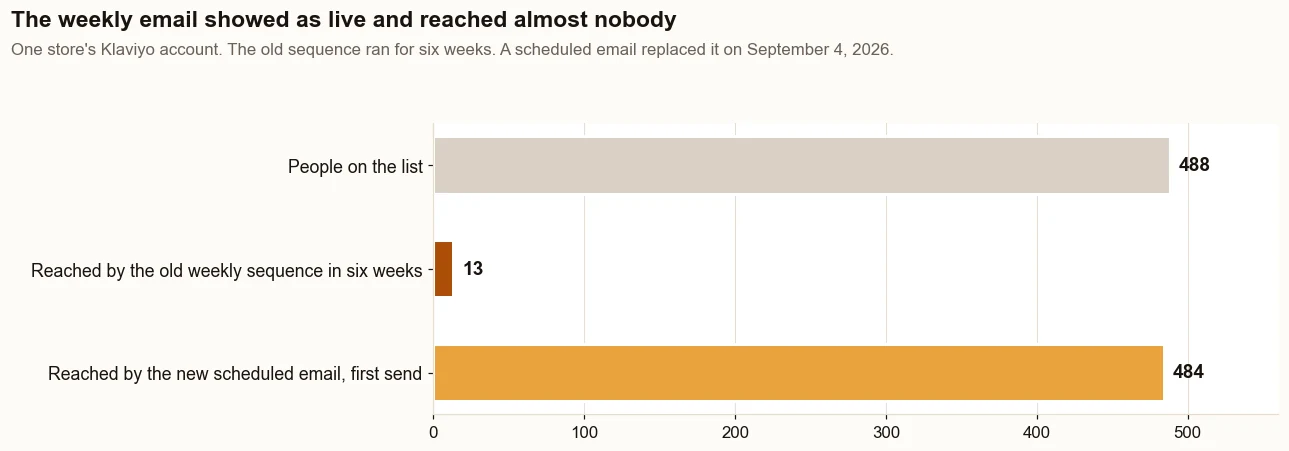
It looks live. On that same store, a weekly sequence built for 488 people showed as live for six weeks and reached 13 of them. Its Added to List trigger only caught people added after the flow went live, and the list was built first.
The weekly sequence reached 13 people in six weeks while it showed as live. The scheduled email that replaced it reached 484 on its first send. Source: the store’s Klaviyo account.
Sales from email on that store went from $982 (19% of sales) in its slowest 30 days before any changes (March 20 to April 18, 2026) to $12,508 (35%) in its best 30 days, about 90 days in (August 17 to September 15, 2026), by Shopify’s own reports.
One deposit order of $9,480 came 17 minutes after a welcome email click. Without it, email brought in $3,028, still 3 times the starting point. It is one store, its Facebook ads ran in both periods, and the full numbers are in the case study.
How does Klaviyo pricing compare with Mailchimp and Shopify Email?
At 500 and 2,500 contacts, Klaviyo’s email plan and Mailchimp’s Standard plan cost the same. At 10,000 and the larger sizes below, Mailchimp Standard costs less, and Shopify’s own email tool charges by messages sent instead of list size.
The units differ, so read the table with care. Mailchimp’s plan guide counts subscribed, unsubscribed and non-subscribed contacts unless you archive them, while Klaviyo stops counting suppressed and unsubscribed people. The same list can land in different tiers on each.
Price is only half the choice. The feature side is in Klaviyo vs Mailchimp for a Shopify store, the built-in option is in Shopify Email or Klaviyo, and wider options are in Klaviyo alternatives.
When checked on September 18, 2026, Mailchimp’s pricing page was also showing a first-year offer: 15 percent off these monthly prices for 12 months.
How do you estimate your own Klaviyo bill?
Add four lines: the email plan for your active profile count, your monthly SMS budget, any add-ons, and room for your busiest month. The calculator on Klaviyo’s pricing page covers the first three.
Line
Where the number comes from
Example store
Email plan
Active profile count, rounded up to the next tier
4,200 people: the 5,000 tier, $100
SMS
The monthly spend you choose
$25
Add-ons
Only what you will use this year
None yet
Busy month
Extra capacity for sales and holidays
Flexible overages, only if needed
Total
About $125 a month
Check the allowance too. The 5,000 tier includes 50,000 emails, so mailing all 4,200 people twice a week, about 36,000 messages a month, fits.
Then check the first line honestly. If a third of those 4,200 people have not clicked in six months, you are paying to reach them anyway.
What does Klaviyo pricing look like when the plan pays for itself?
It looks boring. Every person you pay for can be reached, every live flow sends to the people it was built for, and Shopify’s own reports show the orders email brings in.
Fixes go in a set order: Get Names, then Get Orders, then Show Proof from Shopify’s reports, the later stages of The Traffic to Sales Method. Start with the flows every Shopify store needs, then the list, then the bill.
When that is done, Klaviyo pricing becomes a line you can defend instead of a bill you dread. The free Lost Sales Check reads Shopify, Google and email side by side if you want to see where yours stands; left alone, the list keeps growing and so does the bill.
The proof, from one store
Straight from the case study, with the source and what it does not prove. See all five results.
Result 2 · Email
Sales from email: $982 to $12,508 in about 90 days
Before the work$982
→
About 90 days in$12,508
12.7x
Baseline: the worst case before the work
$982 from 5 orders that came in through an email, 19% of sales, March 20 to April 18, 2026.
The work: what changed
Built welcome, abandoned cart, browse abandonment, win-back and high-ticket follow-up emails in Klaviyo (live July 28). Found that the weekly email only went to people who joined the list after it was switched on, so it reached 13 people in six weeks. Replaced it with a scheduled weekly email (September 4) that reached 484 people on its first send (September 8).
Result: the best case after
$12,508 from 10 orders that came in through an email, 35% of sales, August 17 to September 15, 2026, 12.7 times the baseline.
Evidence source
Shopify Analytics, Total sales by referrer, Klaviyo row, pulled September 18, 2026.
What this does not prove
One deposit order, worth $9,480, was placed 17 minutes after the buyer clicked a welcome email. Without it, email brought in $3,028, still 3 times the baseline. Klaviyo credits email with more, 23 orders for the same dates, because it counts any order placed within days of someone opening or clicking an email.
Test it on your store
In Klaviyo, open each flow and compare recipients over the last 30 days with the size of the list it should reach. Then open Total sales by referrer in Shopify for the same 30 days and find the Klaviyo row. A flow reaching a fraction of its list, or a Klaviyo row near zero, is the place to start.
Klaviyo is free up to 250 active profiles. As of September 2026, its pricing page shows email plans at $20 a month for 500 profiles, $60 for 2,500, $150 for 10,000, $400 for 25,000 and $1,380 for 100,000. SMS and add-ons such as Personalization cost extra.
Why is Klaviyo so expensive?
Klaviyo bills on active profiles, meaning anyone it can email, including shoppers who gave an address at checkout without subscribing. Lists grow faster than sales, and the tiers are uneven: 10,000 people cost $150 a month and 15,000 cost $350, as of September 2026. Suppressing people who never engage lowers the count.
What are the hidden costs with Klaviyo?
SMS, which is a separate monthly spend; add-ons such as Personalization, Composer, Customer Agent and Helpdesk; automatic upgrades when your list passes its tier; flexible overage charges in busy months; and no refunds for mid-cycle downgrades. The largest hidden cost is paying for people your flows never reach.
Is the Klaviyo free plan really free?
Yes, up to 250 people and 500 email sends a month, plus $5 of mobile messages. Email support lasts only the first 60 days, Klaviyo branding stays in your footers and forms, and an account over its limit cannot send or set flow messages live until it drops back under.
Do unsubscribed profiles count toward Klaviyo pricing?
No. Klaviyo bills people who can still receive marketing. Unsubscribed, bounced and suppressed people stay in the account for reporting but stop counting once Klaviyo finishes processing them, which can take up to 72 hours. Deleted people stop counting too, but deletion cannot be undone.
Can I suppress Klaviyo profiles before billing and unsuppress them after?
Not as a monthly routine. Klaviyo sets your plan from the billable count at the time of billing, but once a manually suppressed profile is unsuppressed, it cannot be manually suppressed again for 90 days, except in a new account's first 30 days. Suppress only the people you have decided to stop mailing.
Does Klaviyo tell you who to suppress?
Yes. The Suppressed profiles page can show a recommendation for long-term inactive people: created at least 365 days ago, sent 5 or more emails in about 72 weeks, and never opened, clicked, visited your site or bought. People with a recent human click or order are left out.
How much does Klaviyo SMS cost?
Klaviyo sells SMS as a monthly dollar amount on top of the email plan. Each message draws down a rate that depends on the channel, the country and the number type, with carrier fees included. Every account gets $5 of mobile messages free each month, and unused spend does not roll over.
Can you downgrade a Klaviyo plan?
Yes, once your active profile count fits a lower tier. Suppress or delete the people you no longer need, wait up to 72 hours for the count to refresh, then choose the lower plan in Billing more than 24 hours before your cycle renews. Klaviyo does not refund mid-cycle downgrades.
Is Klaviyo worth it for a small Shopify store?
It is worth it when the flows send to the people they were built for and Shopify's Total sales by referrer report shows orders from email. Compare Klaviyo's attributed orders with Shopify's for the same dates before deciding. A flow that says live and reaches almost nobody makes any price too high.