Home / Insights / Klaviyo alternatives: what to use instead, and when to stay
Email · 21 min read
Klaviyo alternatives: what to use instead, and when to stay
Your Klaviyo bill keeps climbing as the list grows, and email still does not seem to sell. Here is what each alternative costs as of September 2026, what it does differently, and how to tell whether the platform is really the problem.
The short answer
The Klaviyo alternatives most Shopify stores compare are Shopify Messaging, Omnisend, Mailchimp, Brevo and ActiveCampaign. As of September 2026, Shopify Messaging includes 10,000 free emails a month, while Klaviyo charges $20 a month at 500 active profiles. Before you switch, check that your flows actually send and what email earns in Shopify's own reports.
What are the best Klaviyo alternatives for a Shopify store?
The best Klaviyo alternatives for a Shopify store connect to your ecommerce data and fit your list size. They also have to do the jobs your email actually needs. For most stores the shortlist is Shopify Messaging, Omnisend, Mailchimp, Brevo and ActiveCampaign, with Flodesk for simple newsletters.
If Klaviyo now feels too expensive for the value you get, or too much to learn for a store that is just starting, both are fair reasons to look around. They lead to different answers, and this guide covers both.
If you searched for the best email marketing for Shopify, start with the job, not the brand. A store that sends a weekly campaign needs something different from a store whose sales ride on abandoned cart and post-purchase flows.
As of September 2026, according to each vendor's own pricing page, here is where each platform starts:
Your flows depend on shopper behavior and segments
Free to 250 active profiles; $20 a month at 500
Active profiles
Every tool grades its own homework. Mailchimp's Shopify page says customers with a connected store "saw up to a 41x return", based on Mailchimp's own user data. Omnisend's pricing page advertises savings of up to 35% against Klaviyo.
Klaviyo's pricing FAQ answers "Is Klaviyo worth the price?" with "Yes, absolutely." None of that tells you what email earns for your store. Shopify's own reports do.
What should you decide before comparing prices?
Five answers make every price on this page comparable:
Who you can email. Count everyone a platform could bill for, not just subscribers.
How much you send. Add every campaign and every flow email in a normal month. Then check your busiest month.
Which flows earn today. Shopify's report shows what must keep working on day one.
Which channels you need. SMS, web push and WhatsApp are priced differently on every ecommerce email platform.
Who rebuilds the setup. Flows, forms, segments and templates have to be rebuilt or migrated.
Why is Klaviyo so expensive?
Klaviyo prices its email plan on active profiles, and an active profile is anyone Klaviyo can email. Its billing guide says that counts profiles "regardless of consent status", including shoppers who typed an email at checkout without opting in. As that count grows, the price grows with it.
So if your bill keeps climbing while your subscriber count barely moves, look at this rule first.
As of September 2026, Klaviyo's pricing page lists these Email plan prices:
Active profiles
Price per month
Emails included per month
Up to 250
Free
500
500
$20
5,000
1,000
$30
10,000
2,500
$60
25,000
5,000
$100
50,000
10,000
$150
100,000
Two billing rules push the bill up. If your profiles pass your plan's limit, Klaviyo moves you to a "profile-compliant plan" at the next billing cycle.
When the count falls again, the plan does not come down by itself. You choose a lower tier in Billing, or turn on auto-downgrade, which works alongside flexible sending.
For some stores, the cheapest alternative to Klaviyo is a cleaner Klaviyo account. Suppressed profiles stop counting toward the bill once Klaviyo finishes processing them. Its pricing FAQ even recommends suppressing profiles "that are no longer providing value".
“We started Klaviyo with one goal in mind: to personalize at scale.”
That is what the bill pays for. If every subscriber gets the same emails, you are paying for personalization you do not use, and a cheaper tool can do that job. The full cost picture is in what Klaviyo costs as your list grows.
Is the platform really the problem?
Often it is not. The costliest ecommerce email failures are quiet ones: a flow that says live and sends nothing, a sign-up form almost nobody sees, a list nobody has emailed in weeks. Switching tools does not fix any of them.
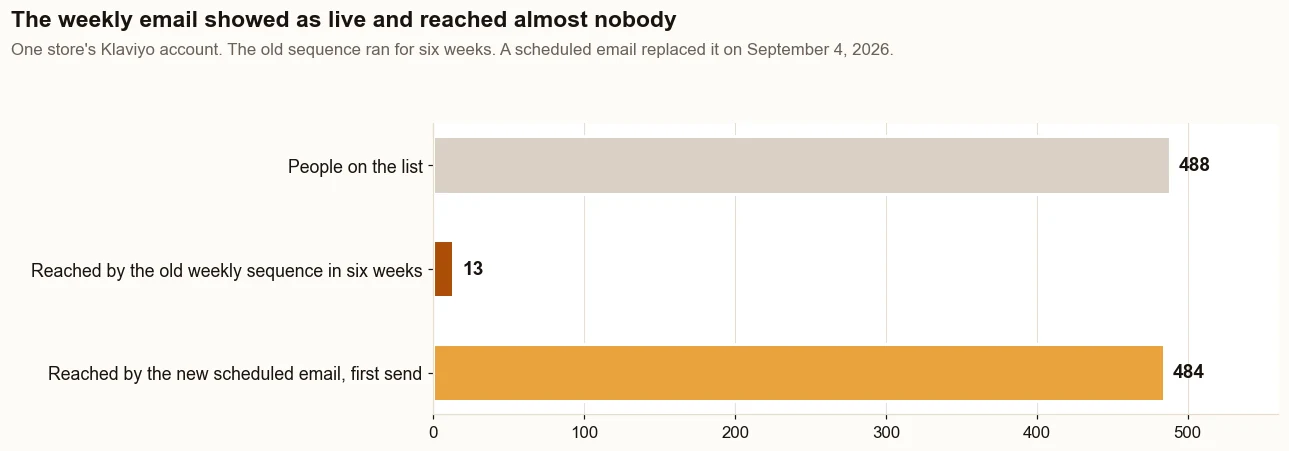
If your dashboard says email works and your bank balance disagrees, you are not imagining it. On one direct to consumer store on Shopify, a weekly Klaviyo sequence built for 488 people showed as live for six weeks and reached 13 of them.
It triggered on Added to List, and the list was built before the flow existed. On August 20, 2026, Klaviyo showed that 438 of the 488 had received nothing over the previous 30 days.
The fix happened in the same Klaviyo account. A scheduled weekly email replaced the sequence on September 4, 2026 and reached 484 people on its first send, on September 8.
The weekly sequence reached 13 people in six weeks while it showed as live. The scheduled email that replaced it reached 484 on its first send. Source: the store’s Klaviyo account.
Sales from email, in Shopify's referring channel report, were $987 (11% of sales) in the 30 days before the work began (May 5 to June 3, 2026). In the 30 days about three months in (August 17 to September 15, 2026), they were $4,308 (18%). One deposit order of $2,080 came 17 minutes after a welcome email click; without it, email was $2,228, still 2 times the start.
It is one store, and its Facebook ads ran in both periods. The sequence fix itself needed no new platform. The details are in the case study.
Does a different email platform fix the sending problem?
No. The sending problem travels with the store, not the tool.
One honest note before the example: the prices and limits above come from each vendor’s own pages, and no Mailchimp account has been run for a client in the work behind these guides. The hands-on work has been in Klaviyo, plus one store whose automated email runs from a separate tool.
That second store sells at a counter and online, on Shopify with its register connected. Its email lives outside Klaviyo, in a separate email tool.
By September 17, 2026, 22 automated emails and 22 customer tags had been built in that tool. The workflows were not yet sending on that date, so the emails existed and had reached no one.
The baseline, taken before the work, showed 0 automated emails. Building 22 was real progress, and it had earned nothing yet, because nothing had gone out.
The store in the case study had the opposite problem in Klaviyo: a flow that said live and reached 13 people. Two stores, two platforms, one lesson. The tool decided nothing; whether the sends went out decided everything.
What it does not prove: neither store switched platforms, so this is not a test of one tool against another. It is the check that matters on every platform: open each automation and confirm that it has sent, to whom, and when.
How do you check what email really earns before switching?
Compare what your email platform credits with what Shopify credits, for the same dates. The two numbers will differ, and the gap tells you how far to trust the dashboard.
Klaviyo counts a conversion when someone opens or clicks and then orders inside its attribution window, the set number of days after an email when Klaviyo still takes credit for a sale. Its conversion tracking guide says that includes opens made automatically by Apple Mail Privacy Protection. For accounts created after October 9, 2024, the default email window is five days.
On the store in the case study, for August 17 to September 15, 2026, Klaviyo credited email with 23 orders. Shopify's report traced 10 to an email click.
Both are defensible. They count differently, so run the comparison yourself:
Pick one 30-day window and use it in every tool.
In your email platform, write down the orders and revenue it credits to flows and campaigns.
In Shopify, open the Total sales by referrer report for the same dates and note the orders from email.
Put the two side by side. A large gap means the platform's figure is a ceiling, not a count.
Judge every flow on clicks and orders, never on open rate.
“iOS 15 has significantly impacted email marketing open rates for ecommerce brands”
Omnisend's analysis of its customers' campaigns found open rates in the 11 months after Apple's change were 93.6% higher than a year earlier. The report ties the jump to Mail Privacy Protection. So every comparison here uses clicks and orders.
What does each alternative cost at the same list size?
At about 500 contacts, the cheapest paid plans run from $9 to $28 a month, and Shopify Messaging costs nothing until you use up its 10,000 free emails a month. The bigger difference is what each price counts.
Platform and plan
Price a month, as of September 2026
Priced on
What it includes
Klaviyo Email
$20
Active profiles
500 active profiles, 5,000 monthly emails
Shopify Messaging
$0 for the first 10,000 each month, then $1 per 1,000
Emails sent
Email campaigns and automations, with SMS charged separately
Omnisend Standard
$16, billed monthly
Contacts
500 contacts, 6,000 monthly emails, unlimited web push
Mailchimp Essentials
From $13
Contacts
Sends up to 10 times your contact limit; flows of up to 4 steps
Mailchimp Standard
From $20
Contacts
Sends up to 12 times your contact limit; up to 200 flows
Read the "priced on" column before the price. Klaviyo counts every profile it can email, subscribed or not. Omnisend's pricing page says it bills "subscribers and non-subscribers who received automated messages", and does not bill unsubscribed contacts.
Shopify charges per email: one campaign to 800 subscribers counts as 800 emails. So compare on the same basis. Take your real number of emailable people, not your subscriber count, and your real monthly sends, including every flow.
A plan that looks cheaper at 500 contacts can cost more once 6,000 emails a month is not enough.
Which channels does each platform cover?
Email is the core everywhere. SMS, web push and WhatsApp vary by vendor and plan, per each pricing page as of September 2026:
Platform
Email
SMS
Web push
WhatsApp
Klaviyo
Yes
Yes, billed per message
Not listed
Yes
Shopify Messaging
Yes
Yes, in select countries, charged separately
Not listed
Yes
Omnisend
Yes
On Pro, from $0.007 a message
Yes, every plan
Not listed
Mailchimp
Yes
Paid add-on in select markets
Not listed
Not listed
Brevo
Yes
Credits sold separately
Yes, from Starter
Listed on Professional
ActiveCampaign
Yes
Add-on, with SMS marketing automation
Not listed
Yes, as its own plan
Flodesk
Yes
Not listed
Not listed
Not listed
"Not listed" means the vendor's pricing page does not show that channel. If SMS matters to you, price it separately: every platform here that offers it charges for text messages on top of the email plan, as an add-on or through credits.
When checked on September 18, 2026, Mailchimp’s pricing page was also showing a first-year offer: 15 percent off these monthly prices for 12 months.
Which Klaviyo alternatives have a free plan?
Three of the alternatives here have a true free plan, and Shopify Messaging includes free emails every month on any paid Shopify plan. Klaviyo's own free plan covers up to 250 active profiles and 500 email sends a month. Klaviyo describes it as best suited for small businesses and brands just getting started with marketing automation.
Platform
Free plan limits, as of September 2026
Worth knowing
Klaviyo
250 active profiles, 500 email sends a month
Basic email templates; email support for the first 60 days
Omnisend
250 contacts, 500 emails and 500 web push notifications a month
24/7 live chat and email support on every plan
Mailchimp
250 contacts, up to 500 sends a month or 250 a day
No marketing automation flows; limited pre-built email templates
Brevo
Up to 300 emails a day
Paid plans remove the daily limit
Shopify Messaging
10,000 free emails a month
Needs a paid Shopify plan; abandoned checkout emails do not count
Flodesk
Forms and landing pages
Its free plan "does not include email sending or workflow automations"
ActiveCampaign
No free plan listed
Four paid plans and a free trial
A free plan is a test drive, not a home. At 250 contacts, one campaign a week to everyone uses about 1,000 sends a month, twice the 500 that Klaviyo, Omnisend and Mailchimp allow for free.
What should you test on a free plan?
Use the free plan to test the parts that decide whether a switch works, before any money or data moves:
Connect Shopify and confirm that customers, orders and product views arrive in the new tool.
Build one real email in its email builder, from your own templates and products.
Build one real flow in its flow builder, with the trigger you would use in production.
Send a test to a Gmail address and check that the message is authenticated for your domain.
Read its report for that test, and note whether it counts opens, clicks or orders.
Is Klaviyo really necessary for a small store?
Not always. If your email is a welcome message, an abandoned checkout reminder and a regular campaign, Shopify Messaging can send all three from your admin. As of September 2026, its first 10,000 emails each month cost nothing on a paid Shopify plan.
If Klaviyo feels like too much right now, in cost and in setup, that is a fair read of where your store is, not a failure to keep up. Klaviyo itself says its free plan is best suited for small businesses and brands just getting started with marketing automation, and that tier stops at 250 active profiles.
When does a small store outgrow the starter tools?
Your emails need to react to behavior, such as a price drop on an item someone viewed, or what they just ordered. Klaviyo’s flows can trigger on both.
You need a custom automation. In Shopify Messaging, anything beyond the templates moves to the Shopify Flow app.
You want texts beyond three moments. Shopify’s SMS automations cover abandoned browse, cart and checkout.
Until then, the bigger question is whether your core flows are on and reaching people. That check works the same on every platform.
Is Shopify Messaging a good Klaviyo alternative?
For a store that mainly sends campaigns and a few standard automations, yes. Shopify Messaging, formerly known as Shopify Email, sends email, SMS and WhatsApp campaigns from the Shopify admin. Every store on the Basic, Grow, Advanced or Plus plan can use it.
What Shopify Messaging does well
Price. According to Shopify's pricing rules, each store gets 10,000 free emails a month, then pays $1 per 1,000, and abandoned checkout automation emails never count toward the limit.
Setup. Shopify offers automation templates for welcome, win-back and upsell emails, with the triggers already chosen.
One place. You send and track emails where your products and customers already live.
Writing help. Sidekick, Shopify's AI assistant, can draft on-brand copy and recommend a send time.
Reports. Each automation shows reach, sessions, orders, conversion rate and sales.
Where Shopify Messaging stops
Custom automations, or any that involve another app, move to the Shopify Flow app, per Shopify's automation guide.
SMS automations cover three moments: abandoned product browse, cart and checkout.
Automations go only to customers subscribed to marketing, except abandoned checkout, which can go to all customers.
It needs Shopify Network Intelligence turned on in your privacy settings.
Shopify backs both approaches. In 2022 it made a strategic investment in Klaviyo, and Klaviyo became the recommended email solution partner for Shopify Plus, according to Klaviyo's announcement. The side-by-side is in Shopify Email or Klaviyo.
Is Omnisend a good Klaviyo alternative?
For many stores, yes. Omnisend is built around the same ecommerce jobs as Klaviyo: email and SMS automation for online stores.
It adds web push notifications and starts cheaper at small list sizes. As of September 2026, its pricing page lists:
Free: 250 contacts, 500 emails and 500 web push notifications a month.
Standard: $16 a month, billed monthly, for 500 contacts and 6,000 emails.
Pro: $59 a month, billed monthly, for 2,500 contacts, with unlimited emails and SMS from $0.007 a message.
Paying three months upfront takes 30% off. Omnisend also offers a free five-day migration, in which its team moves "your flows, lists, and templates and whole setup". It says 24/7 support comes with every plan, including free.
One billing detail matters for stores with big checkout lists: Omnisend bills for non-subscribers who received automated messages. Price that against Klaviyo's active profile rule before you assume the switch saves money.
Which is better, Brevo or Klaviyo?
Brevo is the cheaper start. It prices mainly on how many emails you send each month, with a contact allowance, while Klaviyo prices on active profiles and is built around store behavior, with Shopify data and triggers at its core.
Which is better depends on how much of your email reacts to what shoppers do. As of September 2026, the pricing page for the cheaper option shows:
Free: up to 300 emails a day.
Starter: $9 a month with monthly billing, for 5,000 emails and 500 contacts, with email templates and a drag-and-drop editor.
Standard: $18 a month with monthly billing at the same volume, adding "an unlimited number of automated, multi-step workflows".
Professional: $499 a month with monthly billing, from 150,000 emails, adding WhatsApp, popups, mobile push and advanced ecommerce features such as back-in-stock alerts.
It also sells a separate sales CRM package, connects to Shopify, and on its Standard plan tracks on-site behavior and custom events to trigger messages. Klaviyo's Shopify integration brings customer profiles, orders and on-site browsing events into Klaviyo.
Klaviyo's flows can then trigger on actions such as placing an order or a price drop on a viewed item. If your best emails react to behavior, test how well each tool receives your Shopify customer data before you move.
Is Mailchimp a good alternative to Klaviyo for Shopify?
For newsletters, yes; for automation-heavy stores, only on its higher plans. As of September 2026, Mailchimp's free plan has no marketing automation flows.
Essentials, from $13 a month, allows flows of up to four steps. Standard, from $20 a month, allows up to 200 flows.
Watch the limits as well as the price. On the free plan, Mailchimp pauses sending when you pass the contact or send limit. On paid plans, its pricing page says it bills overages automatically instead.
Mailchimp does connect to Shopify. Its Shopify integration page describes building segments from "customer events passed through Shopify pixels" and says features vary by paid plan.
The same page says customers with a Shopify-connected store "saw up to a 41x return", a figure from Mailchimp's own user data. Treat it like any vendor's number. The full comparison is in Klaviyo vs Mailchimp for a Shopify store.
When does ActiveCampaign make sense instead?
When email is one part of a sales process that also needs a CRM. ActiveCampaign pairs marketing automation with CRM features. Its pricing page lists Shopify among its standard ecommerce integrations, and Shopify Plus among its premium ones.
As of September 2026, Starter is from $15 a month, billed annually, for 1,000 contacts. Starter limits each automation to five actions; Plus, from $49 a month, removes that limit. The pricing page also lists an AI-powered automation builder.
Pipelines and sales engagement come as an Enhanced CRM add-on. If you only sell to consumers, check which of those CRM features you would really use before you pay for them.
What does switching email platforms really cost?
More than the new price. Your sender reputation, the track record inbox providers build from how people react to your emails, stays behind. Your flows have to be rebuilt, and the first weeks with a new sender carry the most risk for your inbox placement.
Your reputation does not move with you
Shopify's warm-up guide says it plainly: when you switch from another email platform, "your sender reputation doesn't transfer". It recommends starting with your most engaged subscribers, growing volume by 20 to 30 percent a week, and leaving out contacts who bounced, complained or unsubscribed.
The inbox rules still apply
Since February 1, 2024, Gmail's sender guidelines require everyone sending to Gmail accounts to set up SPF or DKIM, records that prove the email really came from your domain, and to keep reported spam below 0.3%. Senders of more than 5,000 messages a day also need DMARC, a policy telling inboxes what to do with mail that fails those checks, and one-click unsubscribe. With any new provider, check that it authenticates your domain with SPF and DKIM.
“These practices should be considered basic email hygiene”
Hygiene is not a reason to switch or to stay. It is a checklist the new platform has to pass before your first campaign.
Two connected platforms can double-send
Klaviyo's Shopify guide warns that a previous email platform left connected to Shopify can send double opt-in emails to your existing list. Disconnect the old one first. Shopify gives a similar warning about its own automations: turn on two welcome automations and customers get twice the emails.
How do you switch email platforms without losing sales?
Measure first, then move in a set order, then measure again with the same report. Seven steps cover it:
Record a baseline. Note 30 days of email orders from Shopify's Total sales by referrer report, a number the new tool cannot grade.
Export consent and engagement. Take when and how each person opted in, plus clicks, purchases, bounces and complaints.
Authenticate your domain on the new platform with SPF and DKIM, plus DMARC if you send more than 5,000 a day to Gmail.
Rebuild the flows that earn first: welcome, abandoned cart, post-purchase, then win-back, the order Klaviyo's flow guide recommends. Its flow library can filter pre-built flows by ecommerce integration. See the flows every Shopify store needs.
Disconnect the old platform from Shopify before you connect the new one.
Warm up. Start with people who clicked recently, then grow volume 20 to 30 percent a week.
Compare the same report again after 30 days before you call the switch a success.
The same order works if you stay put. Most of the gains come from steps 1, 4 and 7, on any platform. The basics behind them are in email marketing that earns orders.
What does email look like when it works, on any platform?
It looks boring in the best way. Every flow sends to close to the number of people it should reach, and a regular campaign goes to the whole list.
Shopify's referrer report shows email orders you can point to, and the monthly bill matches the list you actually email.
Get there, and choosing between Klaviyo alternatives becomes a pricing decision instead of a rescue. Skip it, and the same gaps move to the new tool.
Straight from the case study, with the source and what it does not prove. See all five results.
Result 2 · Email
Sales from email: $987 to $4,308 in about 90 days
Before the work$987
→
About 90 days in$4,308
4.4x
Baseline: the 30 days before the work began
$987 from 7 orders that came in through an email, 11% of sales, May 5 to June 3, 2026.
The work: what changed
Built welcome, abandoned cart, browse abandonment, win-back and high-ticket follow-up emails in Klaviyo (live July 28). Found that the weekly email only went to people who joined the list after it was switched on, so it reached 13 people in six weeks. Replaced it with a scheduled weekly email (September 4) that reached 484 people on its first send (September 8).
Result: about three months in
$4,308 from 10 orders that came in through an email, 18% of sales, August 17 to September 15, 2026, 4.4 times the baseline.
Evidence source
Shopify Analytics, Total sales by referrer, Klaviyo row, pulled September 18, 2026.
What this does not prove
One deposit order, worth $2,080, was placed 17 minutes after the buyer clicked a welcome email. Without it, email brought in $2,228, still 2 times the baseline. Klaviyo credits email with more, 23 orders for the same dates, because it counts any order placed within days of someone opening or clicking an email.
Test it on your store
In Klaviyo, open each flow and compare recipients over the last 30 days with the size of the list it should reach. Then open Total sales by referrer in Shopify for the same 30 days and find the Klaviyo row. A flow reaching a fraction of its list, or a Klaviyo row near zero, is the place to start.
There is no neutral ranking. Klaviyo's own site publishes comparison pages against Mailchimp, Postscript, Attentive, Salesforce and Listrak, and Omnisend's pricing page markets itself directly against Klaviyo. For a Shopify store choosing email, the realistic shortlist is Omnisend, Shopify Messaging, Mailchimp and Brevo.
What are the weaknesses of Klaviyo?
Cost and measurement. Klaviyo bills on active profiles, which include people who can be emailed but never opted in, and plans move up automatically but come down only when you choose. Its default attribution counts automatic Apple Mail opens. The free plan stops at 250 active profiles and 500 sends, with email support for 60 days.
What should I do if Klaviyo got too expensive as my list grew?
Clean the list before you compare prices. Klaviyo stops billing suppressed profiles once they are processed, and its pricing page recommends suppressing profiles that no longer provide value. Then price each alternative on the same number of people you can email, because some, such as Omnisend, also bill non-subscribers who received automated messages.
Is Flodesk better than Klaviyo?
For a simple newsletter, Flodesk can cost less to run. As of September 2026, its Pro plan is $28 a month for up to 1,000 subscribers with unlimited sends, against Klaviyo's $30 at 1,000 active profiles. Klaviyo is built around store behavior and flows, so check that Flodesk passes the Shopify events your flows need.
What is the cheapest Klaviyo alternative for Shopify?
Shopify Messaging, for a store already on a paid Shopify plan. As of September 2026, every store on the Basic plan or higher gets 10,000 free emails a month, then pays $1 per 1,000, so 20,000 emails in a month costs $10. Brevo's Starter plan, at $9 a month with monthly billing, is the cheapest paid plan compared here.
Is there a free alternative to Klaviyo?
Yes. As of September 2026, Omnisend's free plan covers 250 contacts and 500 emails a month, Mailchimp's covers 250 contacts without automation flows, and Brevo's allows 300 emails a day. Shopify Messaging includes 10,000 free emails a month with any paid Shopify plan. Klaviyo itself is free up to 250 active profiles.
Is there a Klaviyo alternative that charges per email instead of per contact?
Yes. Shopify Messaging charges only for what you send: as of September 2026, the first 10,000 each month are free, then $1 per 1,000. Brevo also prices mainly on monthly email volume, with a contact allowance. Per-email pricing suits a big list you email now and then; a list you email often can cost more.
What is the best email marketing platform for Shopify?
The one whose flows actually send and whose results show up in Shopify's own reports. For campaigns and standard automations, Shopify Messaging is the cheapest start. For flows built on browsing and purchase behavior, compare Klaviyo and Omnisend side by side. Confirm any pick with Shopify's Total sales by referrer report.
Can I move my Klaviyo flows to another platform?
Plan to rebuild them. Omnisend offers a free five-day migration in which its team moves flows, lists and templates. Your sender reputation does not transfer, so export consent and engagement history before you cancel, then warm up with your most engaged subscribers and grow volume by 20 to 30 percent a week.
Can I start with Shopify Email and move to Klaviyo later?
Yes. Klaviyo's Shopify integration brings your customer profiles and order data into Klaviyo, so past buyers come with you. Rebuild each automatic email as a Klaviyo flow and turn off the Shopify version when its replacement goes live, so nobody gets both. Disconnect any other email app from Shopify first, as Klaviyo's setup guide advises.