Why is your Shopify abandoned cart email not making sales?
Wondering whether abandoned cart emails are even worth it? Before rewriting the copy, work out how many people are eligible. On one store the pool was about eight people a month.
Usually it is because almost nobody is eligible to receive it. An abandoned cart email only reaches people who start checkout and leave, and most shoppers are lost before checkout. On one Shopify store that pool was eight people in 30 days, so no subject line could have fixed the result.
What is an abandoned cart email?
An abandoned cart email is an automated message sent to a shopper who added products or started checkout and left without buying. Shopify can send its own abandoned checkout email. Klaviyo does the same job with a flow, an automatic series of steps: a delay, a message and a link back to the cart. Either way, it can only reach a shopper whose email address the store already has.
Watching full carts turn into nothing is maddening, especially when a reminder is supposed to catch them. Start with who the email can reach.
Why do shoppers abandon a cart in the first place?
Klaviyo’s guide to abandoned cart emails lists the usual reasons, and each one has a fix on the store itself:
| Why shoppers leave, per Klaviyo | What to fix on the store |
|---|---|
| Shipping and other fees are too high | Show shipping costs before checkout, and set a free shipping threshold if the margin allows |
| The delivery estimate is too slow | State delivery times on product pages, not only at checkout |
| They do not trust the site with a card | Familiar payment options and easy-to-find contact and policy pages |
| The return policy is not good enough | A plain return policy linked from product pages |
| There are not enough payment methods | Turn on the payment options your buyers expect |
On the store in the case study, 33 of the 41 people who started checkout finished, so most sales were lost before checkout, not at it.
Whether shipping costs and returns belong on the product page is covered in Shopify product page optimization.
How many people can an abandoned cart email actually reach?
Do the arithmetic before you touch the copy. The people who can receive the email are the ones who start checkout and do not finish. Here is one Shopify store for the 30 days to August 20, 2026:
| Step | Count | Source |
|---|---|---|
| Sessions | About 7,500 | Shopify Analytics |
| People who started checkout | 41 | Klaviyo, Started Checkout, unique people |
| People who finished checkout | 33 | Klaviyo, Placed Order, unique people |
| People left for the abandoned cart email | 8 | 41 minus 33 |
About 80 percent of the people who started checkout finished. That is healthy, and it means the sales were being lost earlier, on product pages and in the traffic itself, not at checkout.
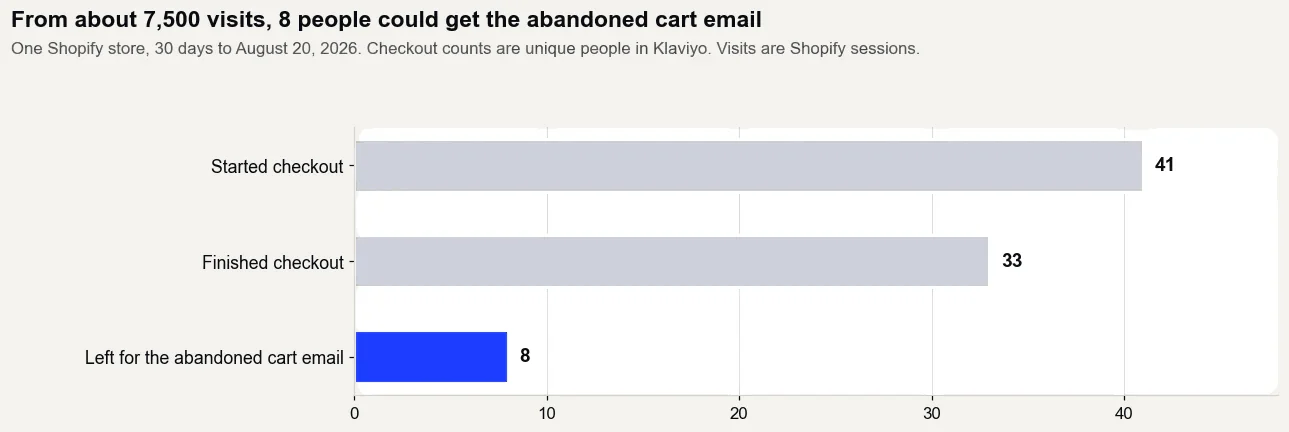
Where do you find those numbers for your own store?
- Sessions: in Shopify, open Analytics, then Reports, then Sessions over time, for the last 30 days.
- People who started checkout: in Klaviyo, open Analytics, then Metrics, then Started Checkout, and count unique people for the same dates.
- People who finished: the Placed Order metric in Klaviyo, for the same dates, counted the same way.
- The pool: subtract the people who finished from the people who started. That is everyone an abandoned cart email can reach in a month.
Shopify also lists abandoned checkouts under Orders, then Abandoned checkouts, which is a quick way to see whether the pool is a handful of people or hundreds.
What was that abandoned cart flow worth?
In the same 30 days, Klaviyo credited the cart flow with $504 from 2 orders on 20 sends. That is a strong return per send on a tiny base. It was also the wrong place to spend the next hour, because doubling a pool of eight people still leaves sixteen.
When is the copy actually the problem?
Match what you see to where the sale is really being lost:
| What you see | What it usually means | Fix this first |
|---|---|---|
| Few people start checkout | Shoppers leave before checkout | Traffic quality, product pages, price, shipping cost |
| Many start checkout, few finish | Friction at checkout | Surprise costs, delivery dates, payment options |
| Most finish checkout and the email pool is tiny | Checkout is healthy | Leave the email alone; work on traffic and product pages |
| A large pool, opens but no clicks | The message is not landing | Subject line, first line, the products shown |
| Clicks but no orders | Something breaks after the click | The cart link, discount code, stock or landing page |
Finding where visitors drop out is the first step in Shopify conversion rate optimization.
Should you use Shopify's abandoned checkout email or a Klaviyo flow?
Either can work, but pick one. Running both means the same shopper can get two reminders for the same checkout.
| Shopify abandoned checkout email | Klaviyo abandoned cart flow | |
|---|---|---|
| Where it runs | Inside Shopify's marketing automations | Inside Klaviyo |
| Who it reaches | Shoppers who started checkout and left | Shoppers the store already has an email address for, depending on the action you choose to start the flow |
| Good fit when | You want one simple reminder | You already run your email in Klaviyo and want several steps |
| How to judge it | Orders recovered in Shopify | Orders in Shopify's sales by referrer, not only Klaviyo's revenue |
The wider choice between the two tools is in Shopify Email or Klaviyo.
How do you set up Shopify's abandoned checkout email?
Shopify can send the reminder itself, with a link back to the checkout. Its help center sets out how it works:
- A checkout counts as abandoned when it stays unfinished for more than ten minutes after the customer enters an email address.
- Recovery works for the Online Store and Buy Button sales channels. Checkouts on Shopify POS or other sales channels do not get a recovery email.
- You can see every abandoned checkout in Orders, then Abandoned checkouts. Shopify deletes them after three months.
- The automatic email lives in Apps, then Messaging, then Automations. Shopify now also offers a newer abandoned checkout automation in its Messaging app, so the screens depend on which version your store uses.
Shopify also lists the cases where it will not send the email at all, which explains a lot of reminders that seem to go missing:
- The customer finished a purchase before the email went out.
- The payment failed with a processing error.
- The store does not ship to the customer's address.
- The customer gave a phone number instead of an email address.
- None of the products in the checkout can still be bought.
- Everything in the checkout was free, with no shipping fee.
- Shopify Payments blocked the checkout as high risk.
Do abandoned checkout emails only go to subscribers?
By default, yes. In Shopify’s newer abandoned checkout automation, built in the Messaging app, the email goes only to customers subscribed to email marketing. Shopify’s help center says you can edit the email’s To: field and choose All customers.
It is frustrating to learn a reminder was only ever reaching subscribers. The default also shrinks the pool above: only shoppers who left checkout and are also subscribed can get it.
That choice exists only for the checkout reminder. Shopify says its marketing automations send only to customers subscribed to marketing, and it lists the cart and product browse reminders among them:
| Shopify automation | Starts when a shopper | Who gets it |
|---|---|---|
| Recover abandoned checkout | Starts checkout and does not complete an order | Email marketing subscribers by default; you can switch it to All customers |
| Recover abandoned cart | Adds products to the cart but does not start checkout | Customers subscribed to marketing |
| Convert abandoned product browse | Views a product but does not add it to the cart or buy | Customers subscribed to marketing |
Two more details from the same help pages. Abandoned checkout emails do not count toward your monthly email total in Shopify Messaging. And switching to the newer automation is permanent: you cannot go back to the legacy abandoned checkout email. To see who a reminder actually reached, open the automation in Shopify Messaging and click View recent activity.
Sending to all customers is a setting, not a legal answer. The consent rules in the section on whether abandoned cart emails are legal still apply.
How do you set up an abandoned cart flow in Klaviyo?
- Connect the store to Klaviyo. Klaviyo then fills its flow library with pre-built flows, including an abandoned cart flow, and recommends starting from that one.
- Check the trigger. Most pre-built versions start on the Started Checkout event, which fires when a shopper enters their details at checkout and moves to the next step. Some store integrations use Added to Cart instead.
- Add the flow filter Placed Order zero times since starting this flow, so anyone who buys drops out.
- Set the time delays. If you want a short one, Klaviyo advises at least 1 hour and 15 minutes, so its data has time to sync.
- Check that the email shows the products left behind. A flow built from scratch needs those product blocks added by hand.
- Set the flow live, then compare its sends with the number of people who started checkout.
How do you stop the email reaching people who already bought?
With a flow filter, a rule that skips shoppers who have already bought. Klaviyo's help center shows abandoned cart flows set up with a filter for people who have placed an order zero times since starting the flow. Klaviyo checks that filter again before each email sends, so a shopper who comes back and buys on their own is skipped instead of reminded about a cart they already paid for.
Check that the filter is still in place after any edit. On a store where 33 of the 41 people who started checkout finished, a flow without it would send most of its reminders to people who had already paid.
How do you measure an abandoned cart email honestly?
Count the orders it actually recovered, not the revenue a dashboard attributes to it. Klaviyo's help center says it counts an order as a conversion when someone opened or clicked the email within its attribution window, the set number of days after an email when Klaviyo still takes credit for a sale. An automatic Apple Mail open counts too. Compare that with the orders Shopify's Total sales by referrer report ties to an email click, and report both.
If you use Shopify’s own reminder, its Abandoned checkouts emails report, in the Growth section, shows the sessions and completed orders the reminders brought back. How to read Total sales by referrer is covered in Shopify analytics: which reports show where sales come from.
How long should you wait before sending?
There is no single delay that works for every store. Shopify's abandoned checkout automation and Klaviyo flows both let you set the wait, so pick one, measure orders against sends for a month, and change one thing at a time. The delay matters far less than the size of the pool it is working with.
As a starting point, Klaviyo's guide suggests sending the first reminder 2 to 4 hours after the cart is left, and a second one 24 to 48 hours later if the first gets no response.
What should an abandoned cart sequence include?
When the pool is small, a short sequence is enough:
| What it does | When it sends | Discount? | |
|---|---|---|---|
| 1. Reminder | Shows the products left behind, with one link back to the cart | After the delay you set in Shopify or Klaviyo | No |
| 2. Answer | Answers what usually stops the purchase: shipping cost, delivery time, sizing or use | Only if the first did not bring the shopper back | No |
| 3. Last nudge | Proof from other buyers or a reason to act now | Only if the first two did not work | Only if the margin allows, and tested |
Whether to add a discount is a margin decision, not a copy decision. A discount in every reminder can teach repeat shoppers to wait for one, so test it on a store with enough eligible shoppers to see a difference.
What goes into a good abandoned cart email?
Klaviyo's guide lists the parts that do the work: a subject line worth opening, clear product details, one prominent button back to the cart, social proof such as reviews, a reason to act now, other products the shopper might like and, sometimes, an incentive. In plain terms:
- Name what was left behind, with a clear image, the product name and the price.
- Make the way back obvious: one button, back to the cart.
- Show that other people bought it, with a short review from a real customer.
- Offer a way out of a wrong choice, with a few related products.
Add one thing the guide does not: the answer to your store's usual worry. If shipping cost is why most carts are left, say what shipping costs.
What subject lines work for abandoned cart emails?
Klaviyo suggests personalizing the subject line with the shopper's name or the product they left. A few plain starting points:
- You left the [product name] in your cart
- Your cart is saved for you
- Still deciding on the [product name]?
- A quick answer about shipping
- Last reminder about your cart
Judge them on clicks and orders, not opens. Apple Mail opens many emails automatically, so an open does not prove anyone read the email. More on that in why your open rate is not real.
Should an abandoned cart email include a discount?
Not by default. Klaviyo's guide lists an incentive as something to tailor, not something every email needs. If you use one, save it for a later email in the sequence, so the shoppers who would have come back anyway still pay the regular price. On a product with thin margins, answering the shopper's question often costs less than a discount.
What does a plain reminder email look like?
Here is a simple first reminder for a store where shipping cost is the usual worry. Swap in your own details.
| Part | What it says |
|---|---|
| Subject | You left the [product name] in your cart |
| Preview text | It is saved. Here is what shipping costs. |
| Opening | Hi [first name], your cart is still here, with the product image, name and price. |
| The worry, answered | Shipping is [your rate], and orders ship within [your time]. |
| Button | Return to your cart |
| Proof | One short review from a real customer |
| Sign-off | Questions? Just reply to this email. |
Are abandoned cart emails legal?
In the United States, it is safest to treat an abandoned cart reminder as commercial email under the CAN-SPAM Act, because the FTC reads the transactional categories narrowly. The FTC's guide requires accurate header information, subject lines that are not deceptive, your physical postal address, a clear way to opt out and prompt handling of opt-outs. Other countries have their own consent rules. This is general information, not legal advice.
How can a shopper stop getting abandoned cart emails?
With the unsubscribe link at the bottom of the email. Under the CAN-SPAM Act, a marketing email has to explain clearly how to opt out, and the FTC says an opt-out request must be honored within 10 business days. If a shopper keeps getting reminders after they have bought, the flow is missing the filter described above.
What actually fixes cart abandonment on a Shopify store?
Two things feed every recovery email: more shoppers reaching checkout, and more visitors the store can identify by their email address. Raising checkout completion recovers orders you almost had. Identifying more visitors, through sign-up forms and email clicks, grows every flow at once. That is why Get Names comes before Get Orders in The Traffic to Sales Method.
The abandoned cart flow is one of several. The rest are in Klaviyo flows, and what to send after the order is in post purchase emails.
- Shopify Help Center: Recovering abandoned checkouts
- Klaviyo Help Center: Getting started with flows
- FTC: CAN-SPAM Act, a compliance guide for business
- Klaviyo Help Center: Understanding message conversion tracking
- Shopify Help Center: Sales reports, including Total sales by referrer
- Klaviyo Help Center: How to create an abandoned cart flow
- Shopify Help Center: Acquisition reports, including Sessions over time
- Klaviyo: Abandoned cart emails, components and best practices
- Shopify Help Center: Opt in to the new abandoned checkout automation
- Shopify Help Center: Creating and managing marketing automations in Shopify Messaging
- Shopify Help Center: Shopify Messaging marketing automations
Does this sound like your store?
If it does, the service that fixes it is Klaviyo email, done for you. You can see the before and after on one store in the case study.
Questions about this.
Why is my Shopify abandoned cart email not converting?
Often because almost nobody is eligible to receive it. Count the people who start checkout and do not finish. On one store with about 7,500 sessions a month, that was eight people in 30 days.
How many people should an abandoned cart email reach?
Only as many as start checkout and leave. Subtract completed checkouts from checkout starts for a month. If that number is small, raise checkout completion and visitor identification before rewriting the email.
How long should I wait to send an abandoned cart email?
Pick a delay, measure orders against sends for a month and change one thing at a time. Shopify's abandoned checkout automation and Klaviyo flows both let you set the wait. The delay matters less than how many shoppers are eligible.
Are abandoned cart emails legal?
In the United States they are safest treated as commercial email under the CAN-SPAM Act, which requires accurate headers and subject lines, your physical postal address, a clear opt-out and prompt handling of opt-outs. Other countries have their own consent rules. This is not legal advice.
What should an abandoned cart email say?
Show the products left behind with one link back to the cart, answer the question that usually stops the purchase, such as shipping cost or delivery time, and keep it short. If only a handful of shoppers are eligible, fix that first.
Are abandoned cart emails worth it?
Yes, if you know how few people they reach. Count the shoppers who start checkout and leave. On one Shopify store with about 7,500 sessions a month, Klaviyo and Shopify put that at 8 people in the 30 days to August 20, 2026. Set it up once, then work on checkout and visitor identification.
Does Shopify's abandoned checkout email go to people who did not subscribe?
Not by default. Shopify's newer abandoned checkout automation sends only to customers subscribed to email marketing unless you edit the email's To: field and choose All customers. Its abandoned cart and product browse reminders are marketing automations, so they reach subscribers only. Whether to email everyone is also a consent question, not just a setting.
Can Shopify send a second abandoned checkout email?
Yes. Shopify's help center says a second abandoned checkout automation defaults to a 10 hour wait and sends only to customers subscribed to marketing, and you can change the wait in Shopify Flow. Shopify also skips anyone who completes a purchase before the email goes out. Judge both emails on orders, not opens.