What belongs on a Shopify SEO checklist?
A free Shopify store optimization check: ten checks you can run on your own store. Each one says where to look, what a good result looks like and what fixes it.
A Shopify SEO checklist should cover more than page titles. These ten checks show whether Google and AI engines can reach your store and include it in their results, whether your best products are in Google's free listings, whether Klaviyo email can reach your visitors, and how much of the month the ads are carrying. Most need only Shopify, Klaviyo and Google Search Console (Google's free report on how your store does in search).
What are the ten checks, at a glance?
| Check | Where to look | Needs work if | What fixes it |
|---|---|---|---|
| 1. Can Google and the AI engines reach your store? | yourstore.com/robots.txt | A crawler you want is blocked, or the password page is on | AI search, Shopify SEO |
| 2. Are your best products listed on Google? | Shopify: Total sales by product, then each product's channels | A best seller is not on Google & YouTube | Google Merchant Center |
| 3. Which of your pages has Google actually indexed? | Search Console: Indexing, then Pages | Pages you want ranking are not indexed | Shopify SEO |
| 4. Where are you almost ranking? | Search Console: Performance, then Queries | High-impression queries stuck in positions 8 to 20 | Shopify SEO |
| 5. Do the AI engines name your store? | ChatGPT, Perplexity and Gemini | Someone else is named instead | AI search |
| 6. How many of your visitors can you identify? | Klaviyo Active on Site against Shopify sessions | About 1 percent or less | Klaviyo email |
| 7. Are your email flows really sending? | Klaviyo: Flows, recipients in the last 30 days | Live, with a handful of recipients | Klaviyo email |
| 8. Is your open rate real? | Klaviyo: open rate beside click rate | Above roughly 50 percent and treated as success | Klaviyo email |
| 9. Which channel really pays? | Shopify: Total sales by referrer | Platforms claim more sales than Shopify recorded | Shopify store audit |
| 10. How much are the ads carrying? | Ad spend and fees against Shopify's sales by referrer | Most of the month's orders come from paid clicks | Shopify store audit |
How do you run each check?
- 01
Can Google and the AI engines reach your store?
If Google or an AI engine is blocked from reading your store, nothing else on this list can help yet, so this check comes first.
- Where to look
- Open yourstore.com/robots.txt in a browser. Every Shopify store has a default robots.txt file, and it only changes if someone adds a robots.txt.liquid file to the theme.
- Good result
- No rule that blocks the whole site (
Disallow: /on its own) for Googlebot, GPTBot, ClaudeBot or PerplexityBot, and the store's password page is off. Lines that block /admin or /cart are normal. - Needs work
- One of those crawlers is blocked, or the store is still behind its password page.
- What fixes it
- AI search and Shopify SEO, in the Get Found stage.
- 02
Are your best products listed on Google?
Google will show your products in free listings, but only the ones that are published and approved.
- Where to look
- In Shopify, open Analytics, then Reports, then Total sales by product, and note your top five. Open each of those products and check that it is published to the Google & YouTube channel.
- Good result
- All five are published to Google & YouTube, and Merchant Center shows no issues on them.
- Needs work
- A best seller is missing from the channel, or Merchant Center flags a problem with it. On one store, the highest-value products had never been published to it.
- What fixes it
- Google Merchant Center, in the Get Found stage.
- 03
Which of your pages has Google actually indexed?
A page Google has not indexed cannot rank, however good it is.
- Where to look
- In Google Search Console, open Indexing, then Pages, and read the reasons under Why pages aren't indexed.
- Good result
- The product and collection pages you want ranking are indexed. Sorted and filtered collection URLs showing as not indexed is normal.
- Needs work
- Products or collections you care about are listed as “Crawled - currently not indexed” or “Discovered - currently not indexed.”
- What fixes it
- Shopify SEO, in the Get Found stage.
- 04
Where are you almost ranking?
Queries where you already appear near the top of Google are the fastest to move.
- Where to look
- In Search Console, open Performance, then Search results. Turn on Average position, open the Queries tab and sort by Impressions.
- Good result
- Your highest-impression queries sit near the top and bring in clicks.
- Needs work
- Searches where your store shows up often but sits between positions 8 and 20. That is the bottom of page one and page two, where a small move up can bring more clicks.
- What fixes it
- Shopify SEO, in the Get Found stage.
- 05
Do the AI engines name your store?
Buyers ask AI engines what to buy, and the answer names someone. Check whether it is you.
- Where to look
- Ask ChatGPT, Perplexity and Gemini the three questions your buyers ask before they buy. Write down whether your store is named, and who is named instead.
- Good result
- Your store is named, ideally with a link to your own pages.
- Needs work
- A competitor or a marketplace is named instead, or no store is named at all.
- What fixes it
- AI search, in the Get Found stage. More in the ChatGPT SEO guide.
- 06
How many of your visitors can you identify?
Every automatic email in Klaviyo can only reach the visitors your store can put a name to.
- Where to look
- In Klaviyo, open the Active on Site metric, which Klaviyo records when a visitor it can identify is on your store. Count the people who triggered it in the last 30 days. In Shopify, open the Sessions over time report for the same dates. Divide the first number by the second.
- Good result
- Enough identified visitors for each flow to get real traffic. At 7,500 sessions a month, 2 percent is about 150 people.
- Needs work
- About 1 percent or less. On one store it was about 0.8 percent in the 30 days to August 20, 2026, which starved every email flow.
- What fixes it
- Klaviyo email, in the Get Names stage. More in the browse abandonment guide.
- 07
Are your email flows really sending?
A flow can show as live for weeks and send almost nothing.
- Where to look
- In Klaviyo, open Flows. For each live flow, compare its recipients over the last 30 days with the number of people who should have triggered it.
- Good result
- Recipients roughly match what the trigger should produce.
- Needs work
- A live flow with a handful of recipients. One store's weekly email sequence showed as live for six weeks and reached 13 people.
- What fixes it
- Klaviyo email, in the Get Orders stage. More in the email audit guide.
- 08
Is your open rate real?
Apple Mail Privacy Protection records opens that nobody made, so a high open rate can be mostly machines.
- Where to look
- In Klaviyo, look at the open rate and the click rate side by side for your last few campaigns.
- Good result
- Email is judged on clicks, revenue per recipient and orders in Shopify.
- Needs work
- An open rate above roughly 50 percent reported as success. That is mostly machine opens.
- What fixes it
- Klaviyo email, in the Get Orders stage. More in the open rate guide.
- 09
Which channel really pays?
Every platform takes credit for the same sale. Shopify's own report is the tiebreaker.
- Where to look
- In Shopify, open Analytics, then Reports, then Total sales by referrer, for one month. Set it beside what Facebook, Google and Klaviyo each claim for the same dates.
- Good result
- The platforms' numbers are close to Shopify's.
- Needs work
- Added together, the platforms claim more sales than Shopify recorded.
- What fixes it
- Shopify store audit, in the Lost Sales Check stage.
- 10
How much are the ads carrying?
This number is the starting line that every other result gets measured against.
- Where to look
- Add up one month of ad spend, plus anyone you pay to run the ads. Set it beside the sales Shopify's Total sales by referrer report gives Facebook and Instagram for the same month.
- Good result
- Search, free listings and email carry a growing share of the month.
- Needs work
- Most of the month's orders come from paid clicks.
- What fixes it
- The whole method, starting with the Shopify store audit. More in the Facebook ads guide.
Which SEO basics should every Shopify store have?
The checks above find where sales go missing. These are the on-page basics every Shopify store should also have in place, and where to set each one, according to Shopify's and Google's own help pages.
| What to set | Where in Shopify | What good looks like |
|---|---|---|
| Page title | The Search engine listing section of each product, collection and page | Unique and descriptive. Shopify suggests 60 characters or fewer so results do not cut it short. |
| Meta description | The same Search engine listing section | Unique for every page, in plain language. Shopify recommends about 160 characters. |
| URL handle | The same Search engine listing section | Short and readable, using the words buyers search for. |
| Image alt text | Products: open the product, click the image, then Edit alt text | Describes what the image actually shows. |
| Sitemap | Shopify creates it automatically at yourstore.com/sitemap.xml | Submitted in Google Search Console, under Sitemaps. |
| Crawler access | yourstore.com/robots.txt | No crawler you want is blocked. |
| Duplicate URLs | Created for filtered and sorted collections, and for products reached through a collection | Google treats the page you want ranking as the main version. |
| Collection pages | Products, then Collections | Collections that match real searches, each with its own description and internal links. |
| Speed and Core Web Vitals | Shopify’s web performance reports, from the Themes page or the Reports list | Good ratings from real visitors for loading, interactivity and visual stability. |
| Out-of-stock products | The product page, and Content, then Menus, then View URL redirects | Pages stay live when the product is coming back; products gone for good redirect to the closest one. |
| What shoppers search for | Analytics, then Reports, then Searches by search query | The words buyers type match your product and collection names. |
These basics matter, but they are rarely the whole story. On the store in the case study, the biggest changes came from the checks that go past on-page SEO: getting the best products onto Google and getting email to reach people. Sales from Google went from $285 to $8,668, and sales from email from $982 to $12,508, comparing the slowest 30 days before the work with the best 30 days after.
What belongs on the checklist for each type of page?
The table above covers settings every page shares. Each type of page also has a job of its own. These are the checks for each one, with where to make the change in Shopify.
Home page
- A title and meta description written for the store as a whole. Set them in Online Store, then Preferences, in the Social sharing image and SEO section.
- The first lines say plainly what you sell and who it is for, using the words buyers search.
- Links to your main collections, so shoppers and crawlers reach them in one click.
- A social sharing image, set in the same Preferences section, so links to the store look right when shared.
Collection pages
- One collection for each way buyers actually search: by use, by size, by material or by occasion.
- A description of its own. Shopify's guidance is at least 250 words of descriptive text on every page.
- A title and meta description in the Search engine listing section that name what the collection holds.
- Alt text on the collection's featured image: open the collection, then Update, then Edit image.
- A link from the menu or the home page. A collection nobody links to is hard for Google to find.
- Filtered and sorted versions left alone. Google is supposed to treat them as copies of the main collection.
Product pages
- A product title with the words buyers use. Shopify turns the title into the page's main heading.
- Your own description, not the manufacturer's. Shopify warns that copied text may already be on other websites.
- The details buyers ask about, written out in the description: size, material, weight, fit, care and shipping time. Detail that only lives inside a size or color menu is easy to miss.
- Alt text on every image that says what the image shows.
- Price and availability that match what Google shows in the free listings.
- Published to the Google & YouTube channel, so the product can appear in Google's free listings.
Blog posts and pages
- One question answered per post, in the words buyers use to ask it.
- Enough to answer it well. Shopify's guidance is at least 500 words for informational pages and blog posts.
- Links from the post to the products or collections it is about.
- A title and meta description, set for a page in Online Store, then Pages, under Edit website SEO.
What goes on a technical SEO checklist for Shopify?
Shopify handles more of the technical side than most platforms, so the technical list for a Shopify store is short. These are the items worth checking once, and then again after any big change.
- The store is public. Google cannot read the sitemap of a store in private mode.
- One main domain. If you own more than one domain and are not using them for different countries, Shopify says to redirect them all to your primary domain.
- The default robots.txt file is left alone unless there is a specific reason to change it. Shopify calls its default file optimal for SEO, and warns that a wrong edit can cost a store all of its search traffic.
- Broken links are redirected. In Shopify, a redirect only works from an address that shows a Page not found error, and a store can have up to 100,000 redirects.
- The Page indexing report in Google Search Console is checked each month, so a product or collection that drops out of Google is caught early.
- The sitemap is submitted once in Google Search Console. Shopify keeps it up to date on its own after that.
How do you find the keywords your buyers use?
You do not need a paid tool to start. The best keyword list for a store that already sells is sitting in two free reports and in Google itself.
- In Shopify, open Analytics, then Reports, then Searches by search query. These are the words shoppers type into your own store's search box.
- In Google Search Console, open Performance, then Search results, and sort the Queries tab by Impressions. These are the searches Google already shows your store for.
- Type your main product words into Google and note the suggestions that appear as you type, and the questions under People also ask.
- Give each phrase one page: a collection for broad searches, a product page for a specific product, a blog post for a question.
- Use the phrase in the four places Shopify names for keywords: the page title, the meta description, the image alt text and the words on the page.
- Check again in a few weeks. Google says some changes show up in a few hours and others can take several months.
What if you sell in specific cities?
Stores that deliver to certain cities, or let customers pick up, have a second way to be found: local searches, including the ones that end in “near me.”
- A Google Business Profile can put the store on Google Maps and in local results. It is for businesses with a storefront or a service area. Google says a rented mailing address with nobody working there is not eligible.
- City pages only where there is something real to say: delivery days, pickup points, or what customers in that city order. Google's spam policies name pages aimed at different cities that all funnel visitors to one page as doorway abuse.
- Local searches tracked by city. Rankings in one city can differ from rankings in the next, so check from the cities you actually serve.
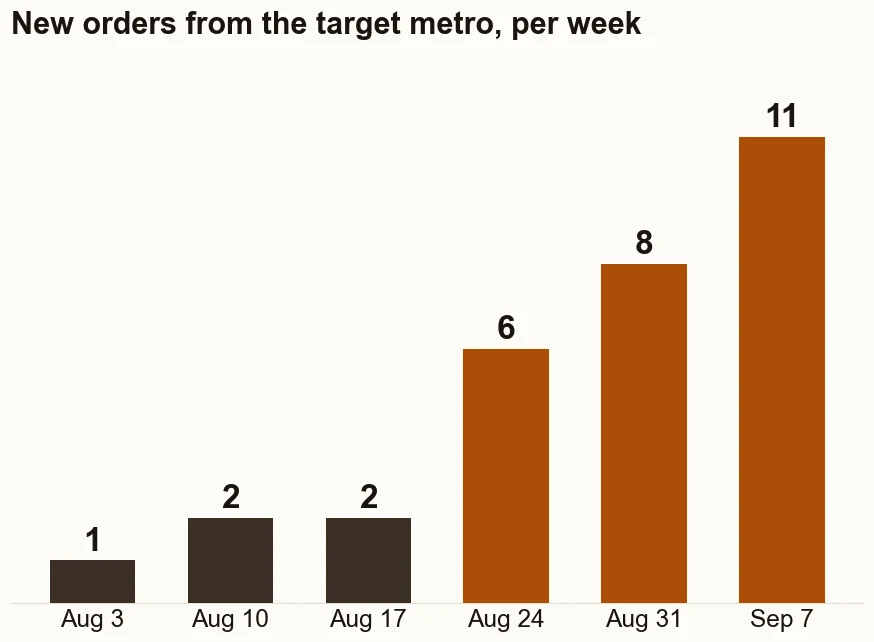
On the store in the case study, six city pages went live in August 2026. On September 11, 2026, 170 of 246 “near me” searches checked in its target metro showed the store on page one of Google.
Do you need an SEO app for Shopify?
Not to start. Shopify builds in the basics: the sitemap, the robots.txt file, and fields for titles, descriptions, URL handles and alt text. An app earns its place when there is a lot of repetitive work, such as writing alt text for hundreds of images. Shopify itself suggests a third-party app when a store needs a large number of redirects.
No app can publish your products to Google's free listings for you, get an email sequence sending to the whole list, or tell you which channel really paid. Those are the checks higher on this page.
What about links from other sites?
Links from other websites still help Google decide what to trust. Buying them is another matter: Google's spam policies list buying or selling links for ranking purposes as link spam. This checklist, and the work behind it, does not include link building. The links worth having come from being worth mentioning, by suppliers, local press and customers who link on their own.
What should you do with what you find?
If a check turns something up, that is where your traffic is leaking sales. Start with the one nearest the top, because the early checks are the ones where the answer is certain and the fix is known. This is the first stage of The Traffic to Sales Method.
Would you rather have it done for you?
The checks on this page are the do-it-yourself version. When I run the Lost Sales Check, I log in to your accounts and read Shopify, Klaviyo, Google Search Console, GA4 and Google Merchant Center together. Then I fix what I find, starting with the biggest dollar amounts. That is the Shopify store audit.
- Shopify Help Center: Adding keywords for SEO to your Shopify store
- Shopify Help Center: Finding and submitting your sitemap
- Shopify Help Center: Editing robots.txt.liquid
- Search Console Help: Page indexing report
- Search Console Help: Performance report (Search results)
- Google Search Central: How to specify a canonical URL
- Google Merchant Center Help: Free listings for products
- Klaviyo Help Center: How to identify iOS 15 Mail Privacy Protection opens
- Shopify Help Center: Sales reports, including Total sales by referrer
- Shopify Help Center: Web performance reports
- Shopify Help Center: Creating and managing URL redirects
- Shopify Help Center: Behavior reports
- Google Search Central: Spam policies for Google web search
- Google Business Profile Help: Guidelines for representing your business
- Google Search Central: SEO Starter Guide
Questions about Shopify SEO.
What are the basic SEO steps for Shopify?
Make sure crawlers can reach the store, submit the sitemap in Google Search Console, give every product, collection and page a unique title and meta description, add alt text to product images, fix the pages Search Console reports as not indexed, and publish your products to Google's free listings.
How do I set up SEO for Shopify?
Verify the store in Google Search Console and submit yourstore.com/sitemap.xml. Connect Shopify's Google and YouTube channel to Merchant Center so products can appear in free listings. Then edit the Search engine listing section of each product, collection and page: the page title, the meta description and the URL handle.
Can I do Shopify SEO myself?
Yes. Every check on this page uses tools Shopify and Google give you for free. The part that takes time is fixing what the checks find, in the right order, across the whole catalog. That is the part I do for store owners who would rather run the store.
Does Shopify have built-in SEO?
Yes, the basics. Shopify creates the sitemap and the robots.txt file automatically, and lets you edit the title, meta description and URL handle of each product, collection and page. It does not decide which pages deserve to rank, and it cannot tell you whether Google indexed them. Search Console does that.
Found something and not sure what it means?
Bring what you found to a thirty minute call.